
Help Center

Setup services: Team Launch, Business Launch, Solo Launch and Email Signature

What each done for you setup includes, what it costs, how long it takes and how refunds work.

A setup service means we build your cards for you. You can order a setup together with a Zapped plan, and it is half off with a yearly plan. If you already pay for a plan, you can also buy a setup on its own.

Use this guide when

You want us to build your cards for you, or you ordered a setup and want to know what happens next.

Before you start

  • Have your logo, brand colors and contact details ready. For Team Launch and Business Launch, you also need your team list.

Steps

  1. Pick your plan and team size on the plan page and choose Start now, setup half off (yearly) or Try free for 7 days (monthly).
  2. On the order page, the setup is ticked when you choose yearly or come from a setup offer, and unticked when you start a monthly plan. The page shows each charge and its date before you pay, and you can tick or untick the setup.
  3. Pay for your plan on the secure Stripe checkout page.
  4. Right after your plan payment, we charge the setup to the same card. On a monthly trial, the setup is charged on the day you order, not at the end of the trial.
  5. Send us your details with the short setup form. For Team Launch and Business Launch that includes your team list.
  6. We build your cards and show you the first draft. You review it, we make up to two rounds of changes, and we send you a link when everything is live.
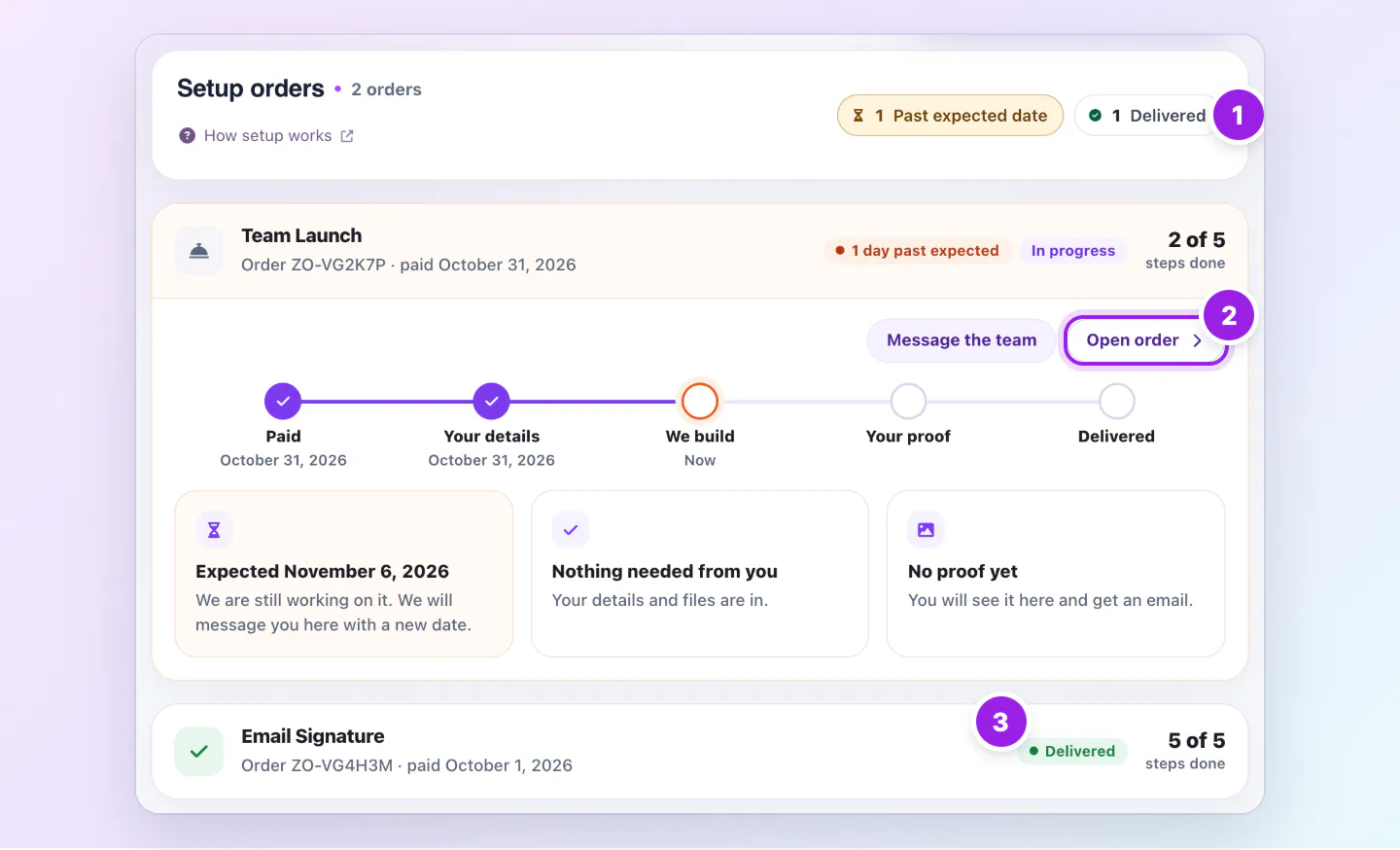
Setup orders page with chips for 1 in progress and 1 delivered, a Team Launch order at 2 of 5 steps and a delivered Email Signature order.
  1. How many orders are in progress or delivered.
  2. Open an order to see proofs, files and messages.
  3. A finished order shows Delivered.
Setup orders lists every setup you bought, with the steps done on each one.
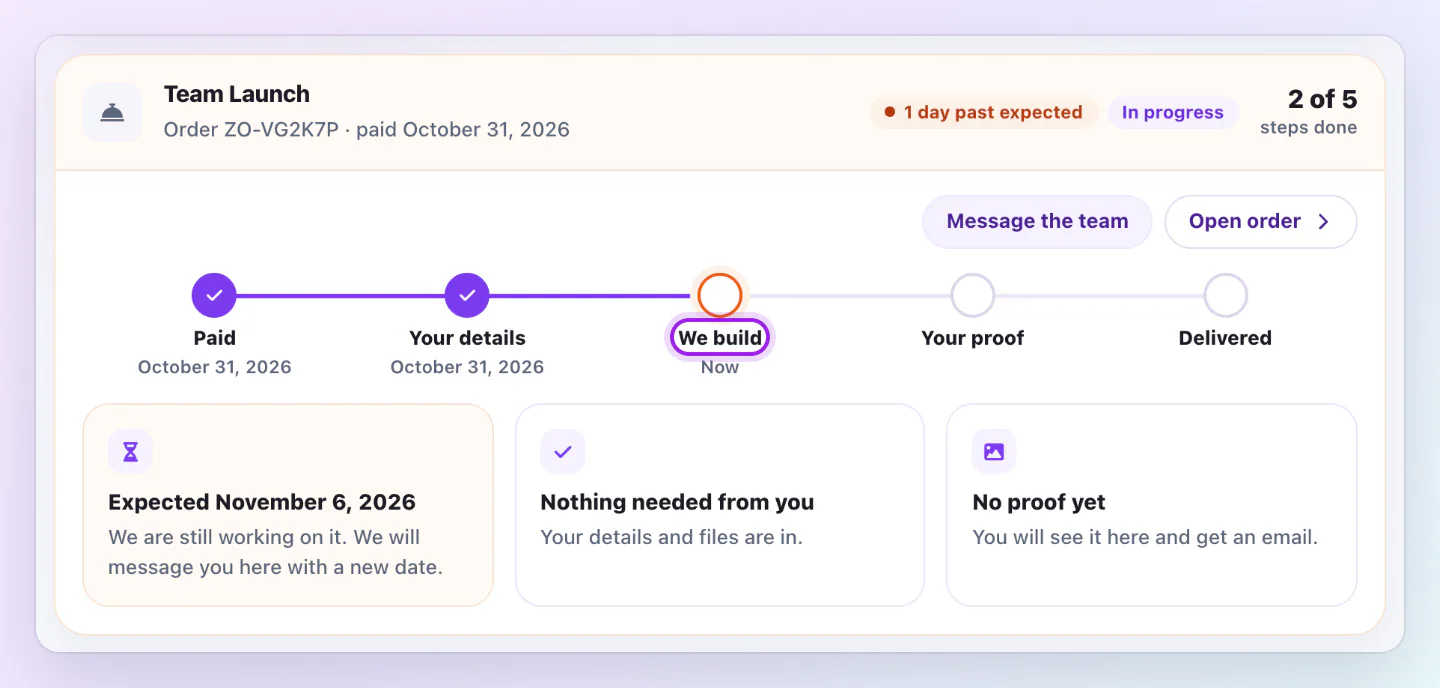
Team Launch order timeline with Paid and Your details done, We build as the current step, then Your proof and Delivered still to come.
The timeline on each order shows what is done, what we are doing now and what comes next.

Setup is refundable for 30 days, or until we start building. Your plan has its own 30 day money back.

The four setups

Each setup fits one plan family. Prices are in US dollars.

  • Email Signature: Sold with Solo, or on its own to anyone. $149, or $75 with a yearly plan. First draft within 3 business days after we start your build. An email signature in your brand, linked to your Zapped card, with step by step install instructions for Gmail or Outlook, and two rounds of changes.
  • Solo Launch: Sold with Solo. $299, or $149 with a yearly plan. First draft within 5 business days after we start your build. Your Zapped card, a matching email signature, branded QR codes and a lead form, built for you, with two rounds of changes.
  • Team Launch: Sold with Team 5 to Team 30. $499, or $249 with a yearly plan. First draft within 5 business days after we start your build. You review it, then we go live. We choose a gallery theme to suit your brand, load your whole team from a spreadsheet, set up your domain and email signatures, and send print ready QR files. Two rounds of changes, then 30 days of small fixes at no extra cost.
  • Business Launch: Sold with Business plans. $799, or $399 with a yearly plan. First draft within 5 business days after we start your build. You review it, then we go live. For bigger rosters: your brand, every office and every person loaded, domains, signatures and print ready QR files. Two rounds of changes, then 30 days of small fixes at no extra cost.

Refunds

Setup is refundable for 30 days, or until we start building. Sending your details does not close the refund window. It closes when we start building, which we usually do within one business day once your order is ready to build. A setup added when a free trial is switched to yearly waits until the first yearly payment succeeds. After that, the setup fee is not refundable, and the two rounds of changes (plus 30 days of small fixes on Team Launch and Business Launch) cover anything that is not right. After 30 days you can still send your details and we build it.

Your plan has its own 30 day money back. Ask within 30 days of your first payment and we refund your plan in full.

Good ways to use this

  • Send your details as soon as you pay. We usually start building within one business day once the order is ready to build.
  • Use the spreadsheet template for your team list so every person loads correctly.
  • Check the first draft on your phone before you send your changes or approve it.

Common questions

Can I buy a setup without a plan?

Yes, in two cases. If you already pay for a Zapped plan, you can buy any setup that fits your plan on its own, from its setup page, without changing your plan. Email Signature can be bought on its own by anyone, even with a free account. Every other setup is ordered together with a plan: pick it on the plan page, and the setup is ticked for you. If your plan is too small for a setup, the button takes you to the plan change first, where you see the new price before you pay, and then straight to the setup. A plan an administrator gave you by hand, or a paused plan, can still buy a setup on its own at the full price. A setup bought on its own costs the full price, or the yearly price in the first 30 days of a yearly plan. A quote or an invoice is optional, you never need one to pay.

What if my card is declined for the setup?

Your plan stays active. Pay the setup with the link in your confirmation email, which works for 7 days, or with the Pay button on your thank you page. After that, contact us. Building starts once the setup is paid and we have your details.

Can we talk first?

Yes, by email. Use the contact page. We do not run sales calls.

Where do I follow my order?

Open Settings, Plan and billing, Setup orders. The order page shows each step, what we need from you and your proof.

Can I get a quote by email?

Yes, it is optional. For a larger team, or if you need an invoice or approval first, use the quote page. We email you a quote with a link to pay by card, using the same prices as the plan page. You can also pay directly, without a quote.

If something looks wrong

  • If you paid and did not get the setup form email, check spam, then open the thank you page link from your order confirmation email.
  • If the setup is not under Setup orders, it is not paid yet. Use the payment link in your confirmation email, or contact us. Setup orders lists only paid orders.

Was this guide helpful?

Still have questions? Contact support and we'll help you out.