Add the card in Zapped
Open NFC Cards, choose Add NFC card, name it, and pick the published card it should open. You never type a link yourself.
 Help Center
Add the card in Zapped, write it from an Android phone, an iPhone or with help from your laptop, test the tap, and manage it afterwards.
An NFC business card shares your Zapped card with one tap. You add the card in Zapped, a phone writes the card’s own short link onto the chip, and you test the first tap. After that you can change what it opens, pause it, or replace it at any time without writing it again. This guide covers the whole job and links to a detailed guide for every part.
Before you start
Zapped gives every NFC card its own short card link and walks you through writing it. You need a writable NFC card and a phone. Then choose the setup that matches the phone in your hand.
Add the card in Zapped
Open NFC Cards, choose Add NFC card, name it, and pick the published card it should open. You never type a link yourself.
A writable NFC card
Works with writable NFC tags and cards that store a web link, such as NTAG213, NTAG215 and NTAG216.
NFC switched on
Enable NFC in your phone settings when your device requires it. Remove a thick case before writing or testing.
Keep it unlocked for now
Test the card first. Locking is optional, it only makes sense after a successful test, and it cannot be undone.
Choose your phone
Write from the phone you have
Android with Chrome writes the card in one tap. An iPhone writes it in one tap with the free NFC Helper app from Safari or Chrome. On a laptop, Zapped hands the job to your phone.
One tap, no app
Open the setup page in Chrome and choose Write to card. Allow NFC when Chrome asks, then hold the card against the back of the phone until the page confirms.
Read the Android guideOne tap with NFC Helper
Open the setup page in Safari or Chrome and choose Write with NFC Helper. The app opens with your card link filled in. Hold the top of the iPhone against the card until the app confirms, and it brings you back to Zapped. NFC Tools works too.
Read the iPhone guideHand off to your phone
The setup page shows a QR code. Scan it with the phone that will write the card, or choose Email a setup link and open it on that phone. The laptop page updates by itself when the card is written.
Read the laptop guide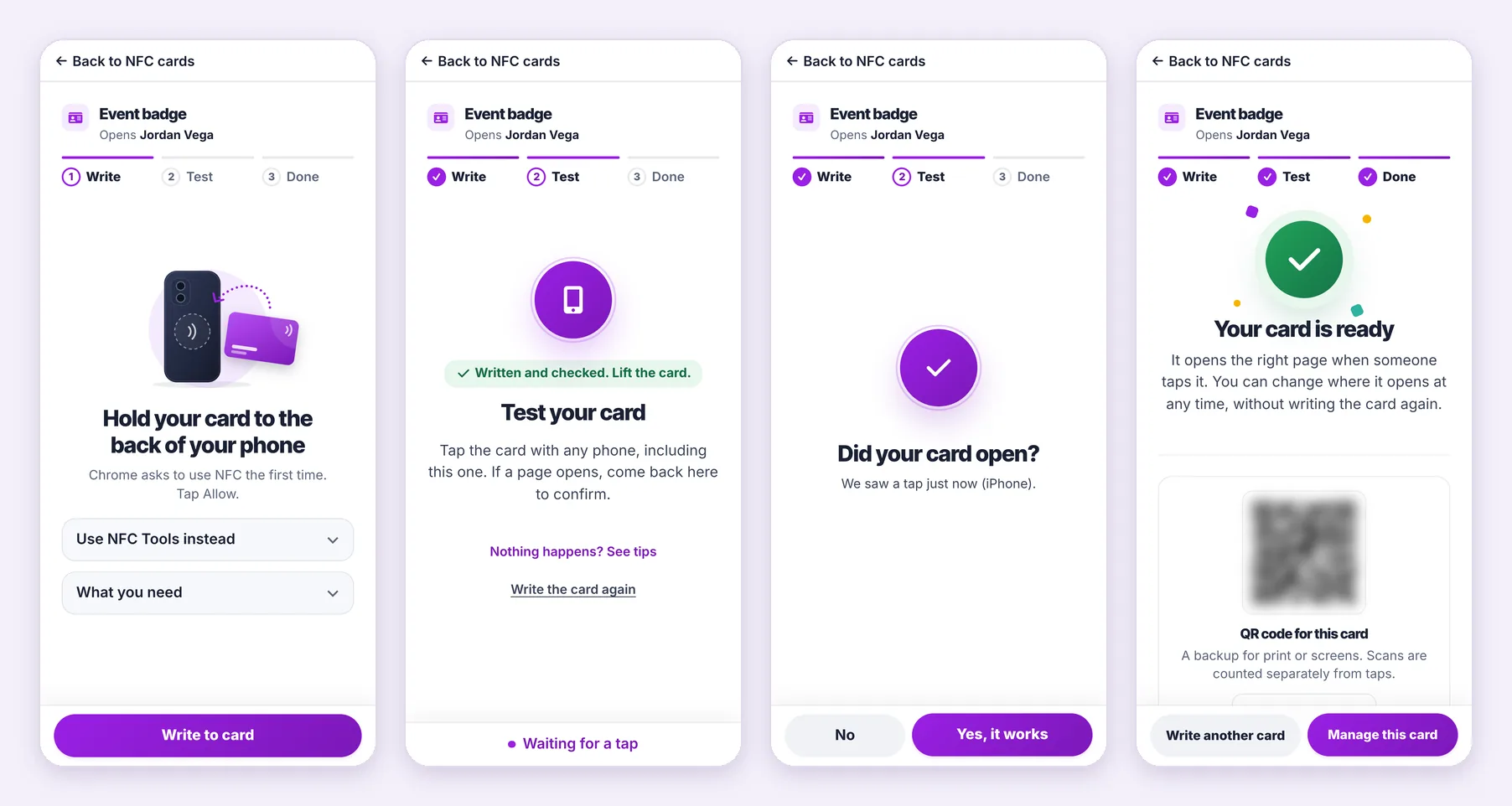
Open NFC Cards from the left menu and choose Add NFC card. You can also start from a card’s actions menu, or from its share window with Put this on an NFC card.
Pick the kind that matches the physical card: card, sticker, keychain, wristband, stand or other. Choose what a tap opens: one of your published cards (you publish and manage them in Cards), or on paid plans a website with a Backup card. Keep the suggested name or type one you will recognize, then choose Add card and set it up.
NFC cards come with paid plans, and your plan sets how many you can add. Lost cards do not count toward that number.
The setup page adapts to the device you open it on. Every route writes the same thing: the short card link Zapped made for this NFC card.
Chrome on Android writes the card itself, so you need no app. Choose Write to card, allow NFC the first time Chrome asks, and hold the card flat against the back of the phone, near the top. Zapped writes the link and reads it back, then says Written and checked. Lift the card. If the card already holds something, Zapped shows what it opens and asks before it replaces anything. If NFC was blocked, the page shows Allow NFC to continue with the steps to allow it.
Write an NFC card from an Android phone covers browsers that cannot write, and why Zapped reads the card back.
iPhone browsers cannot write NFC cards, so Zapped hands your card link to a free app. In Safari or Chrome, choose Write with NFC Helper. NFC Helper opens with the link filled in. Hold the top of the iPhone against the card until the app confirms, and it brings you back to the setup page. You can also choose Use NFC Tools instead, write the link with the NFC Tools app, and choose I wrote it.
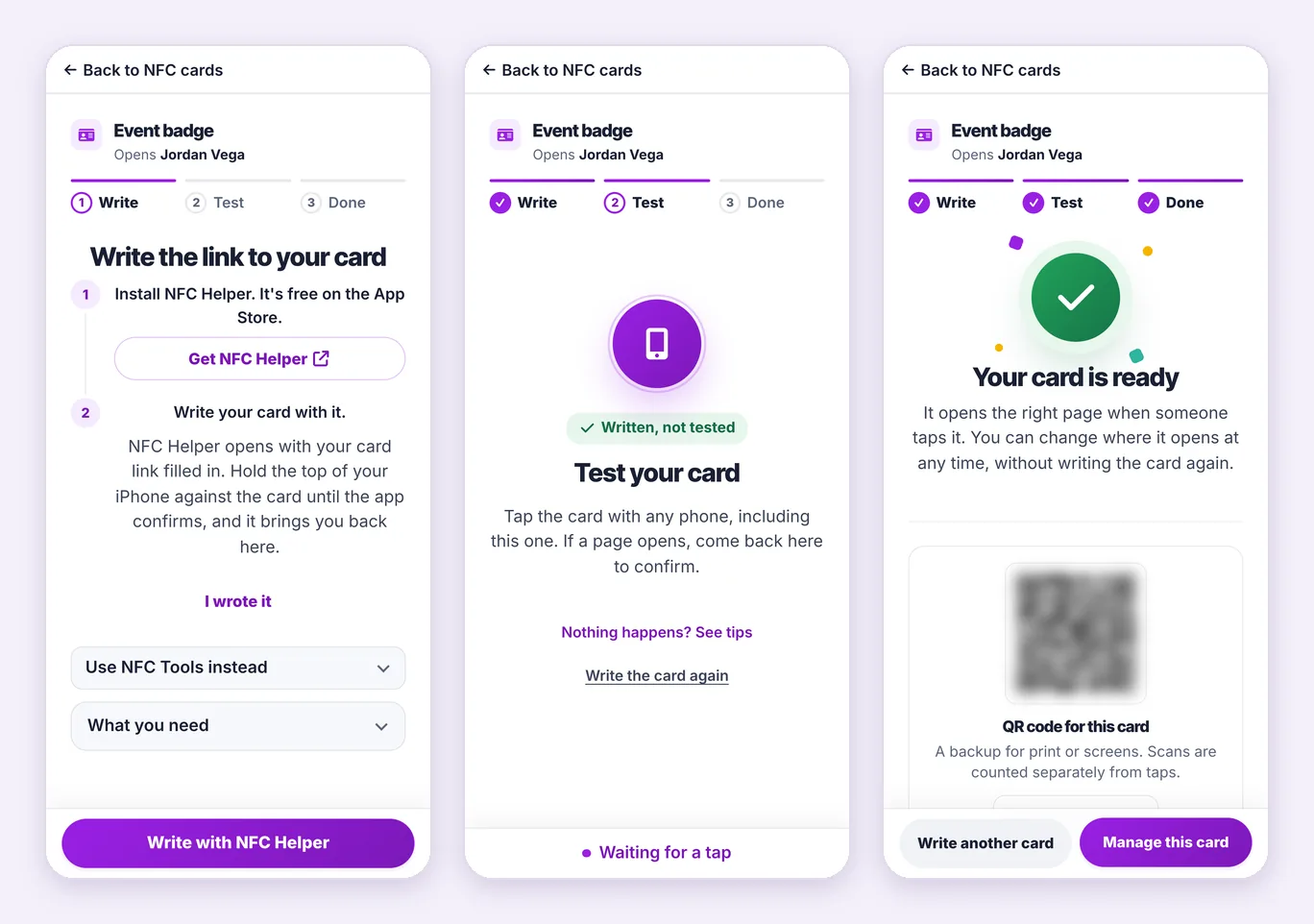
Writing an NFC card from an iPhone has every step for both apps.
A laptop cannot write NFC cards, but you can start there. The setup page shows a QR code that opens a private setup page on your phone. You can also choose Send to my phone, Copy link, or Email a setup link to send it to the person who will write the card. The QR code works for 30 minutes and an emailed link for 24 hours, so keep both private. Your laptop page follows along by itself while the phone writes and tests the card.
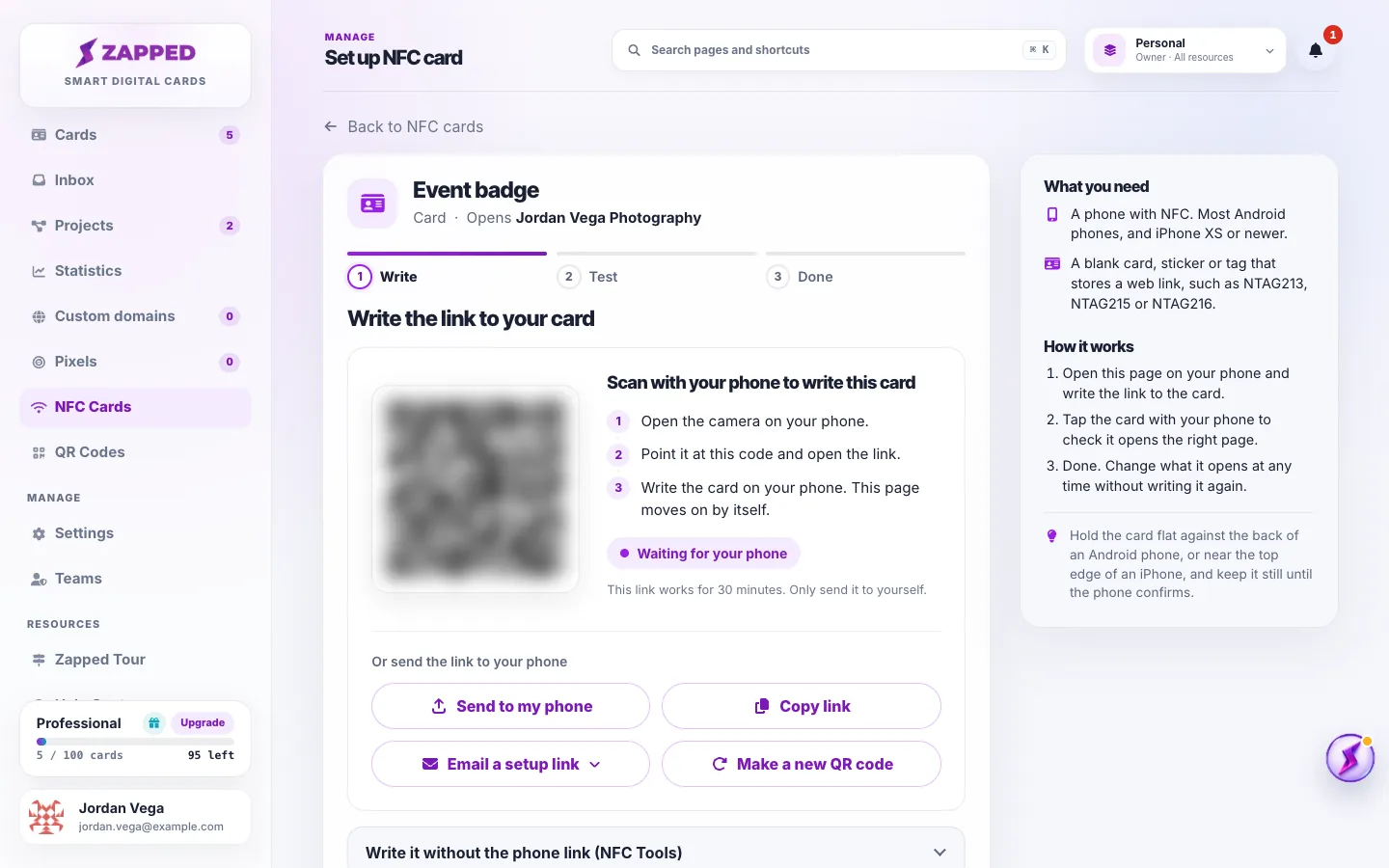
Set up an NFC card from your laptop explains setup links and letting someone else write the card.
Tap the card with any phone, including the one you wrote it with. Zapped sees the tap and asks Did your card open? Choose Yes, it works and the status changes from Written, not tested to Working.
If you choose No, or nothing happens, Zapped shows tips: unlock the phone, hold the card near the top of its back, take off a thick case, and keep it away from metal. Fix NFC card setup problems explains every message the setup page can show.
If you write the card again later, choose I wrote it again so the test starts over. If you leave in the middle of setup, the card shows Continue setup in your list.
The last step shows a QR code for the NFC card, a backup for print or screens. Choose Manage this card to open its page, or Write another card to set up the next one.
Each NFC card has its own page with its status, its taps and scans, and its history. Use Where it opens to pick another card, or on paid plans a website. People who tap see the new choice right away, and the chip is never written again. Manage your NFC cards explains every status and action.
A card can also skip the card page and save your contact straight away. Save the contact right away shows how. Not sure which physical card you are holding? Choose Which card is this? on NFC Cards.
Locking makes the chip read only, so nobody can rewrite it. It is optional, only offered after a successful test, and it cannot be undone. A locked card still opens your link, and you can still change where it opens in Zapped. Most people never lock. Lock an NFC card covers Android, iPhone and the cards that cannot be locked.
On paid plans a card can open a website, such as a booking page, instead of one of your cards. Every website card has a Backup card that opens whenever the website cannot be used, for example after a plan change. Only the workspace owner, or an Admin with access to all resources, can create website cards. NFC cards that open a website has the details.
If a card goes missing, choose Mark as lost on its page. Taps then show a not active message, and the card stops counting toward your plan. Choose I found it if it turns up, or Set up a replacement to write a new card. Lost, found and replaced NFC cards explains the rules. To pause a card you still have, use Turn off.
Works with writable NFC tags and cards that store a web link, such as NTAG213, NTAG215 and NTAG216. Your card link is short, so even the smallest of these chips has room for it. Cards from other digital business card companies are usually locked, and metal cards need a special layer behind the chip. Choose NFC cards that work tells you what to buy.
In a team workspace, Editors and Admins can add, set up and manage the NFC cards that open cards in their access. Changing where a card opens, website cards, deleting and Email a setup link stay with the workspace owner and Admins with access to all resources. NFC cards and QR codes on a team lists every role.
Every NFC card in Zapped has its own short card link, with /nfc/ and a random code in it. That link is what gets written to the chip. Please do not write your profile URL to a card directly.
The card link keeps the NFC card flexible. You can change where it opens without writing it again, Zapped counts every tap, and renaming your card address or moving it to a custom domain does not break an NFC card that is already in someone’s pocket. An NFC card written with a profile URL by hand, or by another app, still opens exactly that URL, so it does not follow later changes.
Yes. Open the card in NFC Cards and choose another published card, or a website on paid plans. The card keeps the same card link, so you never need to write it again.
Not on an Android phone with Chrome. Zapped writes the card in one tap. On an iPhone you need a free NFC app, because iPhone browsers cannot write NFC cards. From Safari or Chrome, Write with NFC Helper does it in one tap, and NFC Tools works from any browser.
Use writable NFC tags and cards that store a web link, such as NTAG213, NTAG215 and NTAG216. Cards that are locked, or that only hold their seller’s own link, cannot be written.
Add it as a new card in Zapped and write it. On Android in Chrome, Zapped shows what the card currently opens and asks before it replaces anything. If the card already belongs to another Zapped card, Zapped names it and warns that the other card will stop working on this physical card. On an iPhone, NFC Helper or NFC Tools writes the card, so check it in that app first. A locked card cannot be rewritten.
Only if you want to stop anyone from changing what is stored on it, and only after a successful test. Locking cannot be undone. Because you can change where the card opens from Zapped, most people leave cards unlocked.
Yes. iPhone XS and newer read NFC cards in the background, so people just hold their iPhone near the card. Writing a card from an iPhone needs a free app such as NFC Helper.
You can start there. The setup page on your computer shows a QR code that opens setup on your phone, and the phone writes the card.
An NFC card opens one thing at a time, a card or a website. You can switch it whenever you like from the card page.
Was this guide helpful?