Help Center

NFC cards that open a website

On paid plans an NFC card can open any website, with a backup card that opens whenever the website cannot be used.

Most NFC cards open one of your Zapped cards. On paid plans, a card can open a website instead, such as a booking page or a portfolio. Every website card has a backup card, so a tap always opens something.

Use this guide when

You want a tap to open a website instead of one of your cards.

Before you start

  • A paid plan that includes website cards.
  • The workspace owner, or an Admin with access to all resources. Other roles cannot create website cards or see them.
  • A published card to use as the backup.

Steps

  1. In NFC Cards, choose Add NFC card. Under what it opens, choose A website.
  2. Enter the full Website address, starting with http or https. Link shorteners are not allowed.
  3. Choose a Backup card. It opens instead whenever the website cannot be used.
  4. Add the card and write it as usual. To switch an existing card to a website, open it and use Where it opens.
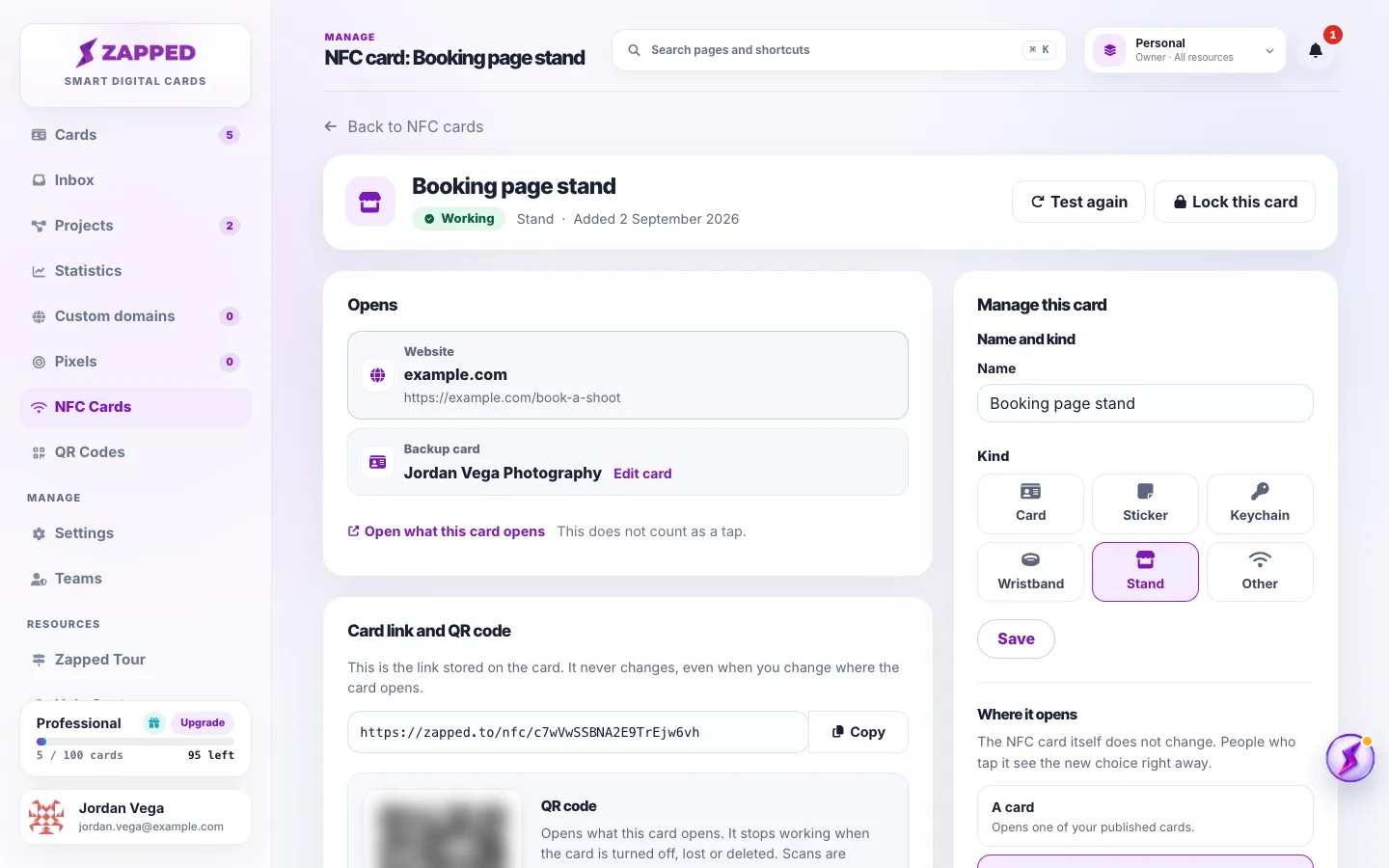
Fictional NFC card page for Booking page stand, which opens the website example.com with Jordan Vega Photography as its backup card.
A website card shows the website it opens and its backup card.

The physical card never changes when you switch between a website and a card. People who tap see the new choice right away.

When the backup card opens

The backup card opens instead of the website after a plan change that no longer includes website cards, while Zapped pauses website cards, or if the website is flagged as unsafe.

The website stays saved. While it cannot be used, you can only use Change the backup card, or Switch to a card, which removes the website.

If the backup card is deleted

The NFC card then says it has no backup card, and it needs attention. Choose a new backup card so the card always opens something.

Website cards and your team

Only the workspace owner, or an Admin with access to all resources, can create website cards, change their website or backup card, or see them in NFC Cards. NFC cards and QR codes on a team has the full list.

Good ways to use this

  • Choose a backup card that makes sense for the same people, such as your main business card.
  • Paste the website's full address, not a shortened link.
  • Use Open what this card opens to check the website from your desk. It does not count as a tap.

Common questions

Can I use a link shortener?

No. Paste the full web address.

Do taps on website cards count?

Yes. Taps count the same way, whatever the card opens.

What if I downgrade my plan?

The website stays saved and the card opens its backup card. Upgrade again, or switch the card to open a card.

If something looks wrong

  • If you cannot choose A website, the page says why: your plan does not include website cards, your role cannot create them, or Zapped has paused them for now.
  • If the website address is refused, enter a full address that starts with http or https.
  • If taps open the backup card, open the NFC card to see why the website cannot be used.

Was this guide helpful?

Still have questions? Contact support and we'll help you out.