Help Center

Delete your account

See exactly what stops, confirm with your password, and close your Zapped account for good.

Deleting your account cannot be undone. Zapped shows you what stops before you confirm, so read that list first.

Use this guide when

you are sure you want to close your Zapped account for good.

Before you start

  • Export any leads and statistics you want to keep.
  • If you only want to stop paying, you can cancel your plan on the Plan page instead. Your account and cards stay.
  • If you are due a refund, ask for it before you delete your account.
  • Have your password ready, and your authenticator app if two factor is on.

Steps

  1. Open Settings, choose Security, then Delete account. You can also reach it from the Profile tab.
  2. Read what stops: your plan, your cards and your team's access.
  3. Tick the box to confirm you understand.
  4. Enter your Current password. If two factor is on, also enter your Authenticator code.
  5. Choose Delete account. To stop here, choose Keep my account.

This cannot be undone. Your plan is not refunded automatically, so ask for any refund first.

What stops when you delete

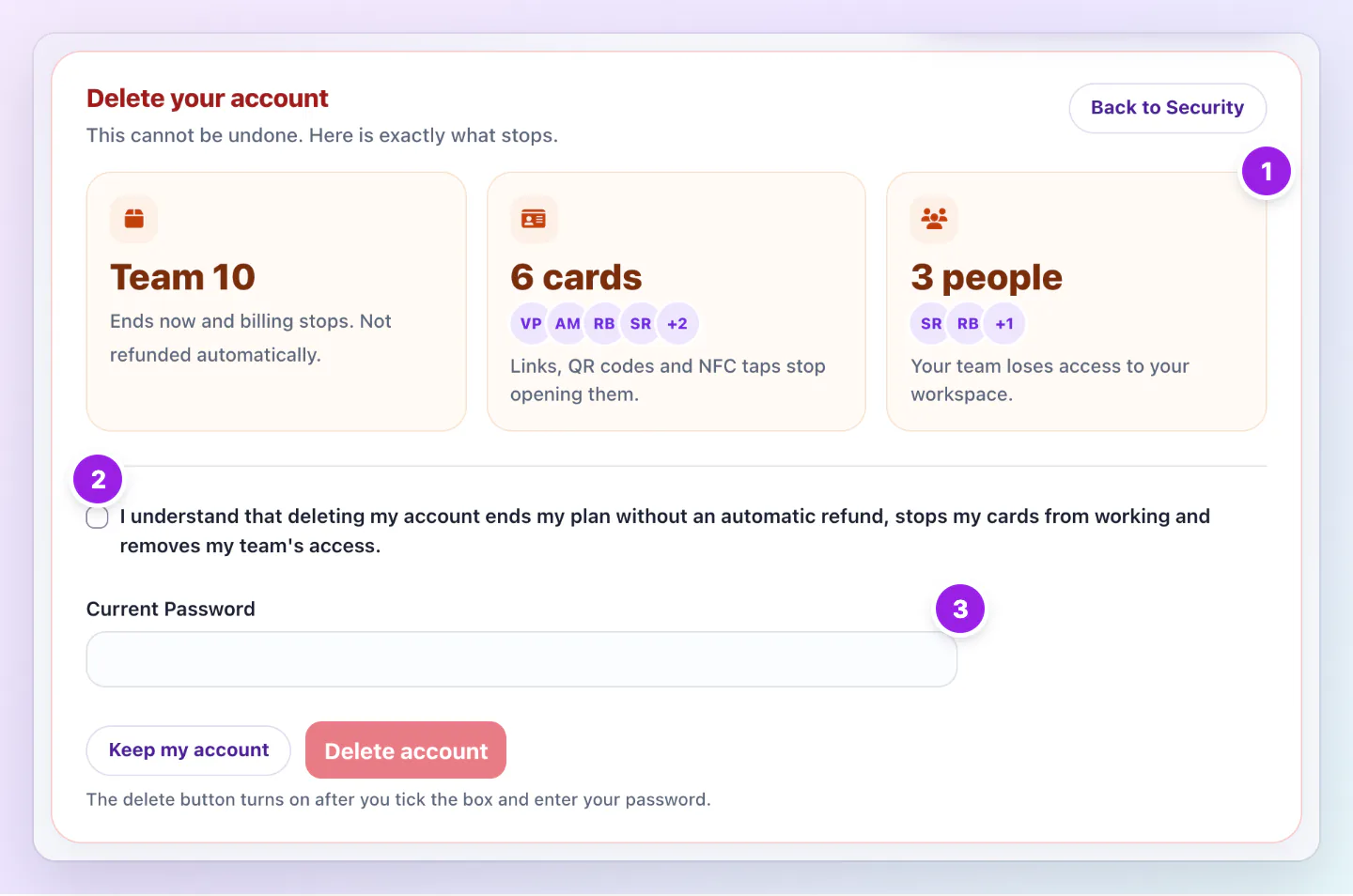
The page lists what applies to your account.

Delete your account page listing the Team 10 plan, 6 cards and 3 people affected, above the tick box, password field and Delete account button.
  1. What stops: your plan, your cards and your team's access.
  2. Tick this box to say you understand.
  3. Enter your password to turn on Delete account.
The page lists what stops before you confirm with the tick box and your password.
  • Your plan: It ends now and billing stops. It is not refunded automatically.
  • Your cards: They stop working. Their links, QR codes and NFC taps will no longer open them.
  • Your team: People on your team lose access to your team workspace.

If a setup order is open

A setup you bought may still be refundable. The page tells you until when. Ask for a refund on its order page before you delete your account.

If the delete does not go through

If your card order is still being made, you can delete your account once it ships, or contact us to cancel it. If we are still confirming your plan cancellation, nothing was deleted, so try again later.

Good ways to use this

  • Download your leads from Inbox first.
  • Tell your team before you delete, because they lose access straight away.
  • Replace printed QR codes or NFC cards that point to your cards, or they will stop working.

Common questions

Can I get my account back after deleting it?

No. Deleting cannot be undone. If you may want to come back, cancel your plan instead.

Can a team member delete the owner's account?

No. Only the person signed in to the account can delete it, with its password.

I signed up with Google. Do I have a password?

Deleting asks for a current password. If you never set one, use Lost password on the sign in page first to set one.

Will I get an email?

Yes. We email you that your Zapped account was deleted.

If something looks wrong

  • If the Delete account button stays off, tick the box and enter your password. It turns on after both.
  • If your password is refused, use Lost password on the sign in page first.
  • If you lost your authenticator, choose Contact support on the code step of sign in.

Was this guide helpful?

Still have questions? Contact support and we'll help you out.