Help Center

Follow up a lead with Reply, Call and History

Use Reply and Call, say how it went, and keep a History of every contact.

Reply and Call open your own email and phone apps. Zapped then asks how it went so your History stays complete and the leads that still need you stay on top.

Use this guide when

A new lead arrived and you want to contact them and keep track.

Steps

  1. Open Inbox. Leads waiting on you come first, with a badge showing how long each has waited.
  2. Choose Reply when the lead gave an email address, or Call when they gave a number.
  3. Come back to Zapped and pick how it went. After Call: Talked, No answer or Left a message. After Reply: Email sent or Follow up sent. Add a note if you like, or choose Not now.
  4. Open the lead to read its History. To record something done elsewhere, choose What happened?, pick an answer and choose Add.
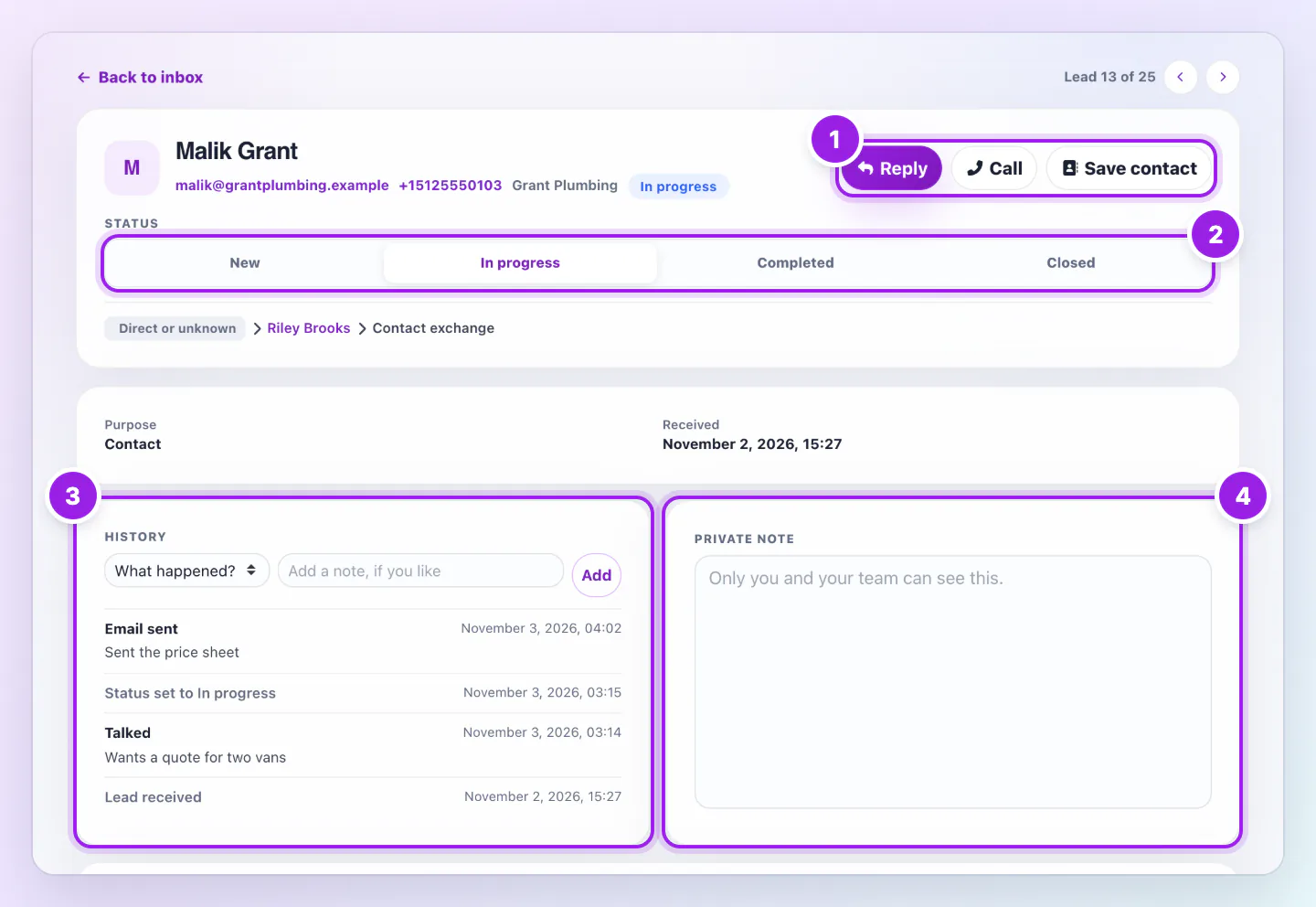
Lead page for a fictional contact with Reply and Call buttons, a status row, a History card listing an email, a status change and a call, and a private note.
  1. Reply and Call open your own email or phone app.
  2. Set the status with one tap. Saved appears when it sticks.
  3. History lists each tap, how it went and every status change.
  4. A private note that only you and your team can see.
A lead page keeps a History of calls, emails and status changes beside a private note.

Any answer except No answer moves a New lead to In progress. Until you answer, Zapped records only the tap.

What History shows

The lead arriving, each tap, how it went, notes and every status change, newest first. It shows the latest five, and Show all opens the rest. In a team, it also shows who did what.

Statuses and the private note

Use New, In progress, Completed and Closed. Saved appears when a status sticks. The private note is for you and your team.

Good ways to use this

  • Answer right after the call.
  • Use the note for the next action.

Common questions

Does Zapped send the reply?

No. Reply opens your email app and Call opens your phone app.

If something looks wrong

  • If Reply is missing, the lead gave no email address. If Call is missing, no number.

Was this guide helpful?

Still have questions? Contact support and we'll help you out.