Help Center

Review a setup proof and ask for changes

Approve your proof, request changes, and understand change rounds.

A proof is the first version of your setup. You check it, approve it or ask for changes. Two rounds of changes are included.

Use this guide when

Your order says Proof ready for you.

Steps

  1. Open the email or bell notice, or the order page, and find Your proof.
  2. Check names, spelling and phone numbers.
  3. To approve, tick I checked the names, spelling and phone numbers and choose Approve and prepare my files.
  4. To ask for changes, tick what needs fixing, describe it in Your changes and choose Send my changes.
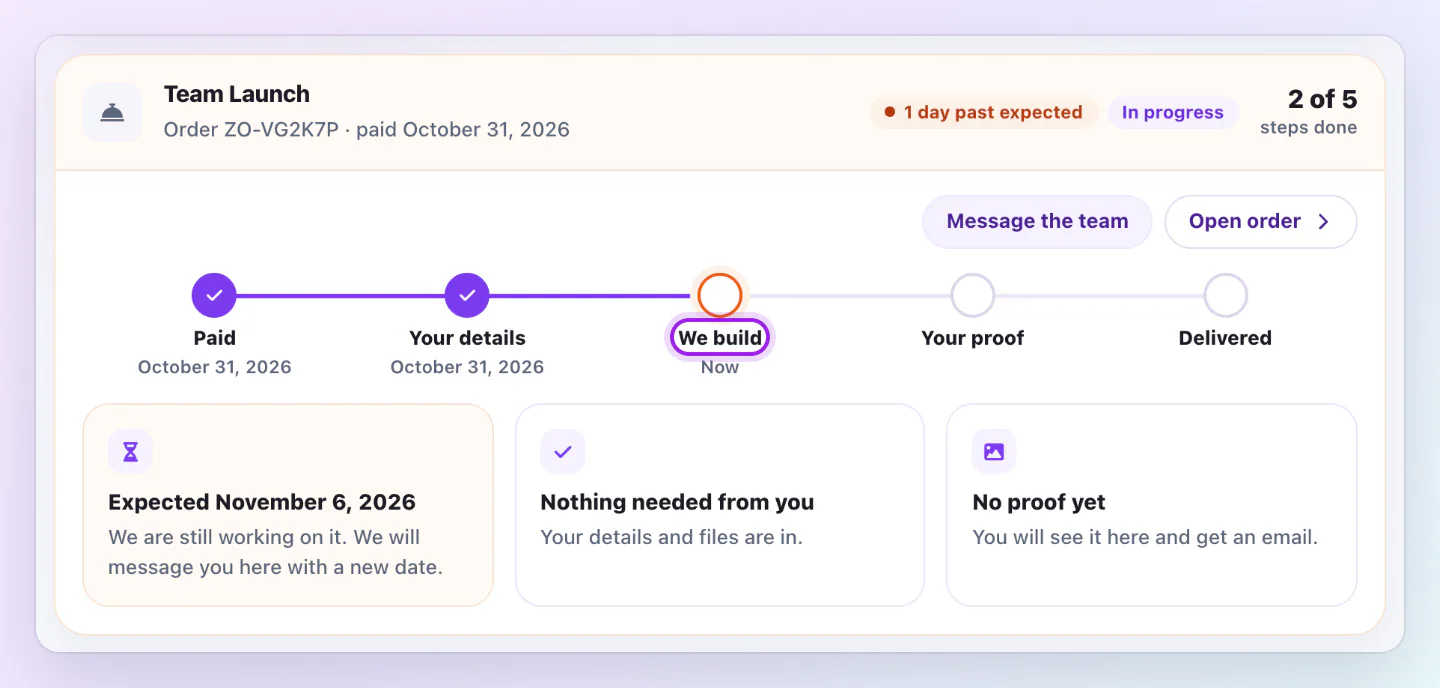
Team Launch order timeline with Paid and Your details done, We build as the current step, then Your proof and Delivered still to come.
The timeline on each order shows what is done, what we are doing now and what comes next.

Put every change in one request, because each request uses a round.

Change rounds

The page shows a pill like Round 1 of 2 included. Your first proof uses no round. If you use both, send your request anyway and we confirm with you before we start.

After you approve

The status becomes Approved, preparing your files, then Delivered. Download everything under Your files.

Small fixes

Team Launch and Business Launch include 30 days of small fixes, by message on the order page.

Good ways to use this

  • Check on your phone.

Common questions

What if I do not answer?

Nothing is approved until you approve it.

If something looks wrong

  • If you cannot see the proof, we have not sent it yet.

Was this guide helpful?

Still have questions? Contact support and we'll help you out.