Pick a sticker or a card based on antenna size and what surface it sits on, not compatibility. Both formats carry the same chip, and any modern phone reads either one.
You've probably already seen the failure this causes. A sticker that scanned fine on a shipping box or a paper menu goes quiet the moment someone moves it to a laptop lid or a phone case with a metal back.
There's a fix, and it costs pennies. What decides whether you need it comes down to antenna size and whether metal is in the picture.
The chip inside both is the same one
Peel open a sticker and a card and you find the same chip. NXP's own datasheet for the NTAG213, NTAG215, and NTAG216 family lists business cards as a target application right alongside stickers, labels, and smart posters. One chip family, two jobs.
See the full list of NFC formats, cards, stickers, keychains, and badges for the category overview, or start with what an NFC business card is if you want the basics first.
Compatibility is not a format question either. Android's own developer documentation sorts NFC support by chip technology class and data format, never by whether the tag is round, square, or shaped like a wallet card.
Apple runs the same logic. Its Core NFC documentation, backed by NXP's own iOS 13 material, defines support by protocol rather than physical shape.
That settles the worry most buyers start with. A phone from the last several years reads a sticker exactly as readily as it reads a card, which means the real decision is not about compatibility at all.
Antenna size is what actually drives range
Antenna size is the whole story here. Seritag's own buying guide puts it plainly: the larger the antenna on an NFC tag, the better its scan strength, whatever shape the tag takes.
A bigger antenna barely changes unit cost either, the same guide adds. A small sticker antenna is usually a shape decision, not a way to save money.
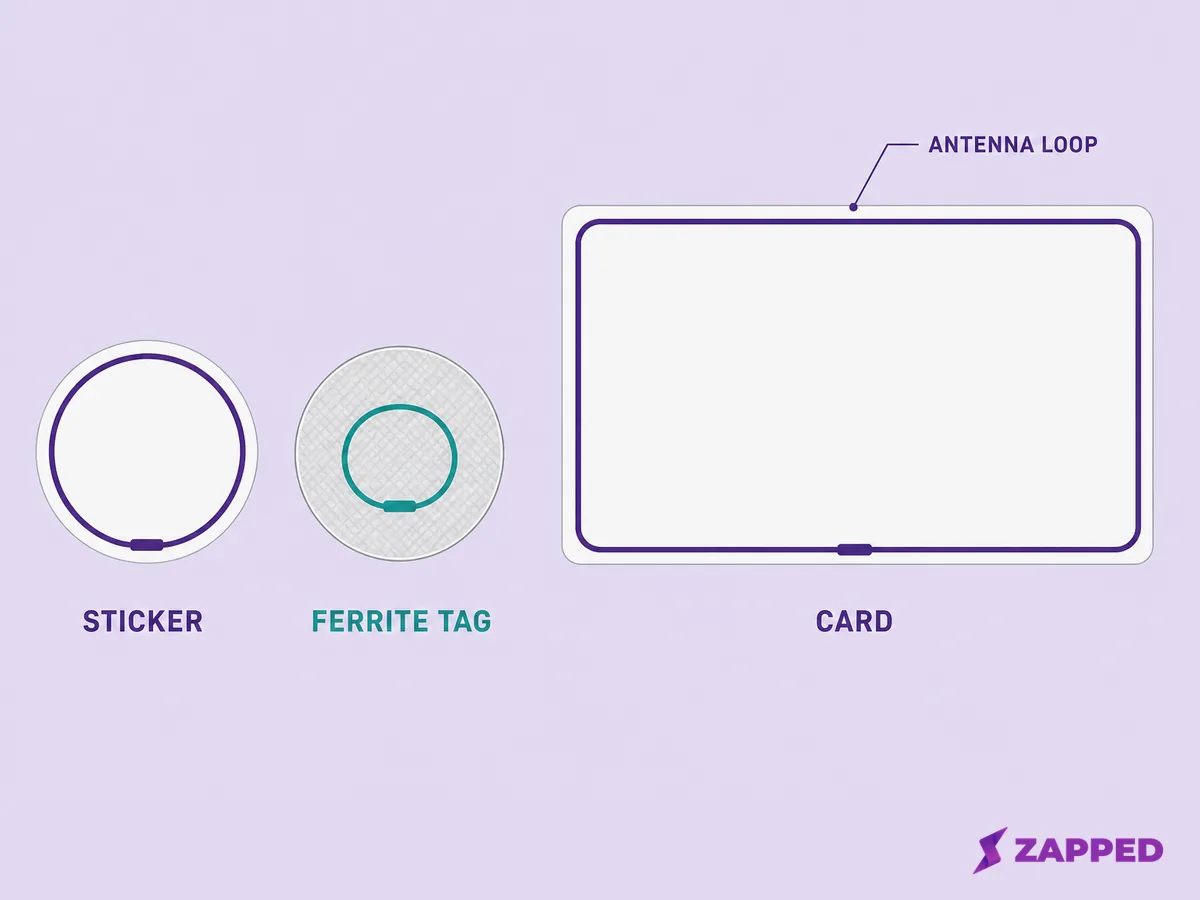
A representative sticker antenna runs about 35 millimeters across, according to Avery Dennison's AD Bullseye datasheet. A smaller sticker built for tight spaces shrinks that to just 10 by 17 millimeters, per Avery Dennison's AD Midas datasheet.
A standard NFC business card runs its antenna around the entire card perimeter, roughly 65 to 70 millimeters by 35 to 40 millimeters, according to GoToTags' card listing. That is several times the area of a typical sticker antenna.
A second seller confirms the same design. ShopNFC says its cards' antenna runs the entire perimeter, which is exactly what gives them their read range.
What happens when the tag touches metal
Metal does not simply block an NFC signal. It absorbs and redirects the reader's field instead, which is worse for a tap than a plain obstruction. We cover the full physics of why metal kills an NFC tap in our keychain guide. Here we stick to what that means for a sticker specifically.
Sellers are blunt about the result. Seritag says an NFC tag can never work behind metal, and if you place a standard one directly on a metal surface, you need a tag rated for metal instead.
That metal rated tag is a real product, not a marketing label. Avery Dennison builds its version with a ferrite layer bonded between the antenna and the side that faces the metal, which isolates the antenna's field instead of letting the metal absorb it.
Avery Dennison's own chart makes the mechanism visible. A standard tag pressed flat against metal reads at essentially zero range, and needs close to a 10 millimeter gap of air before it climbs back near its normal range. For a card-sized version of the same construction decision, see the metal NFC business card construction guide.
If you are approving the printed face as well as the carrier, use the NFC business card design guide for tap guidance and QR recovery checks.
The metal rated version skips that problem entirely. It holds a flat read range around 15 millimeters whether it touches the metal directly or sits with some air behind it.
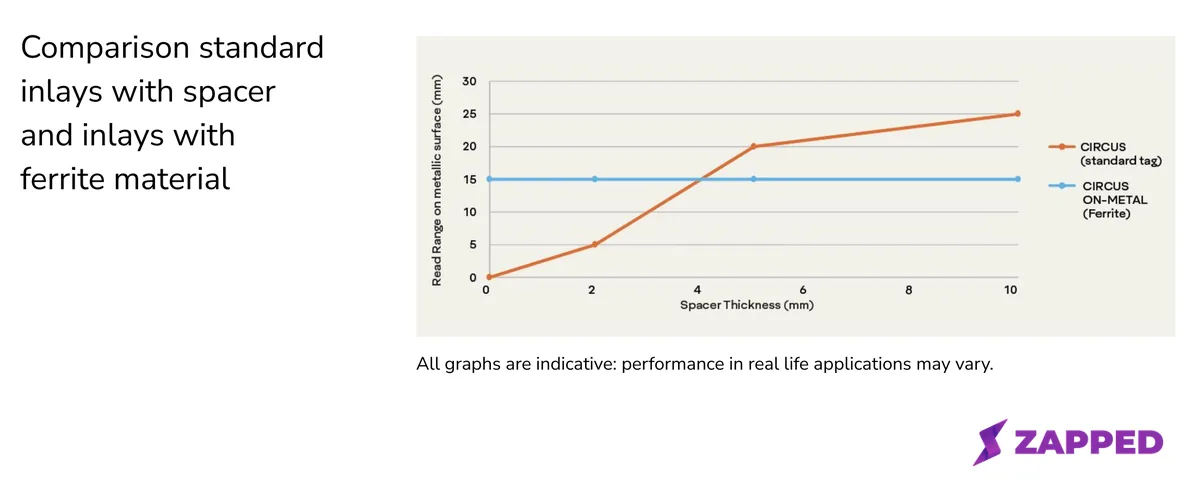
Source: Avery Dennison, captured in August 2026.
A second seller's own testing lines up with that chart. Seritag found that a standard tag needs roughly a 6 millimeter gap from metal before it starts to outperform a metal rated tag, and that metal rated tags typically scan at about half the range of a normal tag held away from metal.
One specific product shows the gap in real numbers. Seritag's own 19 by 19 millimeter metal rated label reads 21 to 25 millimeters off metal but only 6 to 10 millimeters directly on it, against 26 to 30 millimeters for a comparable standard tag off metal.
The metal fix, and what it costs
This matters most for a case you might not think of, your own phone. If your phone has a metal back, Seritag's own support answer says a metal rated tag is the fix.
A companion answer adds that a case lined with metal causes the same interference, and recommends plastic or silicone instead.
One mounting detail applies to both formats. Artwork, foil, or lamination placed directly over the antenna can weaken a tap either way, and our guide covers how decoration and lamination can block the antenna on either format.
The fix itself is cheap. ShopNFC sells an adhesive ferrite backing that turns a regular sticker into one rated for metal, for €0.25 a unit at low volumes, dropping to €0.20 once you order 1,000 or more.
A ready made metal sticker costs more outright. GoToTags prices its own version, built around the NTAG213 chip, from $0.48 a unit down to $0.38 at 10,000 units. Its higher memory NTAG216 option runs nearly three times that when you buy just one, at $1.35.
GoToTags' regular stickers cost noticeably less per unit at similar sizes. The seller doesn't offer an identical size in both a regular and a metal rated version, so there's a real price gap without one clean percentage to quote.
What the adhesive actually has to survive
The adhesive on a metal rated sticker has to survive more than a countertop. 3M's technical sheet for the 467MP tape used on GoToTags' metal stickers rates it down to negative 40 degrees and up to 400 degrees Fahrenheit for brief heat exposure.
That's an acrylic adhesive.
That same sheet is specific about installation too. The surface needs to be clean and dry, applied when the temperature sits between 60 and 100 degrees Fahrenheit.
3M says not to apply it at all below 50 degrees, since the adhesive gets too stiff to bond properly.
Seritag ran its own outdoor test that lasted three years, to see how these materials hold up. Its outdoor rated stickers and its PVC cards both still scanned at the end of it, while printed labels that weren't designed for outdoor use had visibly degraded over the same stretch.
Card sellers publish plenty about the chip inside a card, but not much about the card itself. GoToTags and other card sellers restate the chip's spec for 10 years of data retention, but none publishes a bend or flex figure for the plastic card body itself.
Handed over or stuck in place
Sellers themselves draw this line clearly. Seritag's own buying guide tells shoppers to choose labels for packaging, posters, signage, or general items, and to choose a PVC card specifically for contact sharing, staff ID, or a digital business card.
ShopNFC frames its own card line the same way, built around portability and an official looking presentation, distinct from the stickers it sells separately.
GoToTags' sticker copy pulls the opposite direction on purpose. It markets stickers around being thin, flexible, and good at sticking to a surface, not around being carried in a pocket or handed to someone.
Two people have split the difference this way, independently of each other. An Instagram creator posted using a plain paper business card with a cheap NFC sticker stuck to the back, getting a tap to share link and a physical card to hand over in one move.
A Reddit poster described the same setup, estimating the added cost at about three cents a card.
The reverse happened at a cafe in Melbourne, according to one diner's account on Reddit. A staff member carried a physical NFC card over to the table partway through the meal and asked to tap it against the customer's phone to pull up a Google review page.
It was a card chosen and carried on purpose, not a sticker left stuck to the table.
NFC sticker or NFC business card: which fits your situation
Pick a card for anything you hand to someone, and a sticker for anything that stays fixed in place.
That split holds until metal gets involved, a laptop lid, a phone case, a metal counter, since a standard tag reads at essentially zero range pressed flat against metal. The questions below sort out which variant and which fix you need.
Ask them in this order
- Does the tag touch metal, a laptop lid, a phone case, a metal counter? If yes, budget for a metal rated tag or the ferrite add on.
- Will you hand it to someone, or leave it stuck in place? Cards suit a handoff. Stickers suit something fixed.
- How close does someone need to get before it should work? A card's larger antenna gives more room than a sticker's.
- What does the metal fix cost if it applies? A few cents to about a dollar a unit, depending on the tag.
If a metal card as a premium material is what you're actually shopping for, that's a different decision than the antenna problem above. Our guide to the metal card material decision, separate from the antenna problem covers it.
Your real question might be NFC against QR codes rather than sticker against card. That's the broader NFC vs QR carrier decision, and we cover it on its own.
Once you've landed on a card, the full buyer's comparison once you've picked the card format walks through actual vendors and prices.
Writing your Zapped card to whichever format you choose
Once you've picked a format, putting your Zapped card on it takes the same two steps either way, and the Zapped help center walks through them: copy your card's public link, then write it to the tag with any NFC app that supports a web link.
NFC tap sharing is on every Zapped plan, including Free, so nothing about this format decision touches which plan you need.
Whichever format you land on, add a QR code backup too. Not every phone has NFC turned on, and a QR code printed right next to the tag catches anyone whose phone does not read it.
Sources
Sources are current as checked in August 2026.
- NXP, NTAG213/215/216 data sheet
- Avery Dennison, AD Bullseye NFC data sheet
- Avery Dennison, AD Midas NFC data sheet
- Avery Dennison, AD Circus On-Metal data sheet
- GoToTags, NFC PVC Card, NTAG213
- GoToTags, metal rated NFC sticker, NTAG213, 30 mm circle
- GoToTags, metal rated NFC stickers category
- GoToTags, NFC stickers category
- ShopNFC, NFC Cards category
- ShopNFC, adhesive ferrite for anti metal NFC stickers
- Seritag, NFC tag buying guide
- Seritag, metal rated NFC tags
- Seritag, reverse metal rated tags
- Seritag, will NFC work with a phone case
- Seritag, does a phone case interfere with scanning
- Seritag, how well do NFC products last outdoors
- 3M, adhesive transfer tape 467MP technical data sheet
- Android Developers, NFC basics
- Apple Developer Documentation, background tag reading
- Instagram, @parkspartyplanning reel
- Reddit r/NFC, personal NFC business card
- Reddit r/melbourne, NFC card for reviews in a Melbourne cafe
- Zapped help center, how to program NFC business cards