A paper business card with a QR code on it looks exactly the same the day after a plan lapses. If it is a dynamic code, what can change is whether the redirect behind it stays active, and the print gives no warning. So before you shop for a QRCodeChimp alternative, decide what you're replacing, and don't cancel anything until every printed code you care about has a new home or a reprint date.
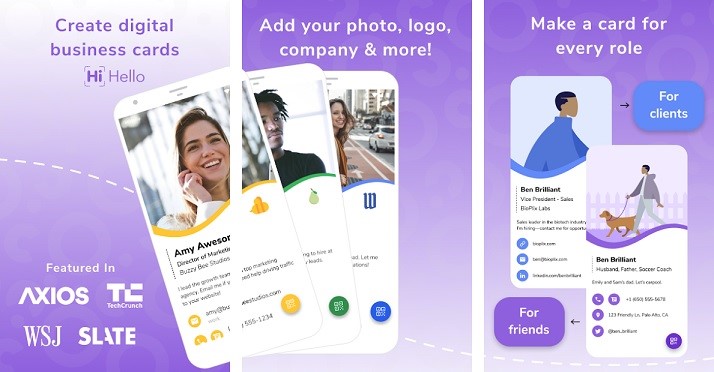
Here are the defaults. If you only need QR codes that you can repoint, QRKit is the plainest replacement. If you want a free personal card, Blinq or HiHello will do it. For a team that needs follow-up, look at HiHello Business; for team lead capture, compare Uniqode Team, and read the Blinq lead charge before you commit. If you can't reprint right now, keep QRCodeChimp running while you sort out the rest.
A QR code that looks fine can be paused behind the scenes
Walk through your drawer, your signage and your email signatures, and write down every printed code. For each one, note where it appears, whether it is static or dynamic, where it points, and which account controls it. A static code carries its destination in the pattern itself, so it keeps working no matter what happens to your plan. A dynamic code points at the provider's redirect, and that redirect is what you're renting.
QRCodeChimp's support page says an expired paid plan moves to Free. Static codes stay available, but only ten dynamic codes remain active, with 1,000 scans a month. The page doesn't say which ten survive an unplanned lapse, so check your dashboard instead of assuming the newest or the busiest. A deliberate downgrade is different: the oldest codes stay active up to the new limit and newer ones are paused. On Free, the 1,000 scan allowance covers all dynamic codes together, and exhausting it pauses them until the month resets or you upgrade.
Two more facts shape the plan. A static code that's already printed keeps its original data, and QRCodeChimp says saving it as dynamic generates a new image. Its expiry page also describes no route for transferring a dynamic code to another provider, so don't plan around one, and a new card profile elsewhere won't carry the old destination. Our QRCodeChimp review covers the full plan and downgrade rules.
Decide whether you are replacing the card, the QR code, or both
Comparisons often mix two products. One is a card profile: a web page with your details and a save button. The other is a QR service: the redirect that lives inside the printed pattern. QRCodeChimp sells both together, with card counts and dynamic code limits that rise across its four plans (1, 5, 30 and 90 cards; 10, 50, 300 and 900 dynamic codes), so leaving it can mean replacing either half or both.
QRKit is the QR focused option. Its dynamic codes use a short redirect that you can change after printing, and QRKit says a dynamic code stays active while your QRKit account is active. A new QRKit code won't inherit an old QRCodeChimp redirect. It also offers a simple hosted card shared by QR code or link. Uniqode sits between the groups. The plan we priced is its Cards product, which pairs card building with branded QR codes on the paid tier. Blinq, HiHello and Zapped are card products first. If you're still choosing which card app belongs on the list, start with the broader digital business card roundup.
What the plans cost, and what each price is counting
Prices only compare once you line up the billing period and the unit. Blinq's paid plans bill monthly. QRKit, Uniqode and HiHello quote annual billing, and Uniqode says there is no monthly cycle at all. Zapped's yearly figures are the full annual charge, not a monthly equivalent. Competitor prices are in USD and were checked on 2026-10-16; Zapped prices come from the Zapped plan page.
| Option | Free plan | Paid entry | Billed per |
|---|---|---|---|
| QRCodeChimp | 1 card, 10 dynamic codes, 1,000 scans a month | Starter $9.99 monthly or $6.99 a month paid yearly (5 cards, 50 dynamic codes) | Account |
| QRKit | 1 dynamic code, 100 scans a month | Starter $6 a month billed annually (12 codes) | Account |
| Uniqode Cards | 1 user, up to 5 leads | Team $6 per user a month, billed annually | User, one minimum |
| Blinq | 2 cards | Premium $9.99 a month (up to 5 cards); Business $6.99 per user a month; $9.99 per captured and enriched lead | Card, user, or lead |
| HiHello | 4 cards, 5 card or badge scans a month | Professional $6 a month or $72 yearly; Business $5 per user a month or $60 per user yearly | User, Business starts at 5 |
| Zapped | Free trial instead, on monthly plans; payment card required | Solo $19 a month or $180 for the full year (1 person, up to 3 live cards); Team 5 $79 a month or $708 for the full year (5 people) | Account |
A free plan means different things for a QR campaign (scan caps and code counts), a personal card (card count) and a team (user minimums and lead charges). Blinq's $9.99 is charged for each lead it captures and enriches, cheap for a few leads and a real line item after a conference. On monthly billing Zapped Solo costs more than QRCodeChimp Starter, $19 against $9.99, and covers one person with up to 3 live cards against five cards. If you are leaving Haystack instead, alternatives to Haystack compare current free and paid terms, team tools, and event capture.
What happens when someone shares their details back
Capture is where the products really differ. With HiHello, a recipient without the app opens your card in a browser. Sharing back is optional: they can enter a name, email or phone number, or tap Skip, and either way no HiHello account or mailing list is created. HiHello's FAQ says Business and Enterprise add custom lead forms, event tags with analytics, CRM sync and exports, and a follow-up email triggered by a card exchange.
Uniqode makes you switch capture on. In the card's LAUNCH tab you enable Two-way Contact Sharing, where Name, Email Address and Company are mandatory. Recipients then tap Share your contact. To get leads out, choose Cards, then Contact Manager, then EXPORT CONTACTS. Free allows up to five leads, while Team lists unlimited lead generation at $6 per user a month, billed annually with a one user minimum. Test the flow on Free first.
Blinq's side is CRM connected team capture on Business. Someone who shares back through a lead form gets a temporary Blinq card and QR code with no account or paid plan on either end. QRCodeChimp lists Lead Collection and Contact Exchange on all four plans.
If you'll edit your card after sharing it, HiHello says an edit shows up immediately for everyone with your link. Uniqode says new viewers see the update, but contacts already saved on someone's device won't change by themselves.
So the rule is simple. Choose HiHello Business for custom forms, event tags, CRM sync and exchange follow-up. Choose Uniqode Team when unlimited lead generation with its one user minimum fits. Choose Blinq Business when CRM connected team capture is worth the per-lead charge.
Teams, bulk setup and reports
Uniqode Team starts at one user and adds bulk card creation, templates, API access and role based access, while Business+ is custom priced with a 50 user minimum. HiHello Business starts at five users and covers up to 100. Blinq Business adds team card management, controlled templates, CRM integrations, event attribution and analytics. QRCodeChimp lists Bulk Upload on Pro and Ultima only.
For reports, QRCodeChimp ranks its analytics Basic on Free, Intermediate on Starter and Advanced on Pro and Ultima. Its pricing FAQ says advanced adds time, location, device, browser, geographic and Excel export views. Uniqode Free keeps 14 days of card analytics, and Team lifts that limit. QRKit offers scan analytics by plan. If a manager will ask which cards or events produced meetings, check that the plan you're pricing includes the view they need before you count the seats.
Where Zapped fits, and where it does not
At Zapped, plans start with Solo, for one person with up to 3 live cards, and Team 5, with a live card for each of 5 people plus spares, is the first tier built for a small group. Zapped doesn't take over an old QRCodeChimp code. What it does offer for printed codes is a Main QR code on every plan that keeps opening the card even if you rename it or change its address. Zapped plans also include a Flexible QR code you can point at a different card after printing, but only for codes made in Zapped.
For reporting, a card's statistics show views, visitors and interactions, with device and referrer details where available. Zapped keeps leads for 12 months on Solo and Team plans and 24 months on Business plans, which is all we can say about follow-up; if you need CRM style automation, HiHello or Blinq Business are the stronger fit.
Move over without stranding a printed code
Treat the switch as a handover: the old route stays open until the new one is proven.
- Build the new card or code next to the old one. Don't edit the old one yet.
- Open the new route from a phone that isn't yours, in a regular browser, and scan each new QR code a few times, as QRCodeChimp itself suggests before production printing.
- Print one proof. In our Zapped QR guide, we recommend printing codes at least 2 cm (0.8 in) wide, keeping the white border, and scanning a printed proof before producing many copies.
- Replace the prints that matter most, such as business cards and signs, and put everything that can't be reprinted soon on a reprint list.
- Only then downgrade or cancel. QRCodeChimp's pricing FAQ says to contact support a day early to stop it, and before a downgrade, check the dashboard for which dynamic codes will stay active.
If you plan to leave a paid card profile at some point, ask the vendor first. Uniqode says paid cards stay active while subscribed and access continues for the rest of the paid period after cancellation, but it doesn't say what happens after that. HiHello's pricing FAQ is the same: access through the end of the billing period, and nothing about the profile afterward. If you can't reprint everything, the safe move is to keep QRCodeChimp for the codes still in circulation and retire it only as the last one is replaced.