Wave Connect is a strong paper value for a solo user who needs one profile, browser sharing, QR or Wallet options, and a free starting point. The recommendation gets weaker when you need deep visual control, several profiles, or proof of the complete export and deletion workflow.
The short version is simple: start with Free if your job is one shareable card. Move to Pro only for a concrete CRM or branding need. Choose Teams only when its administration controls justify paying for at least three seats. If portability or physical NFC performance is central, keep comparing.
Readers who want a category level view can use this broader digital business card comparison. This review stays with Wave’s own plans, its documented product promises, and the outside observations that add useful friction to the picture.
The evaluation frame for the purchase
The price matters, but it is not the whole purchase. Ask whether a recipient can reach the card without installing an app, whether one profile is enough, and whether the available controls match the identity you need to present.
Then look at capture and analytics, administration for teams, what the terms say about your data after cancellation, and whether NFC hardware adds anything beyond a QR code or link. A usable fit is a card you can share without hardware, a recipient path that is easy to open, and documented access to the contacts you collect.
That frame makes Wave’s appeal and its gaps easier to see. The Free plan covers a surprisingly large solo use case. The paid plans solve narrower problems, while the public record leaves some account behavior for the buyer to confirm personally.
Current pricing: Free is generous, Teams needs arithmetic
At a live check on 2026-08-06, the official USD pricing page loaded with its yearly billing view selected. Toggling the visible billing switch exposed separate monthly and yearly displays:
| Plan | Monthly view | Yearly view | What Wave lists |
|---|---|---|---|
| Free | $0 | $0 | One free plan for individuals, with no credit card required |
| Pro | $9 per month | $7 per month | CRM sync, profile branding, branded email signatures, and removal of Wave branding |
| Teams | $7 per user per month | $5 per user per month | Admin management, bulk profile editing, templates, field locking, shared lead dashboards, and admin email signatures; three minimum seats |
| Enterprise | Contact sales | Contact sales | SSO, SCIM, provisioning, assisted onboarding, and priority support |
The Teams minimum is three seats, so the displayed rate is not a one person upgrade. The current USD page shows $7 per user per month in the monthly view and $5 per user per month in the yearly view.
Wave’s founder review instead reports $60 per user per year. These are different billing displays, so do not convert or combine them. Wave’s pricing page is the current USD reference.
The optional physical NFC card is listed at $23 before shipping. That is a separate hardware purchase, not a required gateway to the Free plan. The product page says the card works with iOS and Android and can be linked to a Wave profile after delivery.
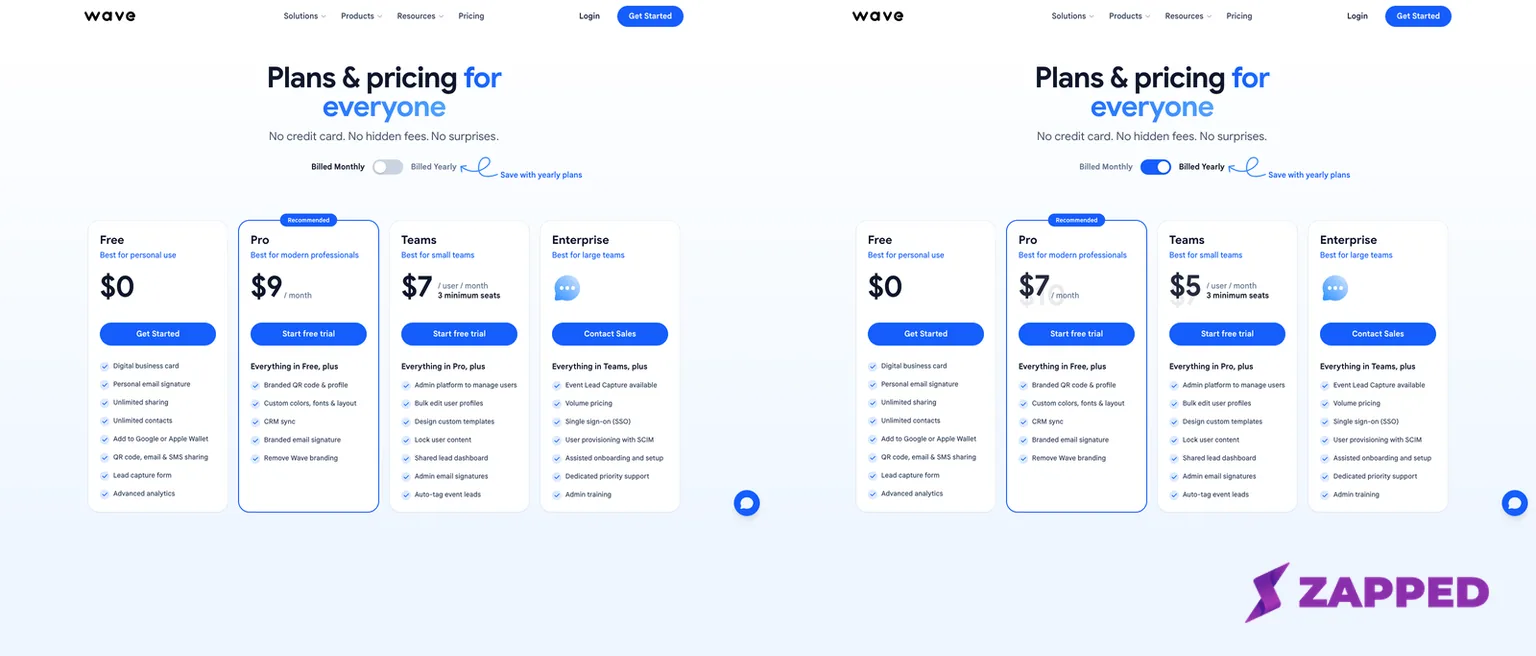
Official Wave Connect USD pricing page, captured in both visible billing states on 2026-08-06. The composite preserves the monthly and yearly storefront views; no annual total is inferred.
What the Free plan actually covers
Wave’s current individual page describes Free as a real digital business card rather than a short preview. The listed baseline includes unlimited sharing, unlimited contacts, QR sharing, email and SMS sharing, and access through Apple or Google Wallet.
| Capability | Free plan record | Why it matters |
|---|---|---|
| Card | One digital business card | Enough for a single professional identity |
| Sharing | Unlimited sharing and contacts | The card can support repeated networking without a stated share cap |
| Routes | QR, email, SMS, and Wallet | Useful when a tap is unavailable or a recipient prefers a familiar route |
| Recipient access | Browser view without a Wave account or app, according to Wave | Less setup for the person receiving your details |
| Editing | Wave says changes go live for people using the existing link | A shared destination can stay current after a profile update |
| Export | Wave documents CSV contact export for free | A useful portability signal, though the actual file and fields are not shown publicly |
The last row deserves careful wording. Wave documents free CSV export in its FAQ and individual page, but that is not the same as seeing an exported file or confirming its contents. Treat it as a documented capability and check the export location before building a serious contact process around it.
This makes Free compelling for a freelancer, consultant, or small operator with one identity. It is also why a feature count alone can mislead. The right question is whether your work needs another profile, stronger visual control, or team administration before you pay.
For the sharing mechanics around QR, link, email, and in person use, see these ways to share a digital business card. If Wallet is your main route, this guide to a digital business card for iPhone Wallet covers the broader platform context.
Sharing is easy on paper, but lead forms can change the moment
According to Wave’s FAQ, a recipient can view a shared card in a browser without a Wave account or app download. Wave’s individual page also lists QR, link, email, SMS, Wallet, and NFC routes. That is a sensible default for networking because the recipient does not have to adopt your tool before seeing your details.
The same Wave documentation says edits go live for people using the existing card link. That gives the profile a useful property: the destination can change without reprinting the QR code or sending a new link. The claim comes from Wave’s documentation, not an observed account session.
Mike Stuzzi’s review describes creating a card and finding profile fields, social links, website links, QR sharing, and online sharing routes. That is one reviewer’s hands on account of the product, but it fills in a little of the workflow that marketing pages leave abstract.
The G2 review summary shows users often praise setup and sharing ease, while limited customization comes up as a recurring concern.
One G2 reviewer also reports that enabling the lead form can require a recipient to submit contact information before seeing the profile. That may create hesitation in a first meeting, but it is one reported configuration experience, not a universal rule.
The Wave Connect App Store listing also describes QR, NFC, Wallet, email, SMS, scanner tools, offline lead capture, CRM sync, CSV export, and analytics. Apple hosts that listing, but the capability descriptions are still vendor supplied and oriented toward the iOS app. Use them as supporting context, not as proof of performance across devices.
If a QR code is your recovery route when a tap fails, this explanation of a digital business card QR code is the useful companion. For the hardware side, how NFC business cards work explains the route without assuming a particular vendor’s card.
Pro and Teams: pay for a workflow, not a longer feature list
Pro is the more legible paid upgrade for an individual. Wave lists CRM sync, custom profile branding, branded email signatures, and removal of Wave branding. Those features make sense when your profile is part of a sales process or your email signature needs to look like the rest of your identity.
Teams is about control across people. Wave lists admin management, bulk profile editing, custom templates, field locking, shared lead dashboards, and admin email signatures. Those controls can reduce drift when several people represent the same company, but the public feature list does not prove how the controls behave inside an authenticated workspace.
The three seat minimum is the economic hinge. A solo buyer pays for capacity they cannot use, while a small group may find the administration layer more valuable than another set of individual profile options. For the rollout questions that sit beyond Wave’s feature table, see this guide to digital business cards for teams.
The public record also contains a pricing disagreement. The current official page displays $7 per user per month in its monthly view and $5 per user per month in its yearly view, with three minimum seats.
Wave’s founder review gives a $60 per user per year Teams figure. The article keeps the billing states visible so a buyer knows to confirm the view before checkout.
Customization is the real counterweight
Mike Stuzzi’s review reports no theme selection, limited product color options, and no NFC phone tags. G2 users repeatedly raise limited customization as a concern.
Neither point proves that every buyer will dislike the design, but both matter if the visual identity of the card is part of the job.
Wave’s founder review also reported no multi profile support and missing Android widgets as limitations in February 2026. Those are dated statements, not permanent product facts. They are still useful questions to ask before buying, especially for people who switch between a personal identity, a company identity, and an event specific profile.
This is the central tradeoff. A long comparison table can make a product look flexible when the actual question is how many identities you can present and how much control you have over their appearance. If those needs are central, Free’s generous sharing baseline does not settle the purchase.
Portability and cancellation: policy is clearer than the dashboard
Wave’s Terms say users can export data while the account is active and may export it for 30 days after the account or paid plan ends. The Terms also say data may be deleted in the ordinary course after that window, subject to legal retention requirements. That is a meaningful deadline for anyone treating a hosted card as a contact system.
The public materials do not expose a directly retrievable dashboard procedure for exporting all profile, analytics, and contact data or deleting an account. That does not establish that the controls do not exist. It means the policy is easier to verify publicly than the exact click path and export scope.
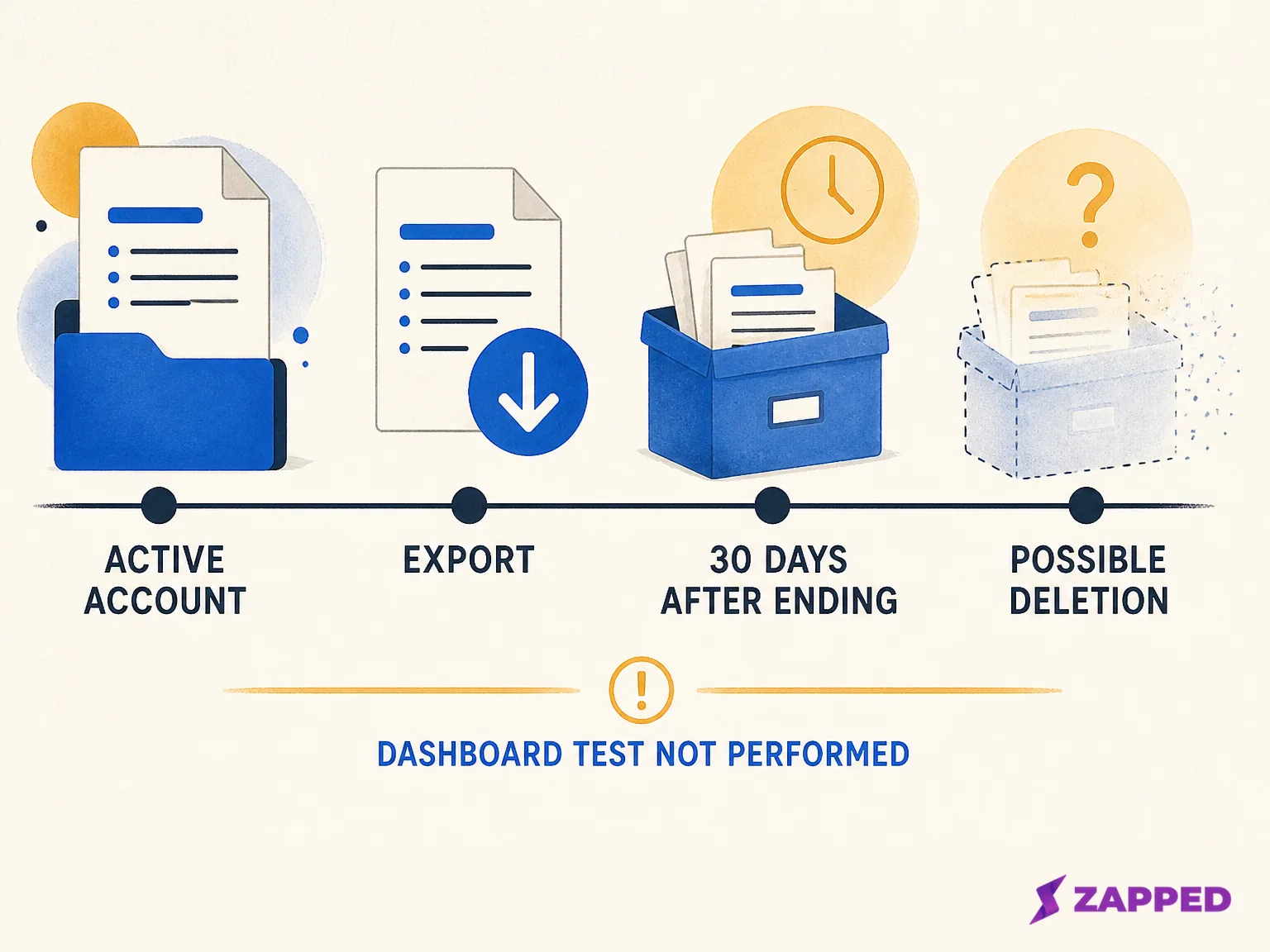
Wave Terms timeline. The diagram explains the stated policy and does not simulate a dashboard or show that deletion occurred.
Before importing a valuable contact list, locate the export and deletion instructions inside the account. Confirm what a CSV contains, whether analytics and profile data travel with it, and how the 30 day period is counted. Those answers can change the value of a low monthly price.
The NFC card is optional, not the product decision
Wave’s NFC product page lists its business card at $23 before shipping and describes iOS and Android compatibility. The page describes choosing the card, creating a profile, then linking and sharing it after delivery. That is enough to understand the intended setup, not enough to judge tap reliability, read range, durability, or physical finish.
The sensible buying question is whether a physical card changes your real sharing behavior. If you already carry a phone and can show a QR code or link, the hardware may add convenience rather than a new capability. If you network in settings where a tap feels natural, it may be worth the separate cost, with QR as the fallback.
Do not buy the card to solve a profile or portability problem. NFC changes the entry route. It does not answer how much customization you get, what data you can leave with, or whether a lead form asks for information before showing the card.
Check these five things before you commit
- Confirm the current USD storefront and billing view, especially for Teams. The displayed monthly and yearly rates, plus the older founder review, use different formats.
- Open the recipient path on a logged out phone. Check whether the profile appears directly and whether a lead form changes the first impression.
- Locate export and deletion controls in the account before importing a contact list. Read the available fields and retention instructions.
- Decide whether one profile is enough. Treat the February limitation report as a question to verify, not a timeless fact.
- Choose NFC only if the physical tap adds value beyond QR and link sharing.
Verdict: a conditional buy with a clear solo sweet spot
Wave Connect earns a buy recommendation for solo users who want one profile, browser sharing, QR or Wallet routes, and a broad documented Free baseline. Free is the product’s strongest argument because it covers the ordinary sharing job without requiring hardware or a credit card.
Pro makes sense when Wave’s listed CRM sync, profile branding, branded email signatures, or branding removal solves a specific work problem. Teams makes sense for a group that needs the listed administration controls and accepts the three seat minimum after confirming the current billing view.
Skip Wave if you need deep visual customization, several profiles per person, independently confirmed export and deletion behavior, or tested physical NFC performance. Those are not small preferences. They determine whether the service fits your identity system, your exit plan, or your real world handoff.
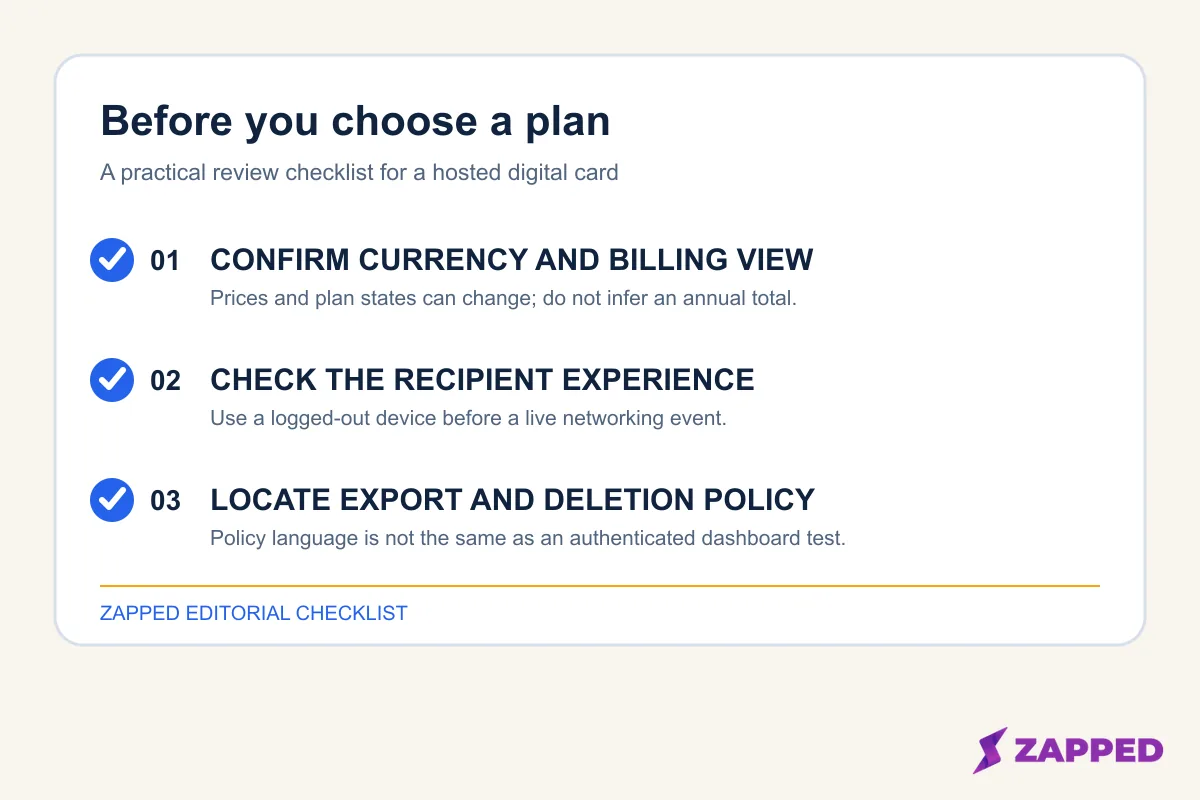
A practical checklist for confirming the live billing view, recipient experience, and policy controls before committing to a hosted card.
The recommendation would change with a verified dashboard export and deletion path, materially different Teams economics, restored or clearly documented multi profile support, stronger customization, or an approved hands on NFC test that establishes reliable hardware behavior.
If your priority is a live profile shared by QR code, link, or NFC tap, with browser access and contact saving, Zapped is an editable digital business card creator worth considering. Its paid plans add team workspaces and roles.
Free is one card with five content blocks and QR, link, and NFC sharing. It suits readers who value an editable profile and team structure more than Wave’s specific CRM and lead capture positioning.
Sources
Sources reviewed and checked 2026-08-06:
- Wave Connect pricing, official USD storefront checked in both visible billing states on 2026-08-06: yearly view Pro $7/month and Teams $5/user/month, monthly view Pro $9/month and Teams $7/user/month, with three minimum seats.
- Wave Connect FAQ, official documentation for export, recipient access, editing, branding, and plan distinctions.
- Wave for individuals, official page for the Free card, sharing routes, Wallet, QR, browser access, and CSV export.
- Wave NFC Business Card, official page for the $23 card price before shipping, compatibility, and profile linking.
- Wave Terms of Use, official policy for active export, the 30 day post ending window, and possible deletion.
- Wave Connect App Store listing, Apple hosted capability listing and iOS oriented context.
- Wave Connect on G2, user reported setup, sharing, customization, and lead form observations.
- Mike Stuzzi’s Wave Connect review, independent account of profile fields, sharing routes, and limitations.
- Wave founder review, first party February 2026 perspective and the alternate Teams price format.