Yes, with the right app installed, an Android phone can answer an NFC reader as a card, and developers have published a way to make that card look like a tag holding a link. It will still not work as a business card, and the reason is not a missing feature.
You are holding an Android phone with NFC, you have watched someone tap a card across a table, and you are trying to decide whether to buy tags you hope you do not need.
Buy them.
If the category itself is new to you, what an NFC business card actually is covers the ground the rest of this builds on.
Key takeaways
- Card emulation is something an app developer builds, not a setting you can find.
- On Android 9 and lower the screen has to be on. On Android 10 and higher, while Secure NFC is on, there is no card with the screen off.
- The one record type that reaches both Android and iPhone is a plain web link, not a contact.
- Android Beam is gone, and the sharing Google points users at now is not NFC at all.
- Every route that works ends the same way, with a page opening in a browser.
What an Android phone can actually emulate
Android has done card emulation since Android 4.4. Its documentation calls it host based card emulation and describes it as a way for any Android application to emulate a card and talk directly to an NFC reader, with the data routed to the host CPU rather than to a secure element.
The exchange sits on the NFC Forum ISO-DEP specification, which is based on ISO/IEC 14443-4, and the phone and the reader trade command and response units defined in ISO/IEC 7816-4. Those are the protocols the readers already in the field speak, which is why the capability is worth anything.
Then comes the part the whole question turns on. The first thing a reader sends is a SELECT AID command naming the application it wants, and Android pulls that identifier out, resolves it to an installed service, and forwards the conversation to that service.
Building such a service is an app developer's job. Android's guide lists what it takes: a class extending HostApduService, the NFC bind permission, an intent filter, and an XML file declaring the identifiers the service answers to. Nothing in Settings turns a phone into a card.
Why an emulated card is the wrong shape for a business card
An emulated card offers nothing to anybody. It sits there and waits to be asked for one named application, then answers.
Reading a tag works the other way around. Android's tag dispatch system parses whatever the tag holds, works out the type, wraps it into an intent and starts an activity, trying the NDEF intent first, then the technology intent, then the bare tag intent. Nobody asked for anything by name.
That is the mismatch. A business card has to volunteer something to a stranger's phone, and card emulation is built for the opposite conversation.
Android documents both sides thoroughly and never joins them. The card emulation guide never mentions NDEF or emulating a tag, and the tag guide never suggests a tag might be a phone.
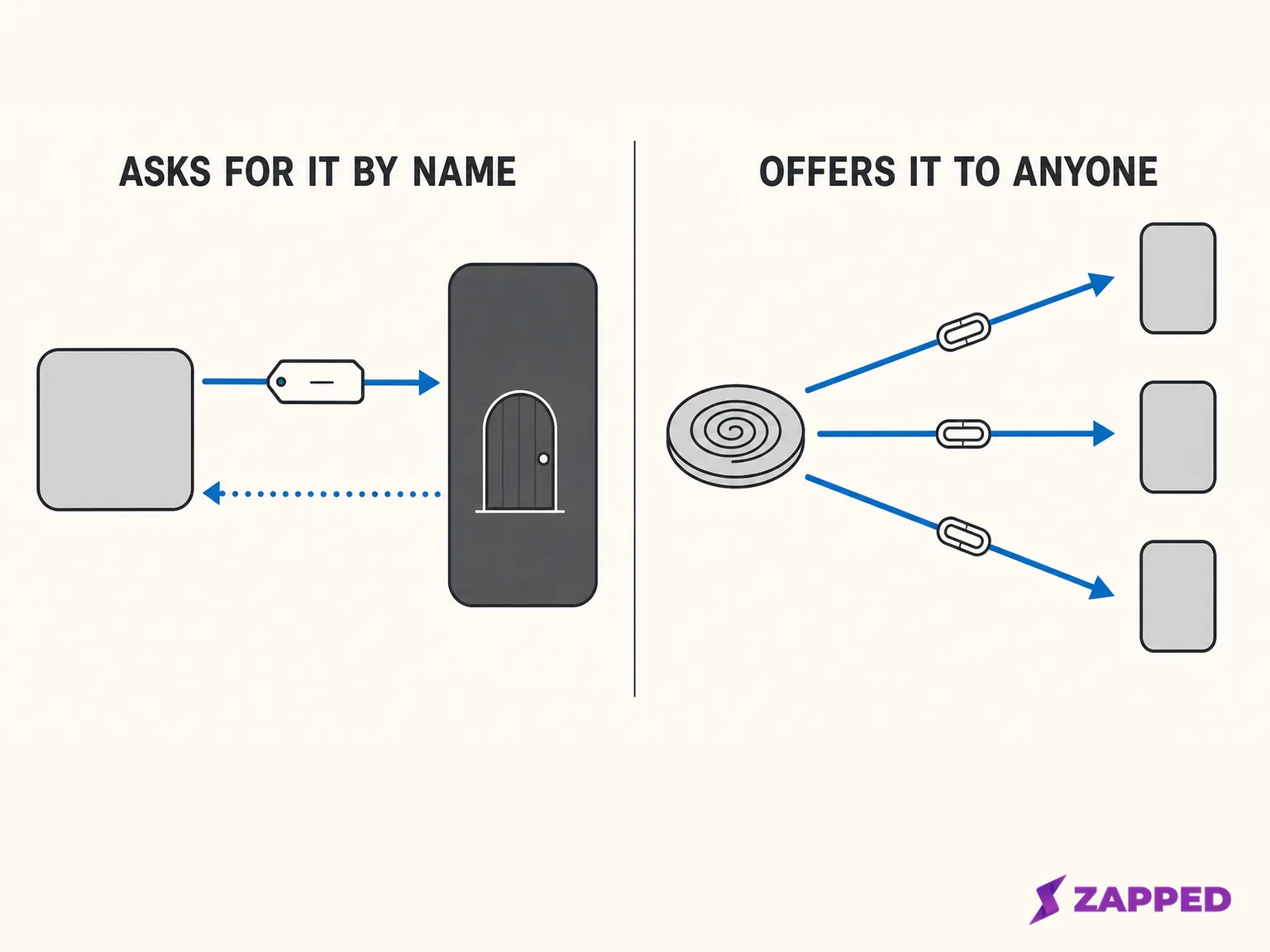 Our diagram of the two exchanges, not a captured trace.
The one route that exists, and what it asks of you
There is a way across the gap. It comes from developers rather than from the platform, and it charges for itself in conditions.
What the developers who built it actually did
LuigiVampa92 publishes an Apache 2.0 Android library that emulates an NFC Forum Type 4 Tag carrying an NDEF message, and states that this tag type meets the technical requirements and fits every restriction of Android's card emulation interface.
That is the bridge. A tag of that type is itself an application a reader can ask for by name.
The author of NfcHceNdefEmulator built the same thing and named the identifier out loud. Their service registers D2760000850101, the NDEF Type 4 Tag application, and they report testing it on real Android 9 and Android 13 devices.
Choose a private identifier instead and ordinary reader apps cannot see the card at all. The developer publishing as AndroidCrypto reports that because their tutorial app uses a proprietary identifier, NXP's TagInfo reader cannot read the emulated tag.
The record that works is only a link
A compatibility table in LuigiVampa92's README is the most useful thing published in this whole area.
| Record on the emulated tag | Android | iPhone |
|---|---|---|
| Web link | Read and acted on natively | Read and acted on natively |
| Contact in vCard format | Read natively | No reaction |
| Raw text | Not parsed | Not parsed |
Read that table for what it costs you. The record that would carry an actual business card is the one an iPhone ignores. What survives the crossing is a link.
Which collapses the exercise. A link is deliverable four easier ways, and the rest of this article is about those four.
Screen off, and with Secure NFC on there is no card
On Android 9 and lower, the NFC controller and the application processor are switched off entirely when the screen is off, so emulation services do not work. On Android 10 and higher, while Secure NFC is on, all card emulators are unavailable when the screen is off, whether they run on the host or beside it.
A tag in your wallet has no such condition. Neither does a piece of card stock.
Two apps, one identifier, one prompt every time
When more than one installed app claims the same identifier, Android resolves it by preferring the selected default wallet app, then a single registered service, and otherwise by asking the user which one to use at tap time.
The author of NfcHceNdefEmulator documents the same collision from the other end, and adds a detail worth knowing: the emulating service runs from the moment the app is installed, not when you open it.
Another app claiming the NDEF identifier produces a routing conflict to be resolved every time a reader is tapped.
So the failure mode is a dialog appearing at the exact moment you were trying to look competent.
What the apps selling this say about themselves
NFC NDEF Tag Emulator by MaxSoft Ltd has passed 100,000 downloads on Google Play. Its description offers a URL mode that lets you embed a web link and use your phone as a clickable NFC tag with zero extra hardware. It holds 2.6 stars.
Its own listing then hedges the promise: it works only on Android devices that support host card emulation, some readers or older devices may not support all tag types, and the developer tells you to always test with your own reader or target device.
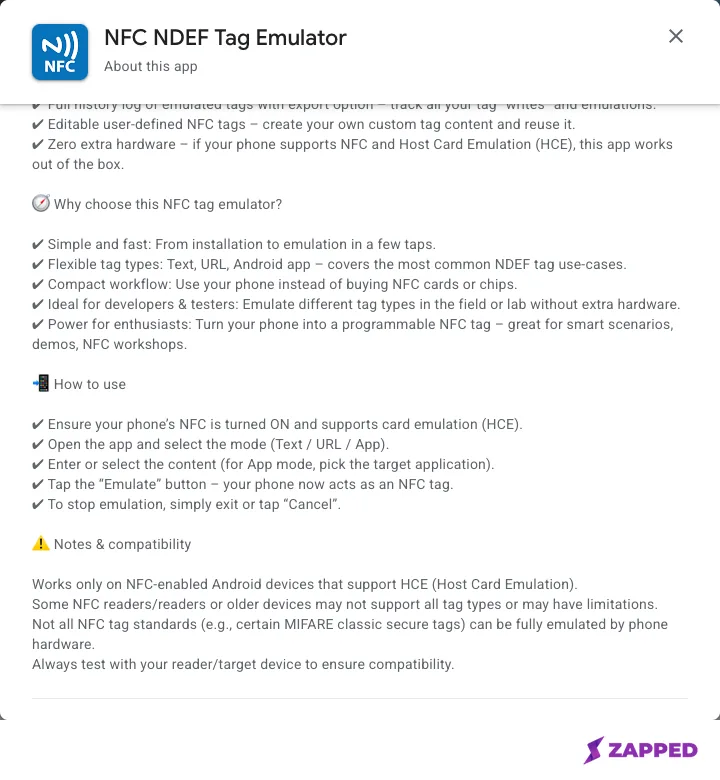 Source: Google Play, NFC NDEF Tag Emulator by MaxSoft Ltd, captured 2026-08-06.
Three of its reviews read like people who wanted this to be simple. One says it simply does not work for them, another wanted instructions, and a third arrived hoping to scan an existing tag and found the data had to be typed in by hand.
If that last one is why you are here, copying a tag onto a phone is its own question with its own answer.
What happened to tapping two phones together
If the memory behind this question is two phones touching back to back, that was Android Beam. Google deprecated Beam in Android 10, saying at the same time that tag reading and payments would keep working as expected.
Android 14, API level 34, finished the job. Android's own difference report for the NFC adapter lists the Beam and NDEF push methods as removed, invokeBeam and setBeamPushUris among them.
What Google points users at instead is not NFC at all. Google's Quick Share help page tells users to turn on Bluetooth on both devices and to unlock the receiving screen, and never mentions NFC anywhere.
Reaching an iPhone, iPad or Mac happens one of two ways. Directly over AirDrop from a Pixel 8a or later and certain Samsung, Oppo, OnePlus, Vivo, Xiaomi, Honor, Transsion and Motorola devices, or otherwise through a QR code, where the files sit on Google servers for 24 hours and both devices need internet access.
Ben Schoon at 9to5Google found an unreleased feature called Tap to Share in an APK teardown, in which NFC would start the interaction rather than carry the data.
What a tag scan does on Android 16 and 17
Since Android 16, scanning a tag that stores a web link triggers a view action instead of the NDEF discovered intent. The link opens; the app that used to claim the tag does not.
That same release handed the user a veto over which apps a tag scan is allowed to launch, with the system flagging the first time an app receives one.
Android 17 adds a step. Scanning such a tag surfaces an "open link" notification, and someone has to interact with it before anything opens. Android 17 is API level 37, and it shipped in June 2026 to most supported Pixel devices first.
Read the direction of travel. On the receiving side the platform is adding deliberate taps, not removing them, at the same moment you are hoping to remove hardware from the sending side.
When a tap appears to do nothing at all, work the problem from the failure side instead of blaming the tag.
If the person you are tapping has an iPhone
The NFC reading an iPhone does on its own is tag reading. Apple's Core NFC documentation says it reads tags of types 1 through 5 containing NDEF data, and separately handles tags with their own protocols, including ISO 7816, ISO 15693, FeliCa and MIFARE.
Which is why LuigiVampa92's table splits where it does. The link row reaches both platforms. The contact row stops at Android.
The other direction is gated too. Apple's card emulation session documentation names the uses its entitlement covers in the European Economic Area: in store payments, car keys, closed loop transit, corporate badges, hotel keys, merchant loyalty and rewards, and event tickets. A business card is not among them, and Apple manages the entitlement through an application process.
For what an iPhone does when it meets a card in the other direction, scanning an NFC business card on iPhone covers the receiving end.
What to use instead, ranked by what the recipient has to do
Five routes, one payload. Whatever you carry, the thing that lands is a URL in somebody's browser, so the only question left is how reliably it gets there.
| Route | What you carry | What they do | Where it breaks |
|---|---|---|---|
| Physical tag or card | A tag you programmed once | Tap it, then tap the notification on Android 17 | NFC switched off |
| QR code | A printed or displayed code | Point a camera at it | Nothing to point at, poor light, hands full |
| A link | A conversation already open | Tap the link | You need that channel to exist first |
| Quick Share | Both phones close together | Accept on an unlocked screen | Bluetooth off, or an iPhone recipient needing AirDrop or a QR code |
| The phone itself | An emulator app | Tap, subject to everything above | Screen off, a second app on the same identifier, a contact record an iPhone ignores |
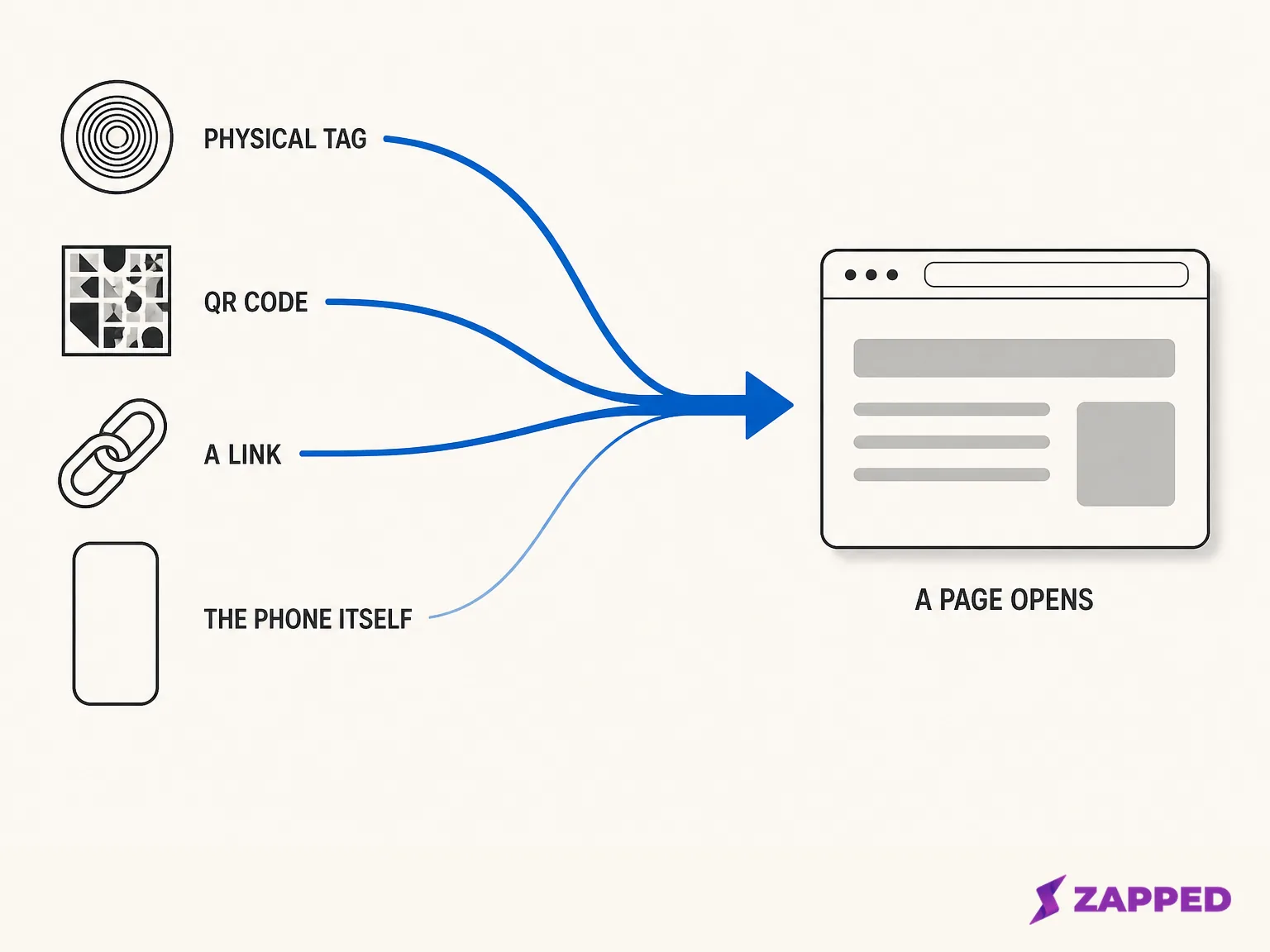
Rank them by what the recipient has to do and the physical tag or printed card wins. Nothing has to be installed, nothing has to be aimed, and nothing has to be open already. The Android 17 notification is one more tap and still the route that asks least of the other person.
A QR code takes over when a tap is not on offer, and a plain link takes over when you already have a thread going. The phone itself comes last, for the five reasons above.
Writing the tag is a small job on the phone you already own, and programming an NFC tag with Android walks it end to end. If you are still weighing the tap against the code, NFC against QR codes settles that separately.
Popl does not ask the phone to be the tag either. Its own activation instructions begin by tapping or scanning a physical Popl device and then placing that device on the back of a phone, which is how Popl works on Android.
The better question is what that page should be.
A Zapped card is a public web page, so the person you tapped opens it in a normal browser with nothing to install and no account to create, and saves your details from there.
QR, link, and NFC sharing come with every plan, including the free one, and the help center walks through programming your own NFC card.
The free plan is one card with five content blocks, and the card carries a badge. Removing the badge is a Professional feature.
The tag is worth buying
If you are deciding what to carry to something this week, stop looking for the app. Buy a tag or a card, write your link to it, and keep a QR code as the fallback for the phones that will not tap.
What would change this answer is a shipped, documented feature from Google that lets a phone present a link with no app involved and no identifier to fight over. Until that exists, the phone in your hand is the reader, and the thing it reads has to be something else.
Sources
- Android Developers, Host based card emulation overview, captured 2026-08-06.
- Android Developers, NFC basics, captured 2026-08-06.
- Android Developers, Android 10 behavior changes, captured 2026-08-06.
- Android Developers, API level 33 to 34 difference report for NfcAdapter, captured 2026-08-06.
- Android Developers Blog, Android 17 release, captured 2026-08-06.
- Google Help, Share files with Quick Share, captured 2026-08-06.
- Apple Developer Documentation, Core NFC, captured 2026-08-06.
- Apple Developer Documentation, CardSession, captured 2026-08-06.
- LuigiVampa92, Android NDEF emulator library, captured 2026-08-06.
- MichaelsPlayground, NfcHceNdefEmulator, captured 2026-08-06.
- AndroidCrypto, How to use host based card emulation in Android, captured 2026-08-06.
- Google Play, NFC NDEF Tag Emulator by MaxSoft Ltd, captured 2026-08-06.
- Ben Schoon, 9to5Google, Android Tap to Share teardown, captured 2026-08-06.
- Popl Help Center, How to activate a Popl device, captured 2026-08-06.