You've watched someone tap a card against a phone and seen a link open with no plastic changing hands and no app to install, then wondered whether you could build the same thing yourself. You can. A blank tag, a free writer app, and about ten minutes are the whole project.
The tag itself, a blank NTAG213 card, runs about fifty five cents from a specialty NFC retailer. The app that writes it, NFC Tools from Wakdev, is free on iPhone and Android. The only real spend most people make is an optional six dollar app upgrade nobody needs for a basic card.
The one decision that determines whether it works
Before you buy anything, get one decision right, because the rest of this guide assumes it. Write a link to a hosted profile onto the tag, not your name, phone number, and email typed directly onto the chip. That single choice is what separates a card that works on every phone from one that only works on some of them.
NTAG213 holds 144 bytes of memory, room for a link of about 130 characters once the tag's own formatting is counted, according to Wakdev's own technical notes on the chip. A full set of contact fields does not fit in that space, so Wakdev's guidance is to encode a short redirect link instead and reach for a bigger chip, NTAG215 or NTAG216, only if you want to pack in more.
There's a second reason a link wins beyond memory. Apple's Core NFC documentation says the iPhone's background tag reader only acts on a URI record, a web address, phone number, or a handful of other supported link types, and silently ignores contact data written directly to the chip in vCard format.
Apple's own Shortcuts app can't fix this either. Its NFC automation trigger only records a tag's unique hardware identifier the first time you scan it, and after that, the tag's actual contents are ignored, according to Apple's own Shortcuts guide. Writing the tag still needs a dedicated app, not a workflow built in Shortcuts.
Buyers who have actually tried this report the same limitation from the other side. One Amazon buyer, review dated May 2025, put it plainly: "Apple won't let you load them to send contact info. You can only use them to send as a direct link to your website or social media pages... For that purpose, they are fantastic."
A second reviewer, on a related tag listing, confirmed writing was easy but "doesn't work with iphone unless through an nfc app." For the fuller case for a link over static contact data, see why a profile link beats a static chip.
What it costs to make an NFC business card yourself
This is the part most guides skip, and it is worth doing properly because the chip you pick and where you buy it change the total more than anything else does.
Picking a chip
NTAG213's 144 bytes is plenty for a single redirect link, which is all a business card needs. NTAG215 and NTAG216 hold 504 and 888 bytes, according to NXP's own product listing for the chip family, useful if you want the tag to also carry a second link or a bit more data, but unnecessary weight for a card that only needs to point somewhere.
Where to buy the blank tag
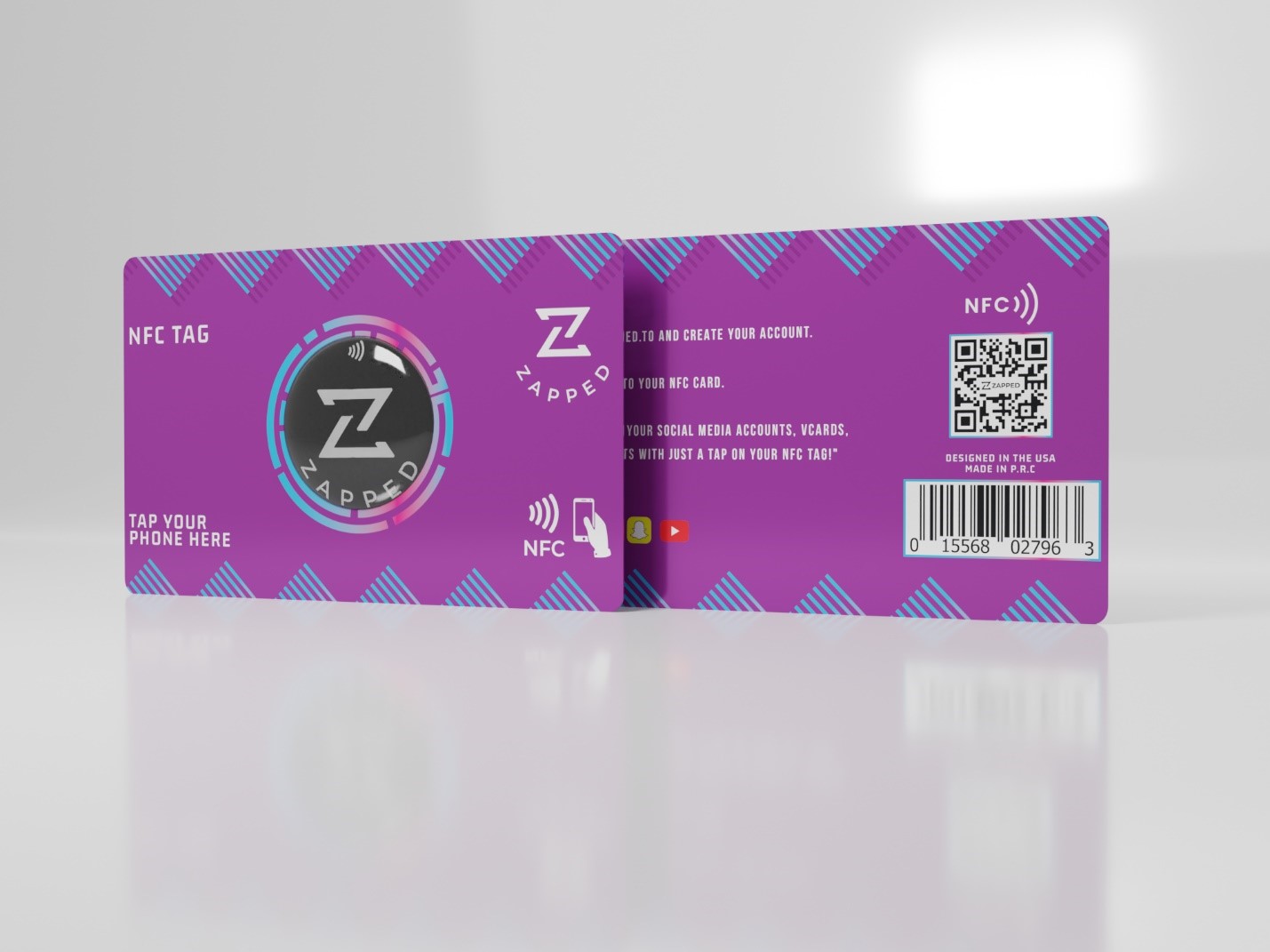
Tagstand, a specialty NFC retailer, sells a blank NTAG213 PVC card for fifty five cents at one to twenty four units, falling to thirty nine cents at a thousand or more. General marketplaces also carry blank NFC business cards, but the price is less predictable.
One Amazon listing for a twenty card pack of NTAG215 cards showed 14.04 Canadian dollars during this check, and a broader web search put similar multi packs in a five to twenty US dollar range. Treat that range as approximate, not a quote, and expect it to shift by currency and seller.
The app costs less than the tag does
NFC Tools by Wakdev is free on iPhone, with purchases available inside the app, requires iOS 15.6 or later, and works from iPhone 7 onward. On Android it's also free, with over 10 million downloads, and a Pro Edition upgrade at $5.99 that adds profile management and automation features a basic card write does not need.
Add it up and a single card costs well under a dollar in materials, plus nothing to six dollars in app cost depending on whether you want the Pro upgrade. That is the realistic range, not one precise number pretending to be more exact than it is, and it undercuts a branded card by a wide margin.
See the full pricing landscape for branded and DIY NFC cards if fifty five cents still sounds too good to be true. If a flat card is not the shape you want, a DIY keychain fob uses the same blank tag approach in a different form factor.
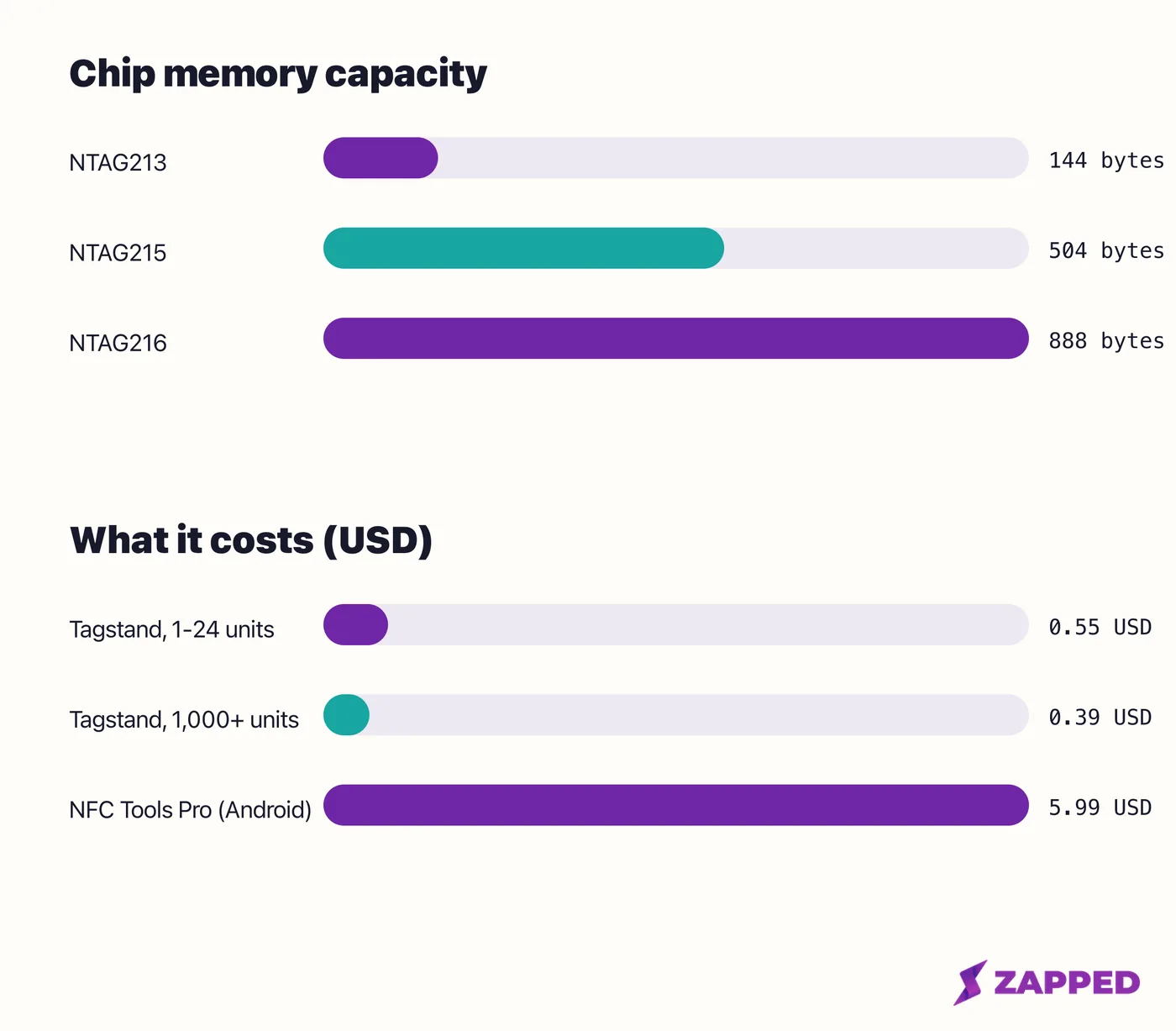
The tag is the cheap part. Whatever you spend beyond fifty five cents is optional, not required.
Turning a blank tag into a working card
The actual write is short enough that it doesn't need a screenshot by screenshot walkthrough here. At a decision level: pick a tag, install NFC Tools, choose to write a URL record, paste your profile link, and hold the tag to the back of the phone until the app confirms the write.
Android's tag dispatch system reads the first record's type and routes accordingly, and Google's own developer documentation recommends the standard NDEF format specifically because it gets the widest device support. Writing a URL record in NFC Tools, the option already chosen above, already puts the tag in that format, so there is nothing extra to configure here.
Android also changed how it handles a scanned link tag recently, and this matters if you are testing on a newer phone. Starting in Android 16, tapping a tag that holds a web link triggers the system's normal link opening action, according to Google's own NFC developer guide, instead of routing straight to an app built for NFC.
Android 16 also added a permission prompt the first time an app receives a scanned tag, asked once per app rather than every tap.
Starting in Android 17, that same tap surfaces a notification the user has to tap on purpose rather than opening the link automatically. None of this breaks a link tag. It just means the newest phones ask for one more tap than older ones did.
Once the tag is written, test it before you consider the job done. Tap it with a second phone, and if you can, one running the other operating system than the one you wrote it on. For the exact button sequence on each platform, see the walkthroughs for writing a tag on iPhone and writing a tag on Android.
The two mistakes that can't be undone
Most things that go wrong with a DIY tag are fixable. Two are not, and both are worth knowing before you touch the lock option.
The first is the one already covered: writing contact data instead of a link. Fixing it later just means writing the tag again with the correct record, so it's inconvenient, not permanent, as long as the tag isn't locked yet.
The second is locking the tag itself. Locking an NTAG21x chip so it can only be read, never edited again, is permanent and cannot be reversed by the cardholder, according to a retail listing quoting the chip's own specs. A separate password protection feature exists and is reversible, which is the milder option if you want to restrict edits without giving up the ability to fix a mistake.
One Google Play reviewer of NFC Tools, reviewing the app in June 2026, flagged that its own "Lock Tag" menu entry should warn more clearly that the action can't be undone, which is exactly the mistake worth avoiding here.
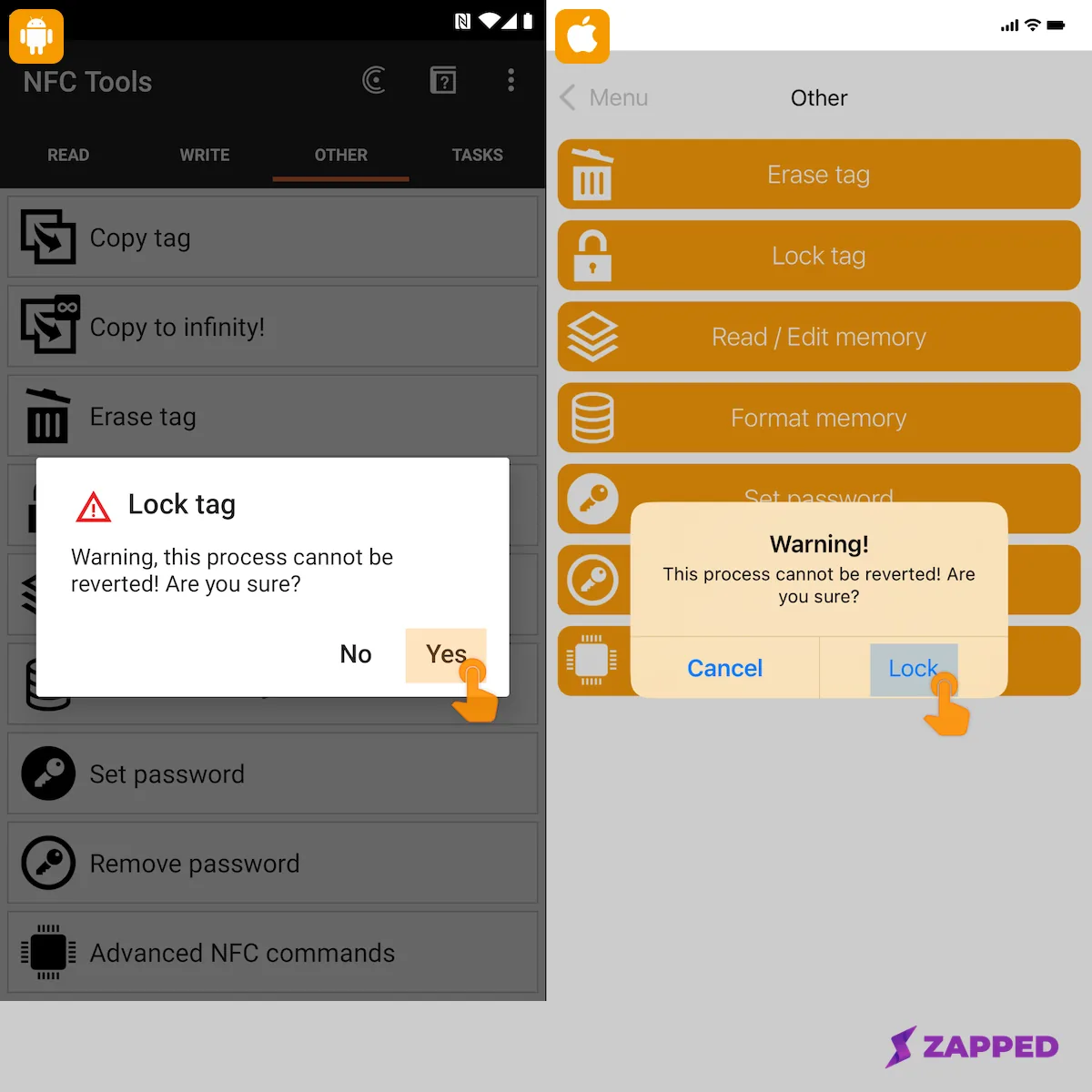 Source: Wakdev, How to lock an NFC chip?, NFC Tools Android and iOS lock confirmation screens, captured 2026-08-06.
The shorter list of everyday causes, according to Wakdev's own troubleshooting guide: moving the tag during the write, a tag that's already locked, the wrong chip type for what you're trying to write, not enough memory for the payload, and a case or metal surface interfering with the antenna. NFC switched off at the phone's settings belongs on that list too, and it's the one people check last.
One Amazon reviewer, review dated May 2026, reported that a freshly written tag sometimes took a couple of tries before a phone would read it, distinct from any of the causes above and not a defect rate, just a real hiccup on the first tap worth expecting.
Before you lock anything, run through a short checklist: test the tag on a second phone, test it on the other operating system if you can, and confirm the destination link is the final one you want, since a locked tag can no longer be rewritten to a new profile.
If the card already works and later stops, that's usually a different problem than the ones above. See what to check when an NFC business card stops working for the fuller troubleshooting path.
Should you make one or just buy one
Here's the actual tradeoff, not a universal winner. DIY wins on cost and control: you're paying under a dollar, you own the whole process, and there's no subscription risk because nothing here depends on a vendor staying in business.
Buying a card that's already made for the purpose wins on finish, durability, and zero setup risk, since someone else already tested the write and picked the materials.
Effort splits the difference. A DIY tag takes about ten minutes and one trip to a retailer's website. A bought card takes zero setup once it arrives, but you're waiting on shipping and paying more for that convenience. Reliability risk sits mostly on the DIY side, since a locking mistake or a wrong record type is on you to avoid, while a bought card arrives already written correctly.
No test comparing a bare DIY card's durability against a finished vendor card's has been run here, so this isn't a claim that one holds up better than the other over time.
If you want full control and a cost close to zero, DIY is the right call. If you want a finished product and no setup risk at all, buying makes more sense, and the rundown of NFC business cards already made for you is the place to compare options if that's the path you'd rather take.
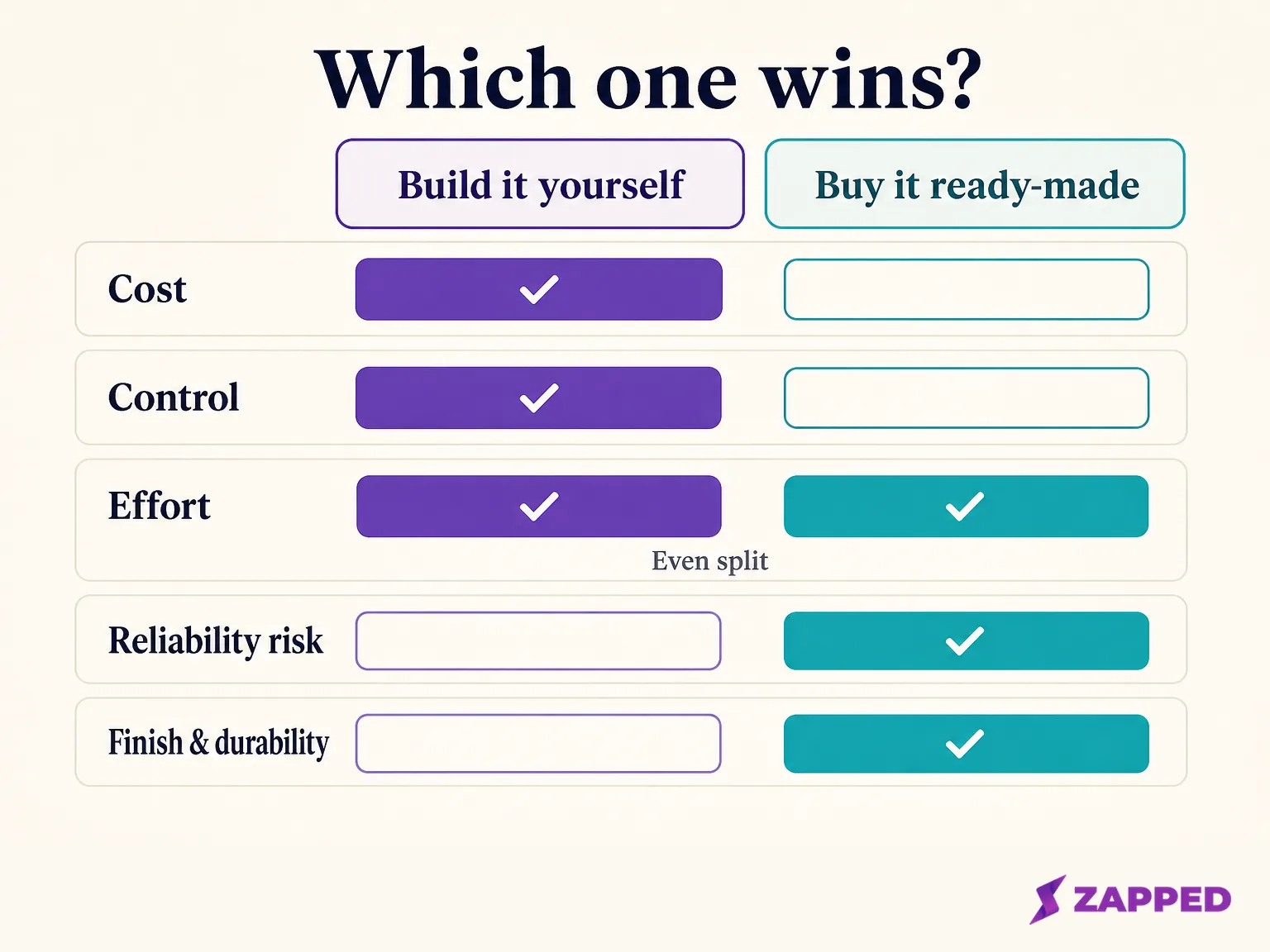
Cost and control favor building it yourself. Finish, durability, and zero setup risk favor buying one that someone else already made.
Point the tag at something worth tapping
Once you've decided and built the tag, the last question is what it should actually point at. A blank tag with a link on it is only as useful as the page behind that link.
Zapped's own card supports QR, link, and NFC sharing on every plan, including Free, so the destination behind a homemade tag costs nothing to set up. The Free plan gives you one card and five content blocks with no credit card required, and the card opens in a normal browser with no app needed to view it, so whoever taps your tag can save your details without installing anything.
For the exact write step once your card and your tag both exist, the Zapped help center walks you through the process here.
One honest limitation worth stating plainly: the physical blank tag itself is not part of what gets sold there. That part of the shopping list still comes from a specialty retailer or a general marketplace, same as it would for any other destination you might choose.
Sources
- NXP, NTAG213/215/216 product page, captured 2026-08-06.
- Wakdev, NTAG213 knowledge base entry, captured 2026-08-06.
- Wakdev, Why I cannot read or write my NFC chips, captured 2026-08-06.
- Wakdev, How to lock an NFC chip?, including the NFC Tools Android and iOS lock confirmation screenshots, captured 2026-08-06.
- Apple Developer Documentation, Adding Support for Background Tag Reading, captured 2026-08-06.
- Apple Support, Setting triggers in Shortcuts, captured 2026-08-06.
- Android Developers, NFC basics, captured 2026-08-06.
- Apple App Store, NFC Tools, captured 2026-08-06.
- Google Play, NFC Tools, captured 2026-08-06.
- Google Play, NFC Tools Pro Edition, captured 2026-08-06.
- Tagstand, Blank NFC PVC Card, NTAG213, captured 2026-08-06.
- Amazon, 20-pack blank NTAG215 NFC business cards, including buyer reviews, captured 2026-08-06.
- Zapped, Program an NFC business card, captured 2026-08-06.