Yes, a URL based NFC business card can work without an app on the recipient's phone. The tag carries a supported HTTP or HTTPS destination, the phone's NFC reader and operating system dispatch that URI, and the default browser opens the public profile.
The important split is on the two sides of the exchange. The owner may use a writing tool to program the URL, while the person receiving the card can reach a URL based profile without installing a viewing app.
For the broader NFC business card definition, start with the parent guide, then use this page for the narrower app question.
Quick answer
An NFC business card does not need to store a complete live profile. In the normal web path, it stores a URI in an NDEF record. The phone reads that record, dispatches its URI or MIME type, and sends the HTTP or HTTPS destination to a browser when no associated app takes the route, as the NFC Forum's cross platform guidance describes.
That path still depends on a compatible reader, the phone's current state, the record format, and the destination loading normally. “Without an app” removes an installation step. It does not remove the operating system, browser, network, or any prompt the phone may show.
Key takeaways
- The recipient and the owner have different app requirements.
- The NFC tag normally carries a URI or URL, not the whole live card.
- Android and iPhone can add different reader, notification, and routing conditions.
- An installed app can be an optional route when the tag or URL is associated with it.
- Opening a web profile and saving contact details are separate actions.
The tap is a four layer handoff
The easiest way to understand the experience is to separate the objects that ranking pages often blend together. A tap is not “the card opening an app.” It is a short handoff through a tag, a phone operating system, a destination handler, and the public page.
| Layer | What happens | What can change the next step |
|---|---|---|
| NFC tag | A URI or URL is stored in an NDEF record. | The first record and its supported format matter. |
| Phone OS | The built in NFC reader reads the tag and dispatches its data. | NFC settings, screen state, device support, and platform rules matter. |
| Browser | The HTTP or HTTPS destination loads as a web page. | The URL and the phone's ability to reach it matter. |
| Optional app | An associated app may receive the link instead. | App links, universal links, or an app specific record can change the handler. |
NFC Forum's URI specification describes storing Uniform Resource Identifiers with the URI record type and NDEF. That is the payload boundary. The tag points to the destination, while the live profile remains at that destination.
Android's NFC documentation describes reader and writer mode as the mode for reading and writing passive tags. Its tag dispatch documentation then explains how the operating system parses NDEF, identifies a URI or MIME type, and starts an activity that can handle the result.
If you want the broader vocabulary before going deeper, this explanation of tap business cards covers the surrounding terminology. This article stays focused on the app boundary and the route from a stored URI to a public page.
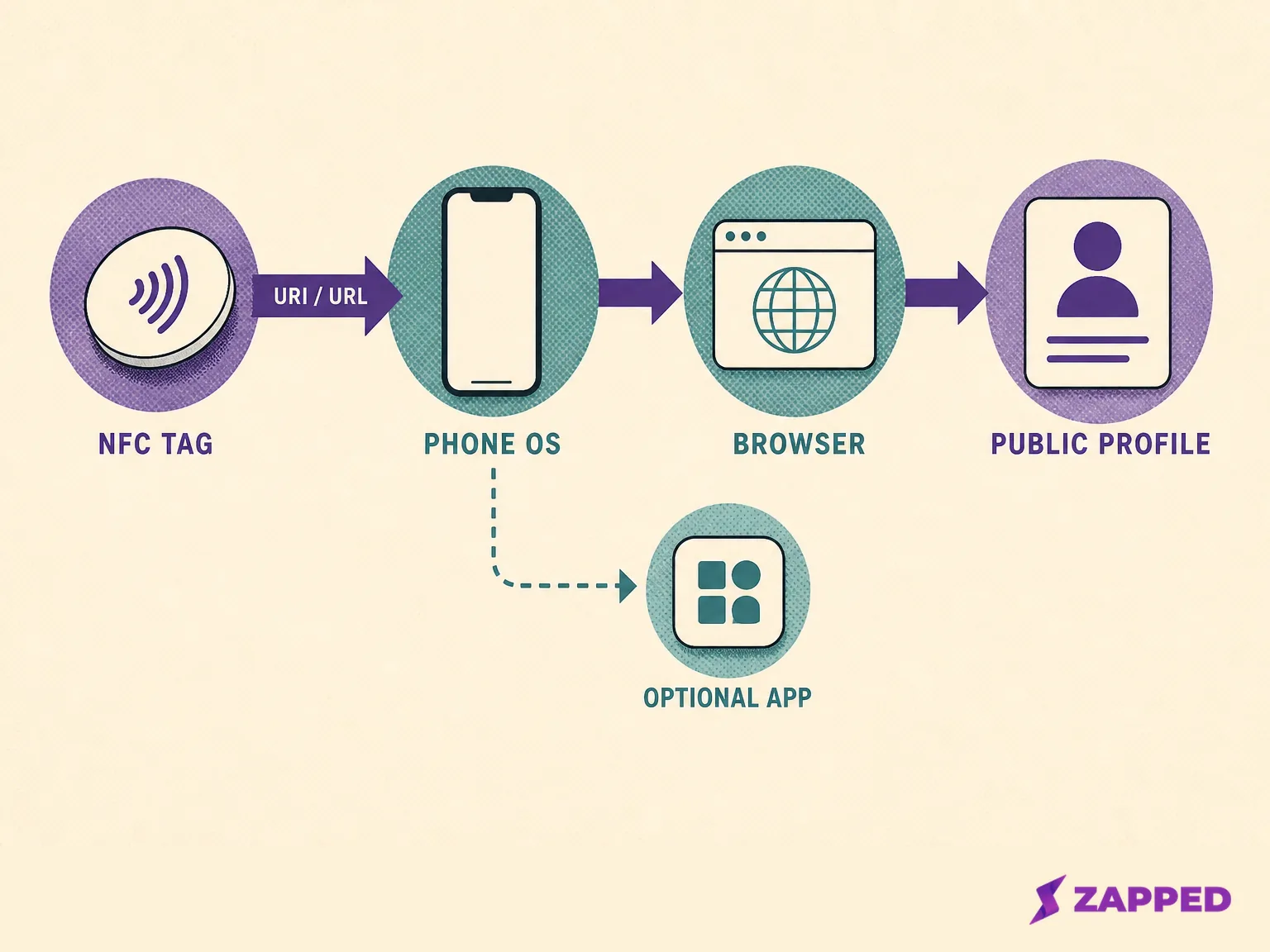
Conceptual diagram based on NFC Forum URI guidance and Android tag dispatch documentation.
What Android does after the tap
Android adds a reader and dispatch step before a browser or another handler can act. The phone reads the tag, examines its NDEF data, identifies the URI or MIME type, and sends the result to an activity that can handle it. A URL based card therefore relies on the phone recognizing both the tag data and a suitable web handler.
Android's NFC basics documentation says devices usually look for tags while the screen is unlocked unless NFC is disabled. That is a practical condition, not a promise that every Android handset presents the same prompt or uses the same reader location.
The current Android documentation also describes version specific web link behavior. It records an ACTION_VIEW path for Android 16 and an open link notification that requires explicit interaction on Android 17. Those details can change what the recipient sees after the tag has been read.
This is why “no app” and “no user action” are different claims. A browser can be the final destination even when Android shows a notification, chooser, or other handoff first. For the operating steps and model specific checks, use the NFC business card troubleshooting guide.
What iPhone does with a URL tag
Apple documents background tag reading on iPhone XS and later. In that path, the phone can read a supported tag and present a notification. The recipient may then need to interact with the notification before the destination opens.
Apple also lists states that can block background reading. These include the first unlock after a restart, an active Core NFC session, Wallet, Camera, and Airplane Mode. The point is not to memorize a universal prompt sequence. It is to recognize that a missing app does not make the phone independent of its own reader conditions.
For the browser branch, Apple's background tag reading documentation says that when no installed app is associated with a universal link, the system opens the link in Safari. That is the cleanest example of a recipient reaching a web destination without a provider app.
Use the iPhone NFC business card scan guide for device steps and troubleshooting depth. This page only needs the condition that explains why the browser path can work.
When an app appears, it is a routing branch
An app can still appear in the experience without being the minimum requirement for a URL based card. The URL may be registered as an App Link or Universal Link, or the tag may include an Android Application Record. In those cases, an installed app can become the handler for the destination.
The NFC Forum's cross platform UX guidance separates the URI only option from application start options. For the URI only path, the guidance describes an HTTP or HTTPS link as the first record and the default browser as the route when the associated app is absent.
That resolves the apparent contradiction. “No app required” describes the minimum browser path for a supported URL record. It does not say that an installed app can never intercept a link, or that every phone will skip a prompt before opening the page.
Owner setup and recipient viewing are different jobs
The word “app” causes trouble because it can refer to two completely different jobs. The owner may need a writing tool to put a public URL on the tag. The recipient needs a phone that can read the tag and a handler that can open the destination.
| Person | Job | What the source backed path requires |
|---|---|---|
| Owner | Program and maintain the card. | A writing tool may write the public URL and test it with another compatible phone. |
| Recipient | Reach the shared profile. | The phone reads the URL and opens it in a browser when no associated app handles it. |
The distinction is especially useful when choosing a card for a meeting. Asking the owner to prepare the tag is a setup question. Asking every recipient to install a branded app is a delivery question. They are not the same dependency.
With the Zapped NFC programming guide, the owner writes the public card URL with an NFC writing app, tests it with another compatible phone, keeps a QR fallback, and can update content behind the same public URL. That product specific setup illustrates the owner and recipient split.
For the complete writing workflow, continue to the NFC business card programming guide. The useful boundary here is simple: setup software can be necessary for the person issuing the card, while viewing software can remain optional for the person receiving it.
What the no app path does not promise
The browser route is useful, but it is narrower than the phrase “no app” suggests. Keep these four distinctions in mind when a card is handed over.
| Common assumption | More precise version |
|---|---|
| The tap always opens immediately. | The phone may show a notification, chooser, or other user action before the browser opens. |
| The tap saves the contact. | Opening a web profile and saving contact details are separate actions; the tap does not universally write a contact. |
| Any phone follows the same path. | Android's documented conditions and Apple's documented conditions vary by device, operating system, record, setting, and app association. |
| The page works without a network. | The tag can carry the URI locally, but the documented destination step is a browser opening an HTTP or HTTPS page. Offline completion is not a dependable path. |
A tag read and a page load are separate steps. The practical conclusion is simple: a URL based card needs a destination that the recipient's browser can reach.
If the reader's real question is whether to carry both channels, the NFC versus QR business card comparison handles that choice. Here, QR matters as a fallback when the phone state, card construction, or room setup makes a tap inconvenient.
A short reliability checklist
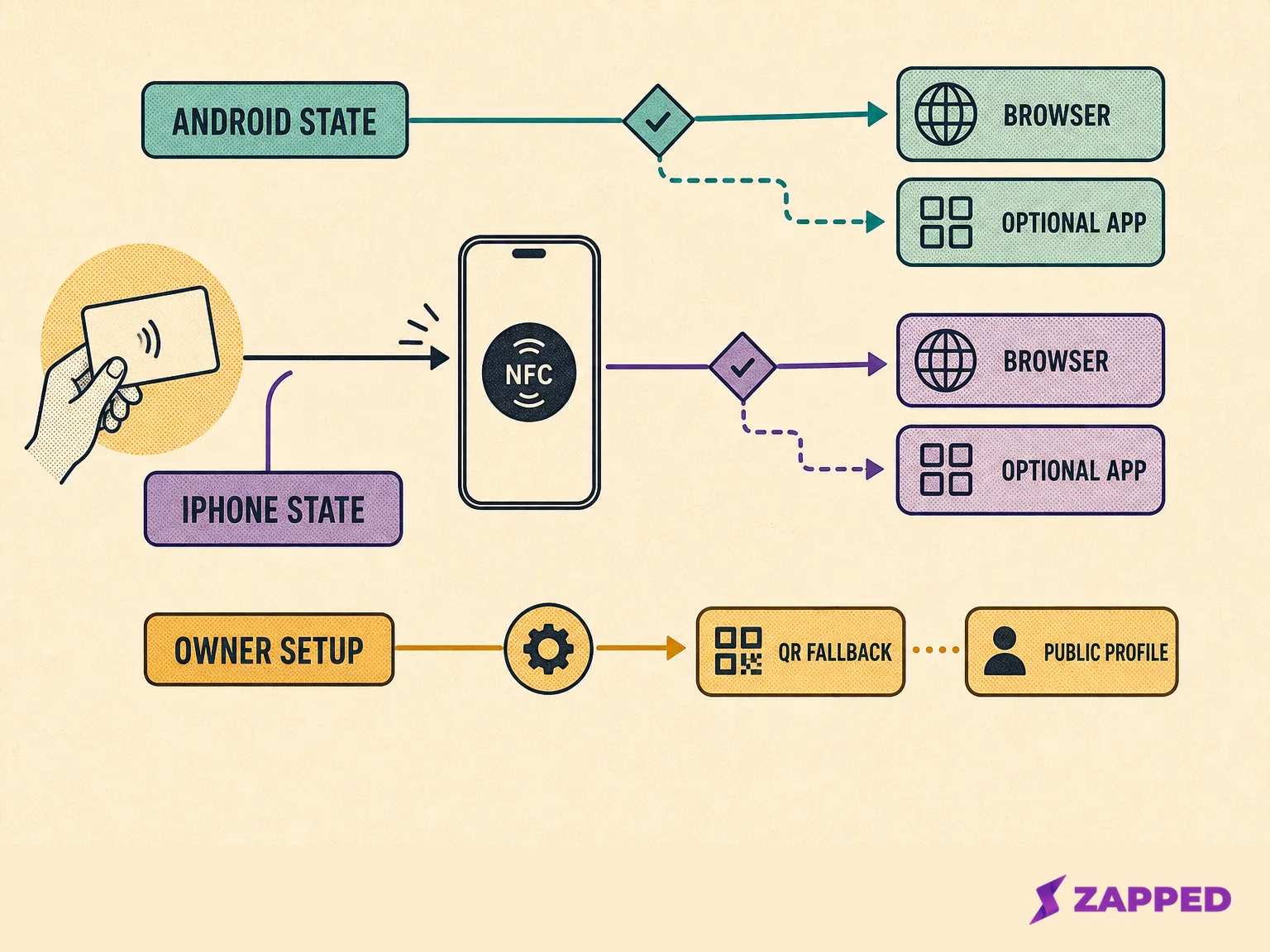
Conceptual decision flow showing platform conditions, owner setup, and the QR fallback.
When a handoff matters, check the layers in this order:
-
Check the phone state. On Android, confirm NFC is enabled and start with the screen unlocked. On iPhone, remember the documented background reading blockers and the notification step.
-
Check the public URL. Open the destination directly in a browser before blaming the card. A tag can be read correctly while the page or redirect still needs attention.
-
Try another compatible phone. This separates a phone state or handler problem from a tag record problem without turning one result into a universal compatibility claim.
-
Keep a QR fallback. A visible QR code gives the recipient another route when the tap is awkward, the phone lacks the right support, or a prompt would slow down the conversation.
The owner can make the handoff easier by testing the public URL and keeping that second route ready. The recipient does not need to know which writing tool created the tag. They only need a readable URL path and a phone that can dispatch it.
Sources
Sources reviewed in August 2026: