Someone taps your card after a good conversation and wants to talk again. That moment is warm, and it cools fast. If the next step is "email me and we'll find a time," a good share of those people never send the email. If the next step is a time they can pick right there, many of them pick one.
Your Zapped card can now book meetings with the scheduler you already use. Connect Calendly, Cal.com, HubSpot Meetings or TidyCal, and your card shows your real open times. Visitors choose a time without hunting for a link, and every meeting lands in your Inbox next to your other leads. Google Calendar booking pages work too, with nothing to connect.
Why booking from the card matters
A business card has always been a promise of a follow up. The trouble is that the follow up depends on someone remembering you a day later, finding your details, and writing first. Booking from the card removes those steps:
- The meeting gets set while interest is high. The visitor books on the spot, at the booth, at the open house or at the end of a coffee.
- No back and forth. Your scheduler already knows when you are free. Nobody trades three emails to land on Tuesday at two.
- Every meeting is a lead you can work. Zapped files each booked meeting in your Inbox with the visitor's details, the event, the time and its status, so the meeting and the person who booked it stay in one place.
- Your tools stay your tools. You keep using the scheduler you already set up, with its event types, buffers, reminders and confirmation emails. Zapped adds the card as a new front door.
Source: Zapped Help demo, captured November 2026. Fictional demo data.
Who it helps
Anyone who meets people in person and wants a next conversation gets value from this. A few roles get the most.
Real estate agents
Open houses, listing appointments and buyer consultations all start with a conversation that should turn into a scheduled meeting. Put a Book a call block for a listing consultation or a buyer meeting on your card, and a visitor at an open house can tap your card and pick a time before they walk to the next property. Each booking shows up in your Inbox as a lead with the meeting attached, so you can reply, call and keep notes in one place.
Insurance and financial agents
Policy reviews, coverage checkups and first consultations are natural next steps after a referral or a community event. A review meeting on your card means a prospect can book while they are still thinking about it, instead of waiting for you to chase them. Calendly and Cal.com both handle the intake questions you set up on your scheduler, and the booked appointment lands in your Inbox.
Sales reps and account executives
Trade show booths, field visits and customer dinners produce interest that rarely survives the flight home. With HubSpot Meetings or Cal.com connected, a prospect can book a demo from your card at the booth, and the meeting reaches your Inbox while your CRM keeps working as usual. Join meeting is one tap away when the time comes, and a rescheduled or cancelled meeting updates its lead on its own.
Source: Zapped Help demo, captured November 2026. Fictional demo data.
Recruiters
Career fairs and campus events are a stream of short conversations with people you want to speak to again. A screening call on your card lets a candidate book on the spot, and every booking becomes a lead you can sort, note and follow up from the Inbox instead of a stack of paper cards.
Consultants, coaches and freelancers
Discovery calls are the first step of most engagements. TidyCal, Cal.com and Calendly are common choices here, and they all work with your card. Someone who meets you at a workshop or a networking breakfast books a discovery call from your card, and you walk into it knowing when they booked and which event they chose.
Appointment based service businesses
Salons, trainers, therapists, tutors and other businesses that run on appointments often use Acuity Scheduling. With Acuity connected, the card shows your next open times and booked appointments reach your Inbox. On any Acuity plan, a Book a call block can also link to your scheduling page or show it inside the card, so a card handed across the counter becomes a way to book the next visit.
Pick your scheduler
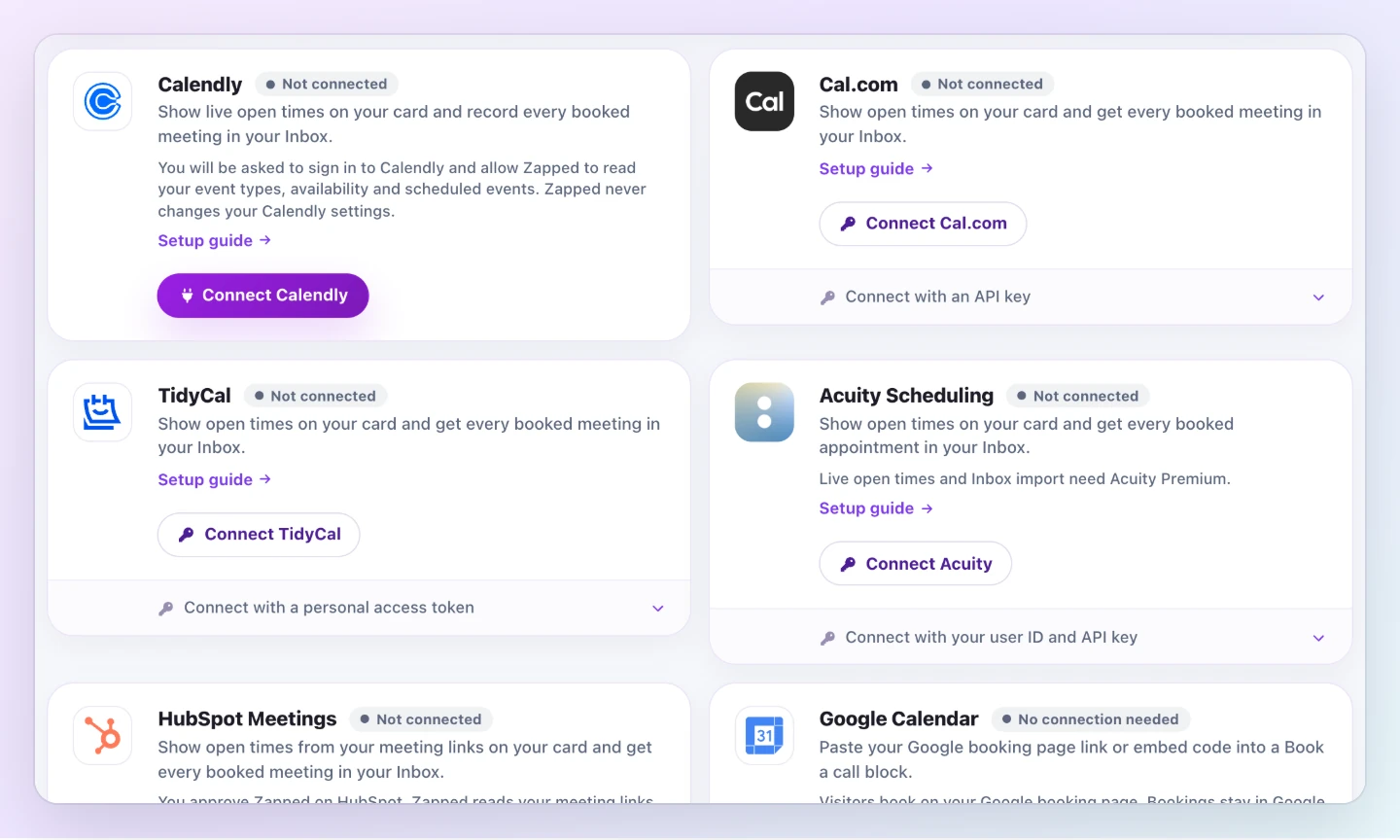
Each scheduler connects from Settings, Integrations, Scheduling. Every card on that page has a Setup guide link that walks through it, and only the account owner can connect or disconnect a scheduler.
- Calendly. Connect once with your Calendly account, then pick an event type in a Book a call block. The Calendly guide shows each step.
- Cal.com. A public Cal.com link already shows your open times on the card. Connect Cal.com with an API key as well, and every meeting booked with you appears in your Inbox with Join meeting, Reschedule and Cancel meeting. Any Cal.com plan works. See the Cal.com guide.
- TidyCal. Connect with a personal access token. Visitors choose a time on your card and confirm it on your TidyCal page. Any TidyCal plan works, including Free. See the TidyCal guide.
- Acuity Scheduling. Live open times and appointments in your Inbox need Acuity's Premium plan, because that is the plan where Acuity opens its API. On any other Acuity plan, a Book a call block still links to your scheduling page or shows it inside your card. See the Acuity guide.
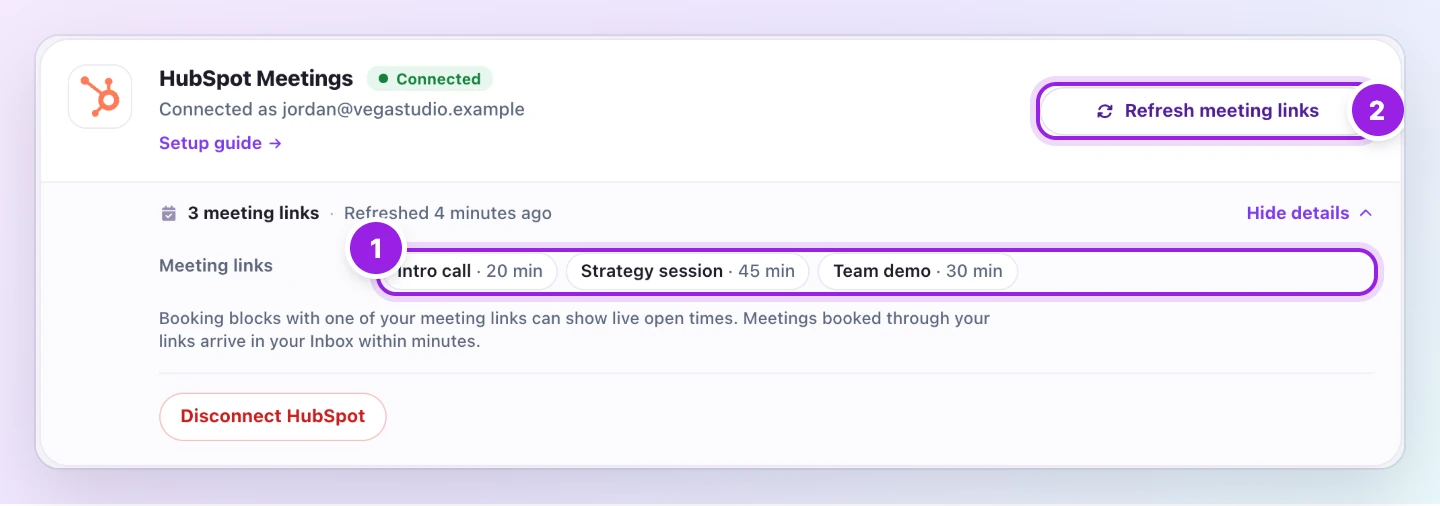
- HubSpot Meetings. Connect with one button, sign in to HubSpot and approve Zapped. Your card shows open times from your HubSpot meeting link, and meetings booked through it reach your Inbox. HubSpot connect is in a limited beta; if HubSpot does not let you approve Zapped yet, your meeting link still works as a plain link or an embedded page. See the HubSpot guide.
- Google Calendar. Google booking pages need no connection and work on every Zapped plan, Free included. Copy your booking page link or embed code from Google Calendar and paste it into a Book a call block. Bookings stay in Google Calendar and do not appear in your Inbox. See the Google Calendar guide.
Source: Zapped Help demo, captured November 2026. Fictional demo data.
What your visitors see
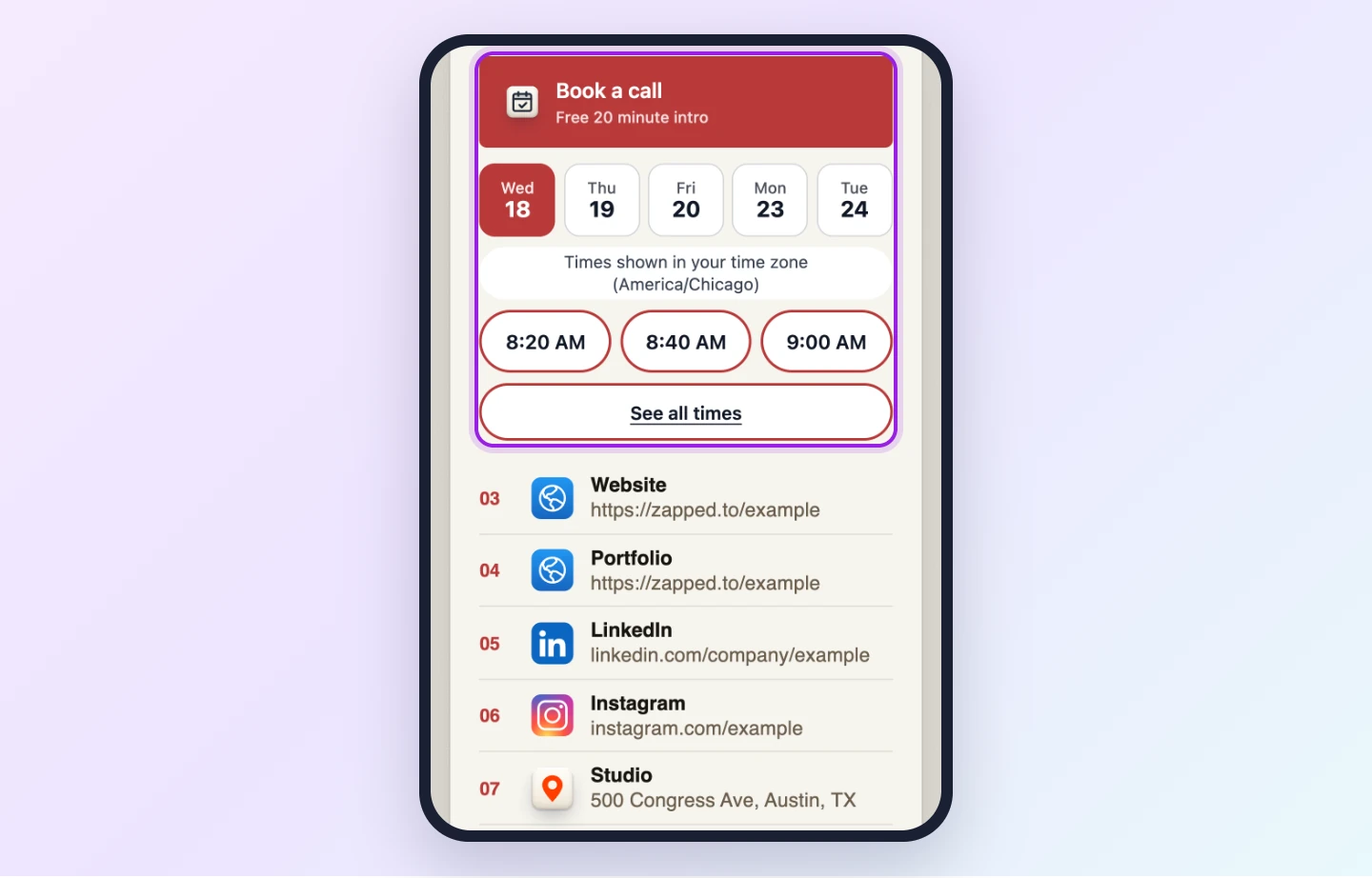
Each Book a call block has an Open as setting that decides how booking looks on your card. Depending on the scheduler, visitors can pick from your next open times right on the card, open your booking page in a panel on top of the card, or follow a link to your booking page in a new tab. Choose the one that fits how you meet people: open times on the card are quickest at an event, while a link suits a card you mostly share by email or in your signature.
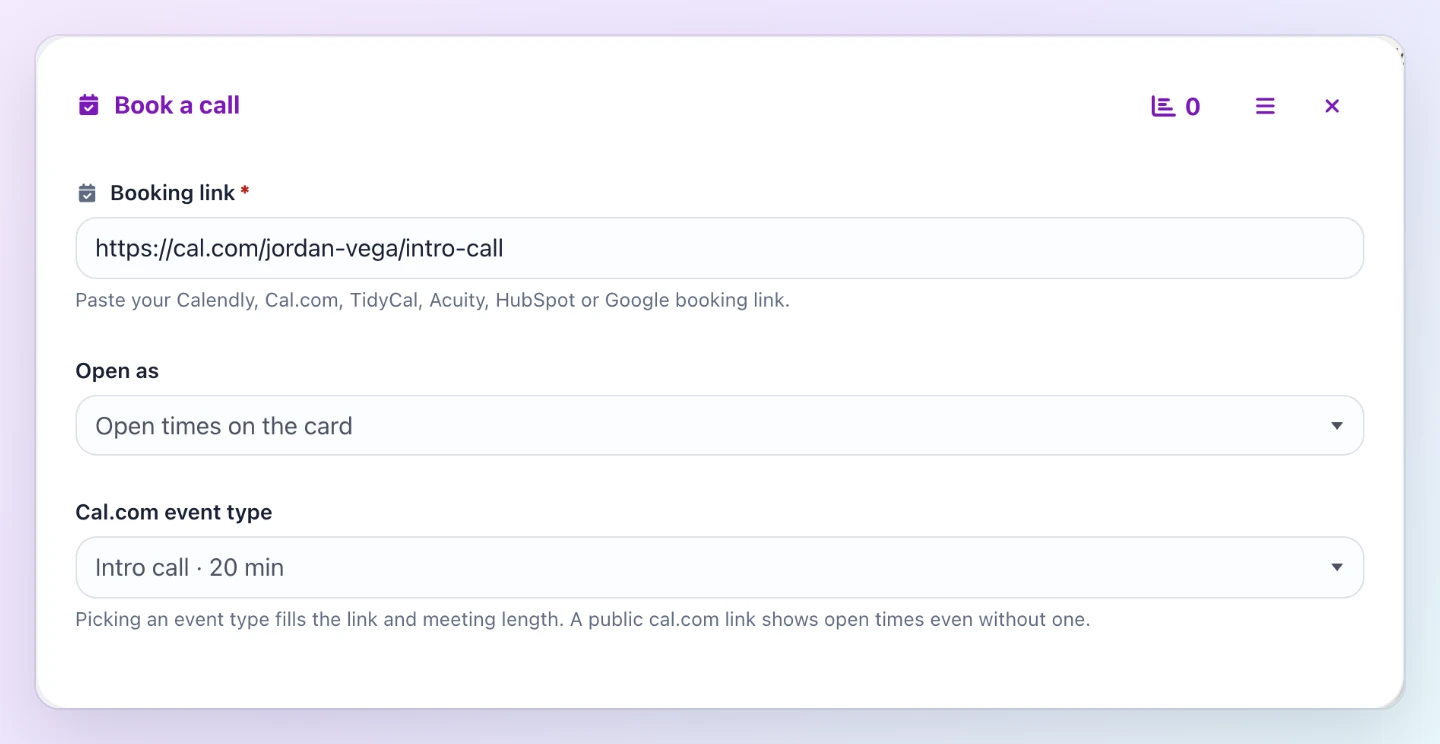
Source: Zapped Help demo, captured November 2026. Fictional demo data.
Meetings land in your Inbox
When someone books from your card through a connected scheduler, the meeting shows up in your Inbox as a lead with its event, its time in your timezone and its booking status. If the meeting has a video link, Join meeting is right there. Where the scheduler allows it, Reschedule and Cancel meeting open the scheduler's own pages.
When a meeting is rescheduled or cancelled, Zapped updates its lead and notes the change in the lead's History, so your Inbox keeps up with your calendar. You can reply, call and keep notes on a meeting lead exactly like any other lead. The Inbox guide covers the rest.
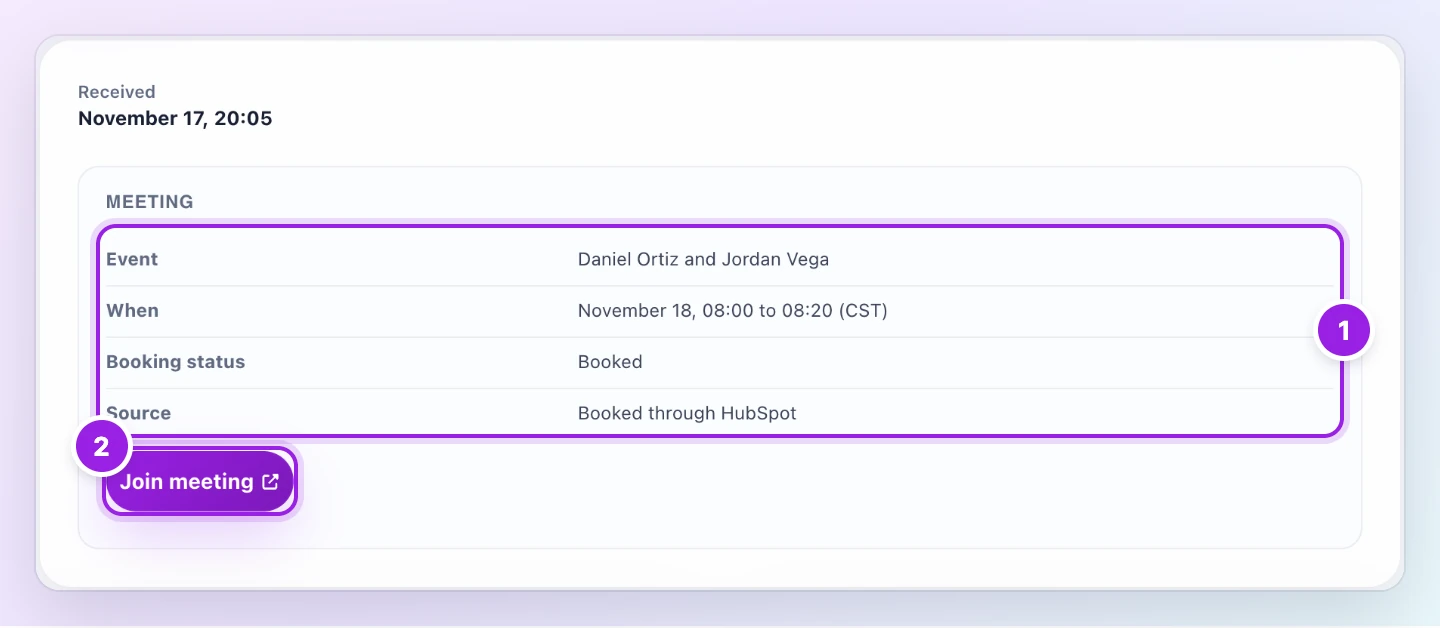
Source: Zapped Help demo, captured November 2026. Fictional demo data.
Your scheduler stays in charge
Zapped only reads what it needs to show times and file meetings: your event types, your open times and your booked meetings. It never changes anything in your scheduler, and your scheduler still sends its usual confirmation emails. API keys and tokens are stored encrypted, and you can disconnect at any time from the same page.
Getting started
Connected schedulers are included in the Solo, Team and Business plans, and in the earlier Starter and Professional plans. On the Free plan you can still add a booking link or a Google booking page to a Book a call block.
- Open Settings, Integrations, Scheduling and connect your scheduler.
- Open your card, choose Add block, then Book a call, and paste your booking link.
- Pick the event visitors should book and how the block opens, then publish the card.
Then hand your card to the next person you meet and let them pick the time.