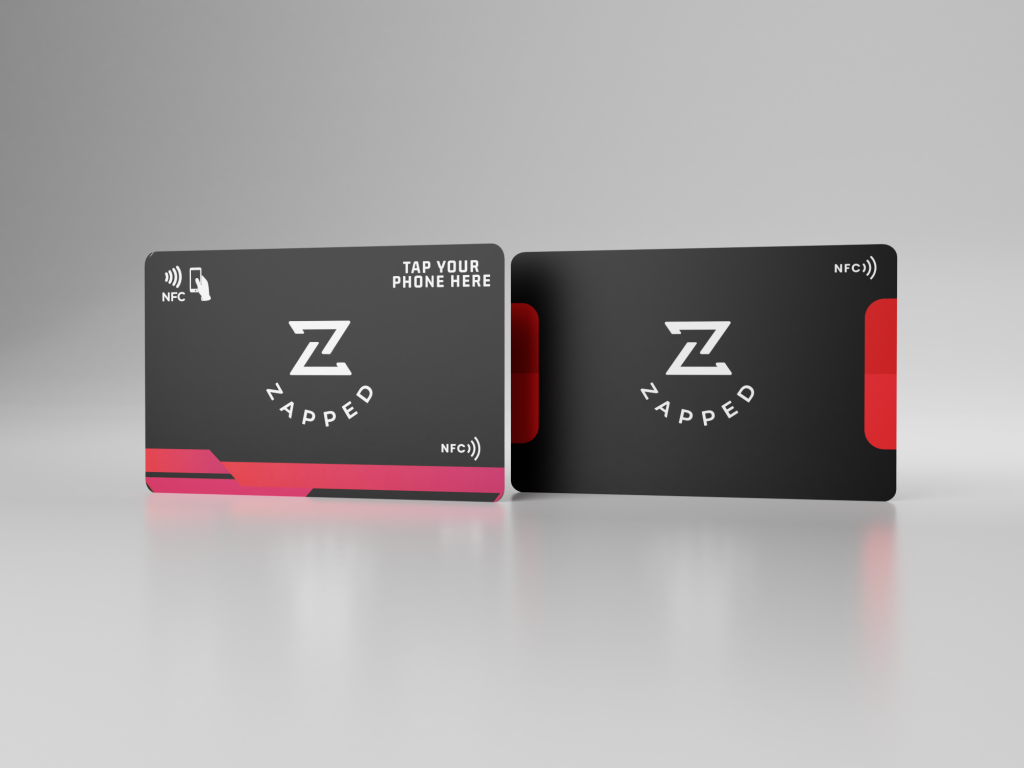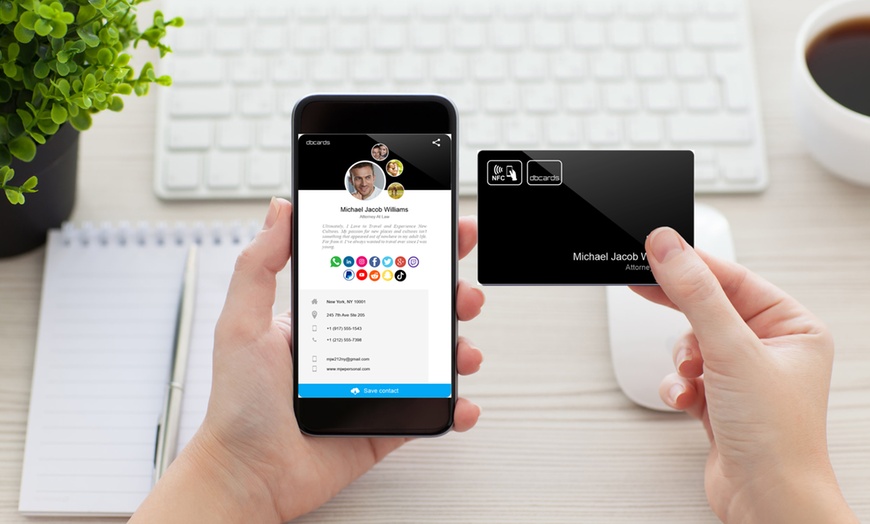
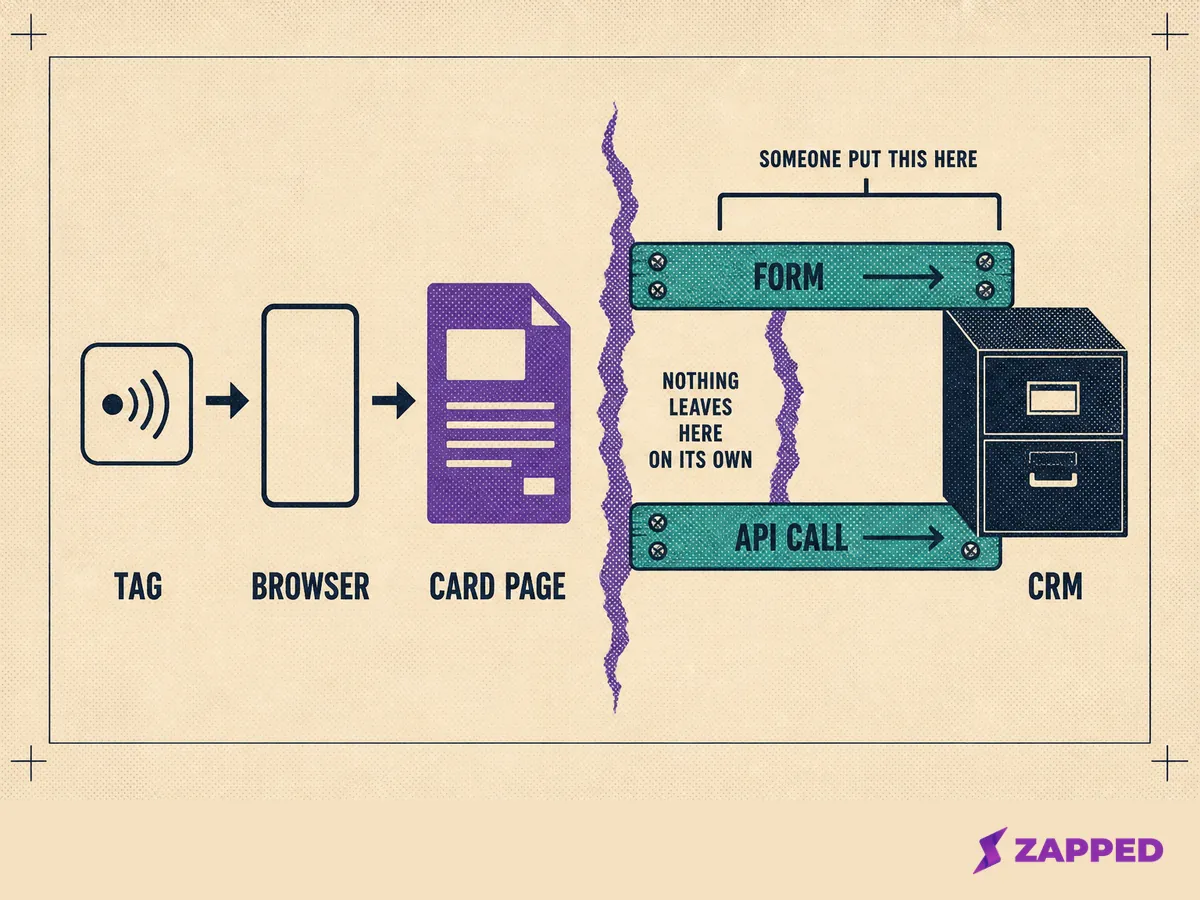
An NFC business card cannot write to a CRM. The tag hands a web address to a browser, and a hosted card page on its own neither posts anywhere nor exposes an endpoint anyone can query. The integration is a form or an API call that somebody has to put in the path.
The fastest way to get tap data into a CRM is to stop shopping for a connector and start naming who owns each hop.
That is not the conversation happening on the Monday after an event. The cards worked, the captures are sitting in a spreadsheet, and someone has asked why none of them are in the pipeline. The honest answer is that nothing was ever going to put them there.
What the tap actually hands over
A tag stores an NDEF message made of records, and it is a URI record inside that message that makes a phone open a web address. Android's own NFC guide describes the tag dispatch system parsing that record into an intent and launching a handler.
So what the tag stores is a link. Not a contact, not a record, nothing your CRM has ever seen.
That link is also just one way into the same page. A QR code, a text message, or an email signature all open the same profile, which is a useful clue: if the page is the destination for every channel, the page is where the capture has to happen.
And the tap is getting less automatic, not more. Android's guide records that from Android 16 a web link tag fires a view intent rather than the older discovery intent, and that from Android 17 scanning one surfaces an open link notification requiring an explicit tap from the person holding the phone.
Anyone designing a flow that assumes the page appears by itself is designing against the platform.
A vCard file is no rescue either. RFC 6350 requires almost nothing of one: alongside the opening and closing lines, only a version and a formatted name have to be present. Everything a sales team cares about is optional. A downloaded contact file is a loosely constrained business card, and it never becomes a lead record on its own.
The four doors into a CRM, and what each one asks of you
Four routes, judged on the same five things: what has to exist on your side, what the CRM demands before it accepts a record, where duplicates get caught, whether the traffic source survives the trip, and what fails without telling anyone.
The last one decides it. Prefer the shortest path that puts a real form or a real API call directly in front of the CRM, because every extra hop is another place a record can disappear without an error.
The CRM's own web form
Salesforce publishes a lead form you generate and paste into a page, and its help documentation is blunt about the ceiling: 500 new leads in a 24 hour period.
Past that, the default lead creator gets an email and further submissions go to a pending queue capped at 50,000 combined requests. Beyond that they are rejected outright and cannot be recovered.
The quieter problem is validation. Salesforce states that form fields are not marked as required by default, so leads can be submitted with incomplete data. Adding the required attribute enforces a check in the browser, but server validation rules reject the save without showing the visitor any message on the form. The person walks away believing they signed up.
Changing what the form collects is a three step job. Salesforce's own instructions have you create the lead field, regenerate the HTML with that field selected, and then hand the new input elements to whoever maintains the page. That is not difficult. It is just not something you do at a stand on day two.
Zoho's equivalent covers more ground. Its webforms create records in Leads, Contacts, Cases and custom modules, with Last Name as the field it will not let you remove, and Email and Phone on the form by default.
Zoho also documents spam controls and an optional approval mode that holds every submission until someone with the approve permission releases it. That approval step is worth knowing about before an event, not after.
An automation webhook
This route depends on something in the chain being able to push, and nothing in this chain does. The next section is why.
A direct API write
The shape is the same everywhere: authenticate, post a record, handle the response. Zoho's version 8 documentation describes a POST to the Leads endpoint with an OAuth token scoped to create leads, only Last_Name as system mandatory, and up to 100 records in a single call. That is a small integration, not a project.
Pipedrive asks for even less and gives away something important in return. Its Leads reference lists a title as the only mandatory property, requires a link to either a person or an organization, and states that every lead created this way automatically receives API as its lead source and origin. Remember that stamp. It comes back the moment anyone asks where a lead came from.
One naming trap worth clearing up. Pipedrive's webhooks point outward: you supply a publicly reachable URL and Pipedrive notifies you when records change, scoped to one user's permissions. They carry news out of the CRM rather than data into it, which is the opposite of what the word suggests here.
The route through the phone's address book
Save the contact on the phone and it stays on the phone. It reaches a CRM only through a deliberate sync, and the mapping is lossy.
HubSpot's Google Contacts integration carries eleven default field mappings that cannot be edited, only switched off, and syncs only the primary phone number unless the others are labelled Mobile or Fax. It states plainly that existing custom text fields, labels, and the owner cannot come across at all.
That is not a failure. It is the answer. If nobody is going to work these contacts through a pipeline, a contact account someone actually maintains beats a CRM nobody opens, and organizing them properly is the shorter road.
| Route | What must exist on your side | What the CRM demands | Where duplicates are caught | Does the source survive | What fails silently |
|---|---|---|---|---|---|
| CRM web form | Generated HTML pasted into the page | Salesforce requires Company; Zoho requires Last Name | At save, by the CRM's own rules | Yes, when the browser carries a token | Validation rejects the save with no message on the form |
| Automation webhook | Something capable of pushing a payload | Whatever the final step writes | At the final step only | Depends on what the payload carries | Every silent cause behind a webhook that never fires |
| Direct API write | A token, a scope, and code that runs somewhere | Zoho requires Last_Name; Pipedrive requires a person or an organization | Zoho checks unique fields on insert | No. There is no browser token, and Pipedrive stamps the source as API | Handled errors nobody reads |
| Address book sync | A connected sync integration | The mapping the integration allows | Handled by the sync | No | Fields dropped quietly by the mapping |
Why your automation never fired
Here is the distinction that explains the whole problem. Zapier's webhook trigger waits to be sent something. Catch Hook generates a brand new URL for your use, and the source application has to target it. Pulling data from a URL on a schedule is a different trigger entirely, Retrieve Poll, which needs a REST endpoint Zapier can query.
A hosted card page is neither. It does not post anywhere when someone opens it, and it does not expose an endpoint anyone can query for new visitors. That is the precise reason the chain does not exist by default, and why no amount of configuring will make it appear.
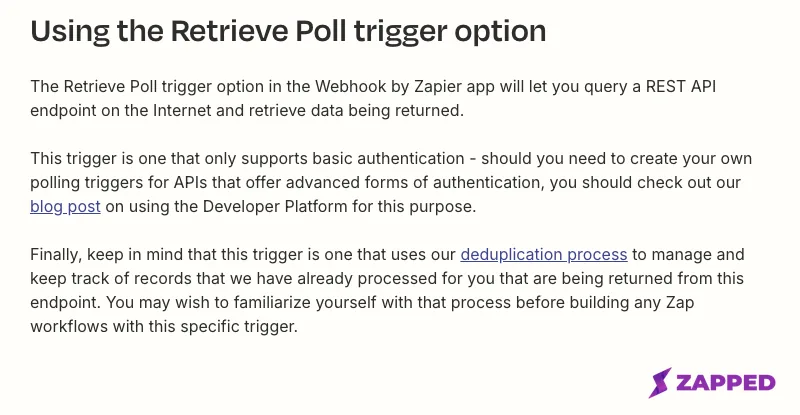
Source: Zapier Help, How to get started with Webhooks by Zapier, https://help.zapier.com/hc/en-us/articles/8496083355661-How-to-get-started-with-Webhooks-by-Zapier, captured 2026-08-06.
There is a price attached before anything is built, too. Zapier lists Webhooks by Zapier on its paid plans rather than the free one, so a route that sounds like plumbing is a line item.
When it is set up and still nothing arrives
Zapier's own troubleshooting article lists the causes, and they are mundane. The sending application has incorrect settings or is not sending to Zapier at all. The payload is not one of the supported formats, which are XML, JSON and form encoded.
Or the URL in the Zap does not match the one configured in the sending application. Or the request method does not match the trigger type, since POST needs Catch Hook and GET needs Retrieve Poll. Or an IP restriction or an authentication requirement is quietly refusing the call.
Every one of those produces nothing. No error in the CRM, no failed run in the Zap history, no bounce to anyone's inbox. The first sign is an empty pipeline on the Monday after the event, which is the worst possible time for it to be the first sign.
What a card gives you against what a lead record demands
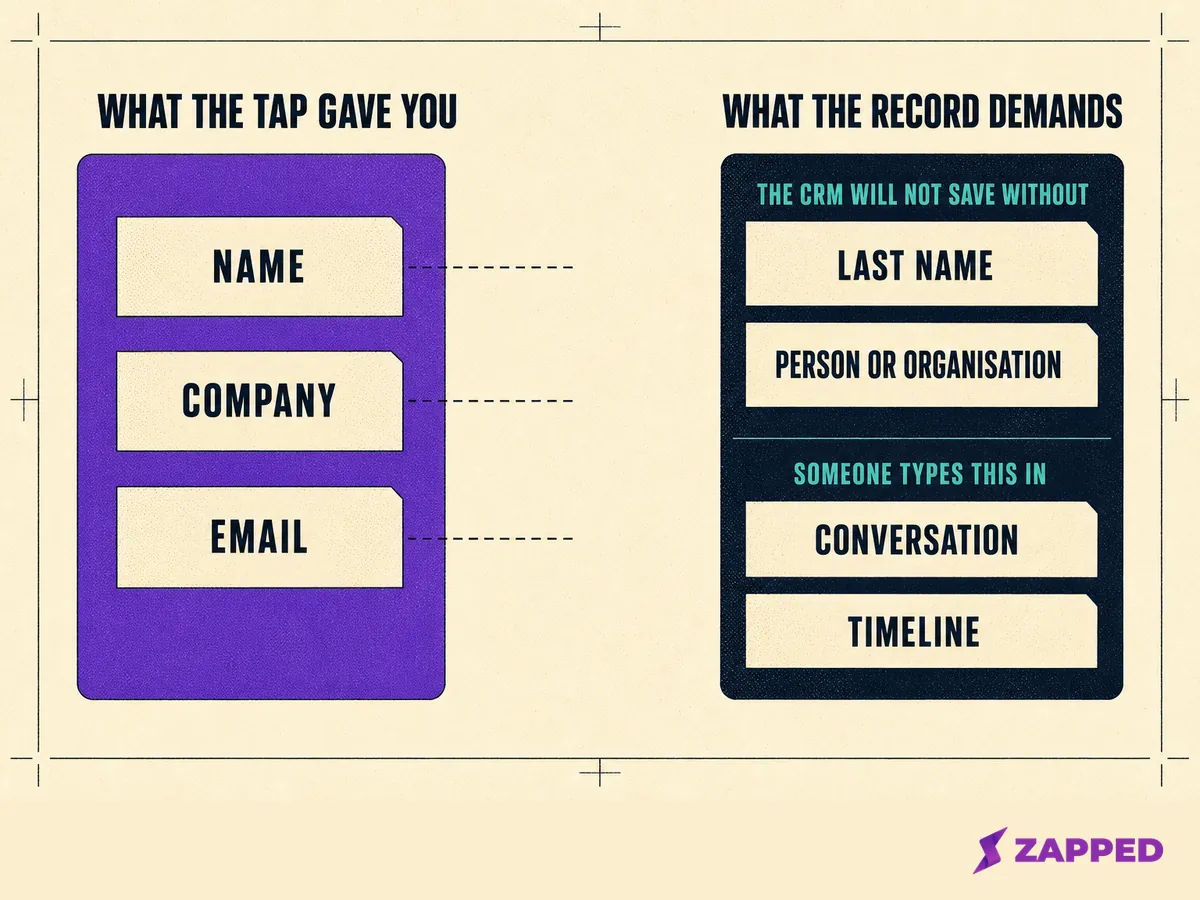
So far the problem has been that nothing connects. Here is the second half of it: build the pipe correctly and the record still arrives thin.
A capture yields, at best, a name, a company and an email address. Salesforce will not accept a Lead without a Company, because the field exists so every lead can be attached to an account on conversion.
Its own guidance suggests placeholders such as Unknown when the real company is not known. Do that at scale and a column of Unknown becomes the largest account in your pipeline report.
Zoho refuses a record without a Last Name. Pipedrive refuses a lead attached to neither a person nor an organization. Three CRMs, three different missing fields, one shared consequence: the shape of a hurried capture is not the shape any of them will save.
Then there are the fields that decide whether the lead is worth working at all. What the conversation was about, which product came up, when they said they were buying. None of that was ever on the card and none of it ever will be. Somebody types it or it is gone by Thursday.
Partial records are not a broken setup. They are the normal output of a correctly built one, and a workflow either designs around that or gets surprised by it every quarter.
Where duplicates come from, and why they cluster on your thinnest records
Every CRM resolves identity on a key, and the key decides whether a submission updates someone or creates someone new. HubSpot matches contacts on the email address, companies on the company domain name, and deals, tickets and custom objects on record ID or a property configured to require unique values.
Its documentation is explicit that a form submission matching an existing email adds the new information to the existing contact.
Zoho takes a different approach, checking unique fields on every insert call and returning a duplicate data error naming the conflicting field and the existing record.
Salesforce hands the choice to an administrator, whose duplicate rule can either allow the save with an alert or block it outright, while separate matching rules decide what counts as a match in the first place.
One tablet, one contact
Here is where a shared device turns the mechanism against you. HubSpot documents that all submissions associated with the same cookie are added to the same contact record, so if someone submits a form repeatedly from the same device and browser, every submission is attributed to a single contact even when each one uses a different email address.
Read that again with a stand in mind. The tablet by the counter is one device and one browser, so it is one cookie, so it is one contact.
A day of conversations, one record, and nobody notices until the list of people to call turns out to be a fraction of the badge count.
There are preconditions worth checking before the event, too. For a form on a page you host to create HubSpot contacts at all, the tracking code has to load on that page, an email input has to be present, and the form cannot sit inside an iframe. Any one of those quietly turns the whole capture into nothing.
Practitioners describe the predictable version of this: duplicates piling up specifically where a capture has neither an email address nor a company domain, which is the shape of a rushed handover. No email means no key, and no key means no match.
Others report the mirror image, submissions sharing one tracking cookie producing two separate contacts instead of one.
| CRM | What it matches on | What happens on a match |
|---|---|---|
| HubSpot | Email for contacts, domain name for companies, record ID or a unique property elsewhere | New information is added to the existing contact |
| Zoho | Fields marked unique, checked on every insert | The insert is refused with a duplicate data error naming the record |
| Salesforce | Whatever the matching rules define | The administrator chooses an overridable alert or a hard block |
The five owners and the five handoffs between them
Roles, not job titles. In a company of eight, one person holds all five, and the value of the model is knowing which hat is failing. At scale they sit in different departments and the value is knowing who to call.
Both readings are correct, which is what makes this worth writing down before an event rather than after one.
The card owner keeps the destination current and knows which physical card is which. If the cards are not distinguishable at the destination, attribution for each card is impossible from the very first tap, and no downstream fix recovers it.
The capture owner owns the form or the app living on the page: which fields exist, which are required, and what the visitor is told will happen next. Everything before that moment, the conversation and what you ask for, belongs to running the floor, not to this chain.
The pipe owner owns the connector, the lead form endpoint, the Zap, or the API client. This is the only role positioned to notice a silent failure, because a webhook that never fires produces no error anywhere else in the organization.
The record owner owns required fields, duplicate rules, assignment, and the enrichment a human adds while the conversation is still fresh. This role is the reason partial records become workable ones.
The retention owner owns how long the record is kept, which other systems received a copy, and what happens when someone asks to be erased. That role sounds like overhead right up to the first request.
This is where a team rollout stops being about templates and starts being about plumbing. And it is where a larger company discovers that the five roles it collapsed into one person at twenty employees have to expand again at two hundred.
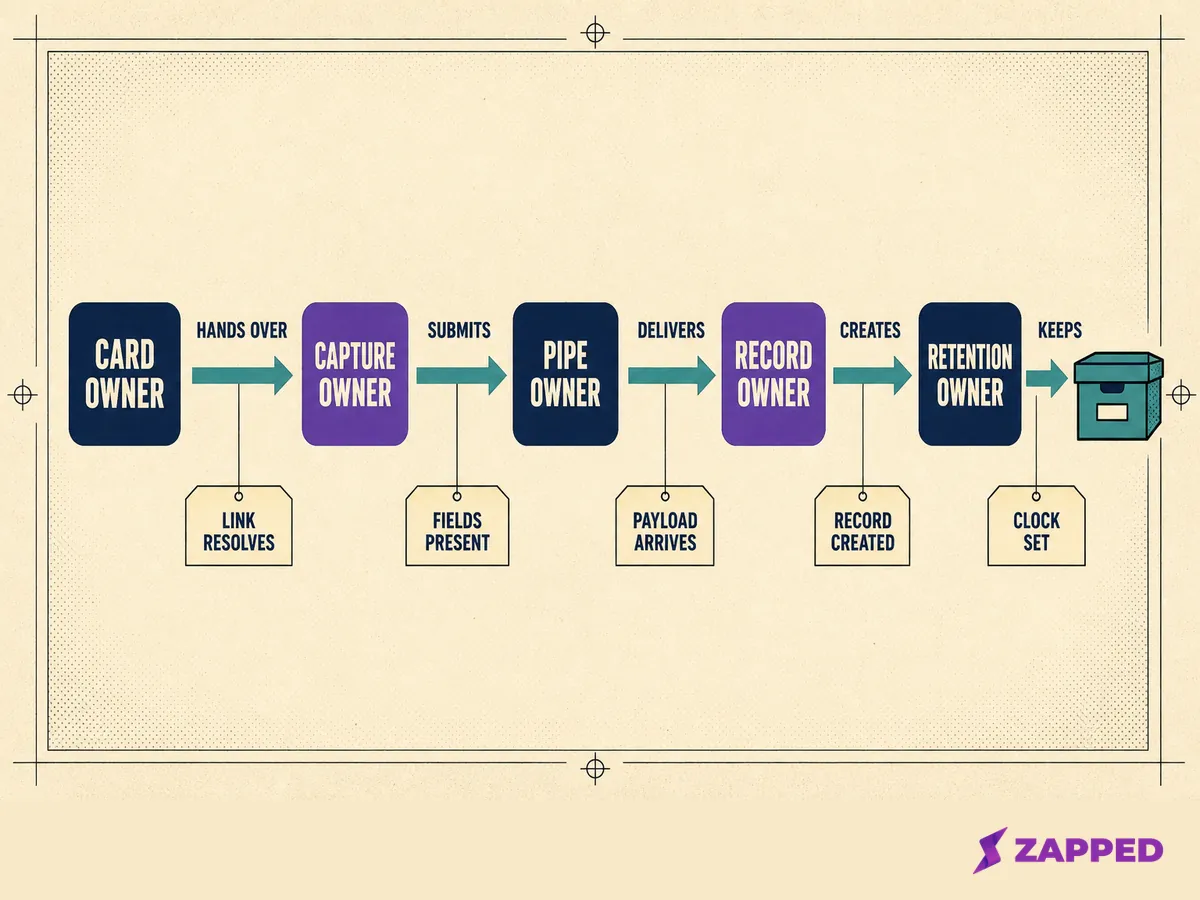
| Handoff | Who hands to whom | The one check |
|---|---|---|
| Tag to browser | Card owner to capture owner | Tap a current phone and confirm the page that opens is the current one |
| Browser to writer | Capture owner to pipe owner | Submit the form and confirm the payload leaves the page |
| Writer to CRM | Pipe owner to record owner | Confirm one test submission becomes one visible record |
| CRM to human | Record owner to whoever works the lead | Confirm assignment fires and the record reaches an inbox |
| CRM to retention | Record owner to retention owner | Confirm every system holding a copy is listed somewhere |
What you can measure, and what quietly breaks attribution
Start with attribution, because it is what the last number in this section measures. A submission made in the browser can carry a token tying the record to a session and a traffic source. A write that happens on a server has no token to carry.
HubSpot documents the result without softening it: with no user token passed through the submission, the source falls back to Direct. That happens when the Forms API is used, when cookie tracking is off, or when the visitor ignored or declined the cookie banner.
Pipedrive is blunter about it. Every lead created through its API is stamped with API as the source, which tells you the record arrived through code and precisely nothing else about where the person came from.
Practitioners describe a related constraint: HubSpot's Contacts API will not accept the browser tracking token when creating or updating a contact, so a write from a server cannot claim an existing browser identity.
Anything linking a CRM record back to a specific card, a specific tap and a specific event has to be carried deliberately as a value in the payload, from the first hop to the last. Nothing carries it for you.
Five numbers worth computing
Measuring the tap is a separate job from measuring the pipeline, and it runs on a separate tool. At Zapped, we cover card creation, sharing, capture and analytics, so each card carries its own statistics.
History there is capped by plan at 60 days on Free, 185 days on Starter and 365 days on Professional, with tracking pixels on paid plans. That half tells you a card was tapped and when. What became of the person is recorded at the other end, and joining the two halves is deliberate work.
Compute your own numbers, because there are none to borrow. The percentages about event leads that circulate in this category trace back to nobody's research, recycled from one marketing page to the next with no study underneath any of them.
| Outcome | How to compute it | What it catches |
|---|---|---|
| Capture to record rate | Records created divided by captures collected | A pipe that is dropping submissions without an error |
| Field completeness at creation | Share of records with a real company and a real email at the moment they are saved | Placeholder values quietly filling required fields |
| Duplicate rate per event | Duplicates flagged or merged divided by records created | Shared devices and captures with no usable key |
| Time to context | Hours between record creation and the first human note | Enrichment that never happens because the week moved on |
| Attributable share | Records naming a real card and a real event divided by records created | Attribution lost at whichever hop stopped carrying it |
The last number is the least flattering one here. It is still the one that tells you whether any of this worked.
Keeping the record after the show is over
A capture is personal data the moment it exists, and the obligations attached to it are the cost of keeping it.
The ICO's guidance states that the right to erasure is not absolute and applies only in certain circumstances. Those include consent being withdrawn where consent was the basis, an objection under legitimate interests that is not outweighed, an objection to direct marketing, and data no longer needed for its original purpose.
A request has no required form. The ICO says a request can be made verbally or in writing, to any part of the organization, without citing any article of the law.
The ICO puts the deadline at without undue delay and at the latest within one month, extendable by two further months for complex requests only if the person is told inside that first month.
Then the part that ties straight back to the data flow. The ICO's guidance states that where personal data has been disclosed to others, each recipient must be informed of the erasure unless that proves impossible or involves disproportionate effort, and that backup data which cannot be immediately overwritten must be put beyond use.
A capture copied into four systems is a deletion request against four systems.
On how long to keep it, the ICO offers no clock. Its storage limitation guidance states that the law sets no specific time limits, that the organization needs a policy setting standard retention periods and should review what it holds periodically, and that data kept just in case will by definition be unnecessary and unlikely to have a lawful basis.
Where the capture is shared onward, the ICO expects the parties to settle it up front: its guidance says organizations sharing personal data should agree between themselves what happens once the sharing is no longer needed. That agreement is easier to write before an event than to reconstruct after one.
Run this before your next event
Six checks, each with a pass condition, all runnable in an afternoon.
-
Tap a card with a current phone and confirm the page that opens is the page you think it is.
-
Submit the form twice, once with everything filled and once with an optional field blank, and confirm both produce a record.
-
Confirm that record clears the CRM's required fields without a placeholder standing in for a real company.
-
Confirm the card identifier and the event identifier survived into the saved record.
-
Confirm the duplicate rule behaves the way the administrator believes it does, by submitting the same email address twice.
-
Name the five owners out loud, even when all five are you.
None of this makes an NFC card integrate with a CRM, because nothing does. It makes the path from a tap to a worked lead something a person designed on purpose, which is the only version that survives contact with a busy Thursday.
Sources
All pages read on 2026-08-06.
- Android NFC guide, tag dispatch and NDEF records, Google
- NFC Forum specifications index, NFC Forum
- RFC 6350, vCard Format Specification, IETF
- Web to Lead volume limits and the pending request queue, Salesforce Help
- Company as a required field on Lead records, Salesforce Help
- Required fields and validation on generated lead forms, Salesforce Help
- Adding a custom field to a generated lead form, Salesforce Help
- Duplicate rule metadata reference, Salesforce Developers
- Set up webforms, Zoho CRM Help
- Insert Records, API version 8, Zoho CRM Developers
- Leads API reference, Pipedrive Developers
- Webhooks API reference, Pipedrive Developers
- Deduplication of records, HubSpot Knowledge Base
- Use forms not built in HubSpot, HubSpot Knowledge Base
- Why do I have more direct traffic than expected, HubSpot Knowledge Base
- Connect HubSpot and Google Contacts, HubSpot Knowledge Base
- How to get started with Webhooks by Zapier, Zapier Help
- Trigger Zaps from webhooks, Zapier Help
- Zap is not receiving webhooks, Zapier Help
- Right to erasure, Information Commissioner's Office
- Storage limitation, Information Commissioner's Office