Copy your card's link, paste it into the thread, and add one sentence saying who you are and why you are sending it. That is the entire send, and it works the same on iPhone and on Android.
Everything interesting happens after that. What the other person actually sees is decided by three parties, none of which is you: the page your link points at, a setting on their phone, and whether your number is already in their contacts. It is one of several ways to hand someone your card, and it is the one with the most moving parts you cannot see.
Start with the sharpest of them.
Apple documents that a link from someone who is not a contact may not open at all, and its own remedy is for the recipient to mark you as a known sender.
The send itself, on iPhone and on Android
There is no trick to it. Copy the link to your card, paste it into the conversation, write one line, send.
Two details sit under that. Apple's support pages state that in iOS 26 the user chooses which app handles SMS, MMS, and RCS messages, so the app drawing your link on the other end is no longer guaranteed to be Apple's.
The second is the group. Google documents that a group conversation sends replies to everyone over MMS, while a mass text sends SMS and collects replies individually. Same recipients, different plumbing, and the plumbing decides how your link is carried.
What actually shows up in their thread
Apple publishes a technote on this, TN3156, and it is the closest thing anyone has to a rulebook for the box that appears under your message.
Where the title and the image come from
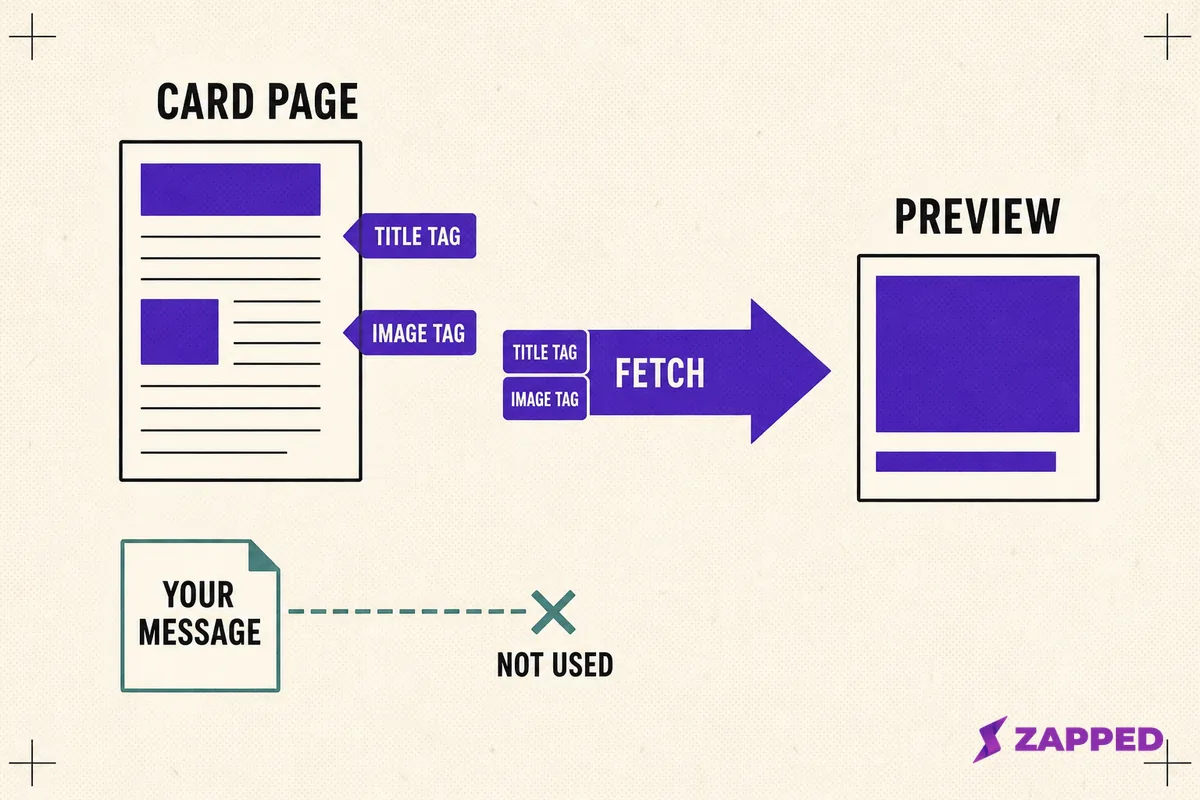
By default, Apple says, Messages shows a link as a gray bubble carrying the page title, the domain, and a small icon. That is the plain version.
The richer version, the one with a real image, is built from two Open Graph properties on the destination page, og:title and og:image. Rewriting your message will not change any of it, because the preview never reads your message.
Now the part that explains a complaint people have carried for years. You wrote a careful description for your page, and Apple's account of that box has no place for it.
Apple gives og:description exactly one job in the technote, and it is previewing posts on social networks. For that job the page also has to carry a twitter:card value of summary or summary_large_image, plus a link element with a type of application/activity+json, the declaration a social feed uses. Nowhere else does the technote assign og:description a role.
So the properties Apple names for a Messages preview are the title and the image, and the description belongs to that separate social case. No amount of rewriting that description was ever going to change which tags the preview is documented to read.
The guidance is not new either. Apple first published it in 2017 as TN2444 and republished it in 2024 under its current number.
What Messages will not do to find your tags
It will not run JavaScript, and it will not follow a redirect written into the page markup. The tags have to be in the HTML the server hands back. Apple notes that redirects performed by the server are followed, and recommends them as the alternative.
Then the sizes. Apple asks for images at least 900 pixels wide, warns that anything under 150 pixels may be ignored or demoted to an icon, and wants icons square at 108 pixels or more. It caps the main page resource at 1 MB and its associated images and video at 10 MB.
Apple calls these guidelines and says the limits may change.
One more instruction is worth acting on. Apple advises keeping text out of preview images, because previews render at different sizes and the words become unreadable. A card image that is mostly your name set in type is the wrong image for this job.
Why your preview came through as a bare link
Three documented causes, roughly in the order they bite.
The recipient turned previews off, or never turned them on. On Android this is entirely their setting. Google's own page describes the app spotting links on the device and sending them to Google for a quick lookup, and documents a control the recipient owns under automatic previews. Nothing you do to your message reaches that switch.
A QR code carries the same dependency: the code is just an address, and the page at the end of it does all the work.
Your tags were not reachable. The page needed JavaScript to assemble them, or leaned on a redirect written into the markup. Apple's technote rules both out.
The image was too small, or the page too heavy. Under 150 pixels wide and it may be shown as an icon. Over the resource limits and the fetch has nothing to work with.
None of that leaves the bubble empty. Scott Bartell, instrumenting his own site in 2019, found that with no og:title iMessage fell back to the page's title element, and with no og:image it picked up the site's apple-touch-icon. Apple's technote describes the same icon fallback, which is why his finding holds.
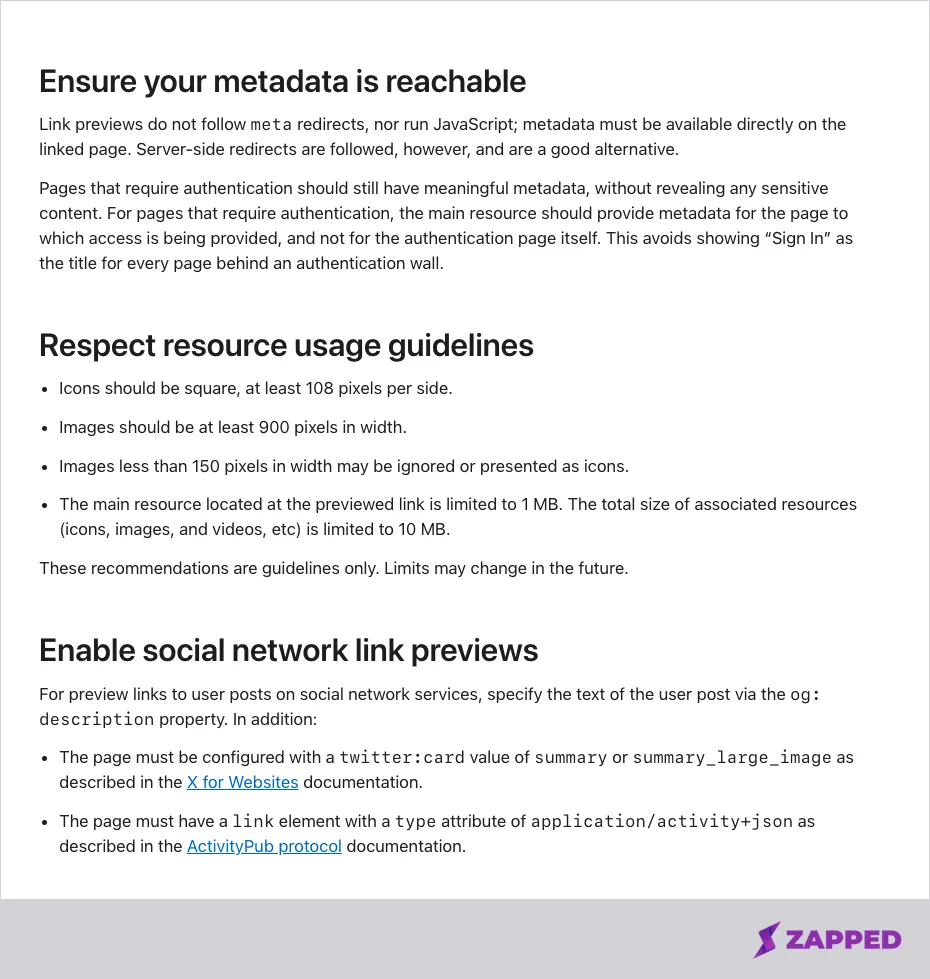 Source: Apple, TN3156 Create rich previews for Messages, https://developer.apple.com/documentation/technotes/tn3156-create-rich-previews-for-messages, captured 2026-08-06.
9to5Google reported in November 2025 that a Google Messages beta build redesigned link previews to drop the page snippet and hide the original URL. That was a beta build, reported by two outlets with the second crediting the first, so treat it as a direction of travel rather than as how Android behaves today.
What your link has to clear before anyone taps it
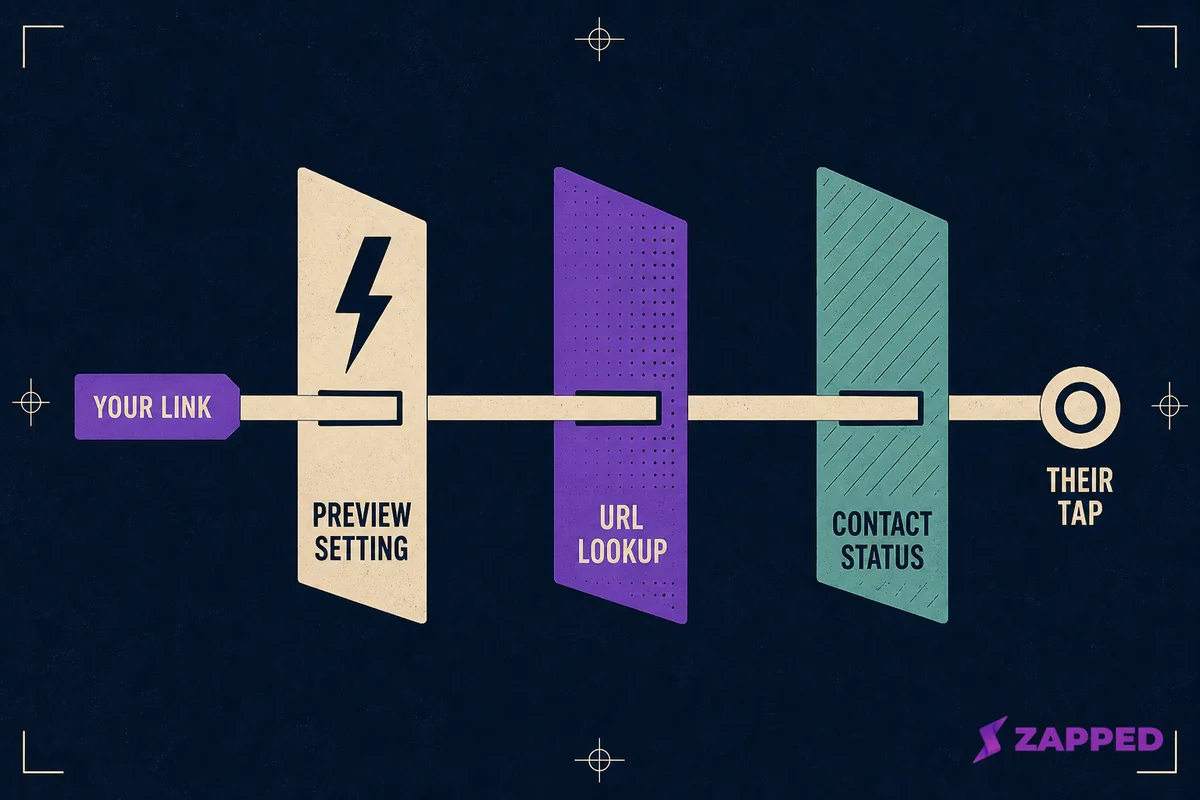
Between your send and their tap sit three inspections, and not one of them reads your message.
Their phone inspects the link. Google states that with spam protection on, Google Messages checks whether a message contains a URL and, if it does, uploads that URL to Google to verify the link is not malicious. Google also says messages detected as spam can be dropped outright or hidden in a spam folder.
Their contact list decides whether the link is even tappable. Apple documents that with Screen Unknown Senders on, messages from people who are not contacts land in separate folders with no notification. Apple's stated fix for a link you cannot open from an unknown sender is to make that sender known or add them to Contacts.
Apple's separate text message filter, the one that sorts promotions and transactions, stops applying to anyone the recipient has replied to three times or more.
The industry guidance you have read about is not written about you. CTIA's advice that a link should not conceal the sender's identity, and that a shortener should use a domain and IP addresses dedicated to that sender, sits in a section headed Non Consumer Best Practices, and CTIA defines a Message Sender as a service provider or a non consumer.
Where carriers do block, the published criteria are fraud, grey routes, lack of authentication, and a pattern of abuse.
Two rules fall out of that, and both are free. Send the link on your own domain rather than through a public shortener. And get into their contacts before the link has to do any work: text them first, get one reply, then send the card. It is the remote version of the move that makes an in person card exchange stick.
RCS or SMS, and where it changes what you write
Take the platforms at their own word here, because the summaries you will read elsewhere run ahead of the documentation.
Apple states that RCS on iPhone needs iOS 18 and a carrier that supports it, with the setting under Settings, Apps, Messages, RCS Messaging. RCS carries texts, high resolution photos and video, and links, with delivery receipts, read receipts, and typing indicators, and it shows up in green bubbles the way SMS and MMS do.
Google is equally specific about the conditions. RCS chats turn on only when every participant in the conversation has RCS, availability varies by region and carrier, and Google Messages can still send as SMS or MMS when it is unavailable. Encrypted RCS is newer again, which Apple documents from iOS 26.5 in beta with supported carriers, announced by Google on the same day.
Apple describes Messages previews without ever naming the transport that carried the link, so whether an RCS or SMS link previews exactly like an iMessage one is simply not on the public record.
The consequence you can act on lives in plain SMS. The GSM specification allows 160 characters in the default alphabet, drops to 70 the moment anything forces the wider encoding, and gives each piece only 153 characters once a message splits into segments.
One emoji plus a long URL can quietly cost you two segments. That is a reason to keep the link clean and the sentence short, not a matter of taste.
Sending the contact file instead, and what it costs you
The real alternative to a link is a contact file. That file is a vCard, the text/vcard MIME type defined by RFC 6350, and it is a snapshot of your details at the moment you sent it rather than a page that stays current.
Apple documents the iPhone path plainly: open Contacts, tap the contact, tap Share Contact, choose which fields to share, then choose Messages. Google's help center still points at an article on sharing contacts in messages, and that link now resolves to a page that does not exist.
The file also does not always arrive usable. Google Messages help community threads report vCard files failing to attach, contact shares converting from SMS to MMS on their own, and a message reading "Couldn't Load Contact Card" when one is opened. Those are user reports, not confirmed behavior.
| Contact file | Card link | |
|---|---|---|
| Saved to their phone immediately | Yes | Only if they act |
| Still correct in six months | No | Yes |
| Survives a job change | No | Yes |
| Works with no network | Yes | No |
Send the file when the point is getting into their address book tonight. Send the link when the point is being findable later, which is the live profile decision that sits underneath every sharing method. If you want the snapshot in a form people can capture without a message at all, a vCard QR code does the same job on paper.
What to write
One sentence is the entire message. Name yourself, name the reason, and stop.
"Great meeting you at the Thursday mixer, Dana. Here's my card: yoursite.com/yourname"
That fits inside a single segment with room to spare, which matters more than tone does. Every extra clause is another chance to push the message into two pieces and give the link company it does not need. If the conversation is already somewhere else, sending a card on WhatsApp follows different rules.
Setting the image your card shows in a message
Here is the one lever in this entire article that you actually hold.
A Zapped card page publishes the tags a preview reads: og:title from the card, og:url from the card's own address, og:description, and og:image from an upload attached to that specific card.
The preview image is a field on the individual card in the editor rather than a setting applying across the site, and it crops to a 1.91 ratio.
Until an image is uploaded for that card, og:image is not published for it. No site wide picture stands behind an individual card to catch the fall, so what a recipient gets is that icon fallback.
Which makes the fix for a flat looking texted card a one minute job in the card editor, and the same job whatever tool you use. If you have no card to text yet, starting one on an iPhone takes about as long.
The recipient's side needs nothing else. The card opens in a normal browser with nothing for them to install, and link sharing is on every Zapped plan, including the free one.
So spend your effort on the two things that are actually yours. Put a wide graphical image on the card, and get one reply out of the person before the link has to carry any weight. The rest of it belongs to Apple, to Google, and to their address book.
Sources
- Apple, TN3156: Create rich previews for Messages. First published 2017 as TN2444, republished April 2024. Reviewed 2026-08-06.
- Apple, LPLinkMetadata and LPMetadataProvider. Reviewed 2026-08-06.
- Apple, Turn on RCS messaging on your iPhone. Page dated May 11, 2026. Reviewed 2026-08-06.
- Apple, What is the difference between iMessage, RCS, and SMS/MMS?. Page dated May 11, 2026. Reviewed 2026-08-06.
- Apple, Screen and filter text messages on iPhone, iPhone User Guide. Reviewed 2026-08-06.
- Apple, Add and use contact information on iPhone, iPhone User Guide. Reviewed 2026-08-06.
- Google, Your chats stay private with automatic previews. Reviewed 2026-08-06.
- Google, How Google protects your privacy with spam detection. Reviewed 2026-08-06.
- Google, RCS chats by Google FAQ. Reviewed 2026-08-06.
- Google, Explore group conversations in Google Messages. Reviewed 2026-08-06.
- Google, End to end encrypted RCS messaging begins rolling out today, May 11, 2026. Reviewed 2026-08-06.
- ETSI TS 123 038 V10.0.0 (3GPP TS 23.038), Alphabets and language specific information. Reviewed 2026-08-06.
- ETSI TS 123 040 V17.2.0 (3GPP TS 23.040), Technical realization of the Short Message Service, clause 9.2.3.24.1. Reviewed 2026-08-06.
- IETF, RFC 6350, vCard Format Specification. Reviewed 2026-08-06.
- CTIA, Messaging Principles and Best Practices, May 2023, sections 3.3.12 and 5.3.2. Reviewed 2026-08-06.
- CTIA, Messaging Security Best Practices, October 2025, section 3.1. Reviewed 2026-08-06.
- Abner Li, 9to5Google, Google Messages redesigning link and YouTube previews, November 28, 2025. Reviewed 2026-08-06.
- Scott Bartell, Implementing iMessage Link Previews with Open Graph, March 5, 2019. Reviewed 2026-08-06.
- Google Messages Help Community threads on contact card failures: vCard files not attaching, contact shares converting to MMS, and Couldn't Load Contact Card. Reviewed 2026-08-06.