What a digital business card template for WordPress actually gives you
A digital business card template for WordPress gives you the visible card, and you can assemble that yourself out of core blocks without buying anything. What it does not give you is the file behind the save to contacts button, because WordPress does not accept that file into the media library by default.
The visible half is the easy half.
That one gap reorganizes the whole decision. Whichever route you pick, a page of blocks, a pattern, a custom template, a plugin, or a whole theme, the card design part is largely solved and the delivery part is not. The routes differ mainly in where their code lives once you change themes.
If what you want is the general job rather than the WordPress route, start with how to make a digital business card and come back when the platform is decided.
Building the card page out of core blocks
Four core blocks and you have the card. A Group block holds it, an Image block carries the photo, a Buttons block carries call and email, and a Social Icons block carries the profiles.
The core File block is described in the block reference as adding a link to a downloadable file. That is exactly what it does, and exactly where its responsibility ends.
Build the card out of blocks rather than one Custom HTML block. The Custom HTML block takes raw markup, and raw markup on the page depends on the unfiltered_html capability, which on Multisite only Super Admins hold. A colleague who lacks it and edits the page saves that markup away, for every visitor, with no warning.
The Block Editor Handbook records that block content is serialized into the post as HTML annotated with comment delimiters, so the card's content lives with the page rather than with the theme. The content is the most portable thing you are about to build. The button that makes it work is the least.
The markup semantics underneath are the same on any platform: the contact element, the link forms, the alt text. None of that is a WordPress question.
The save to contacts file WordPress will not let you upload
Source: WordPress developer reference, wp_get_mime_types, captured 2026-08-06.
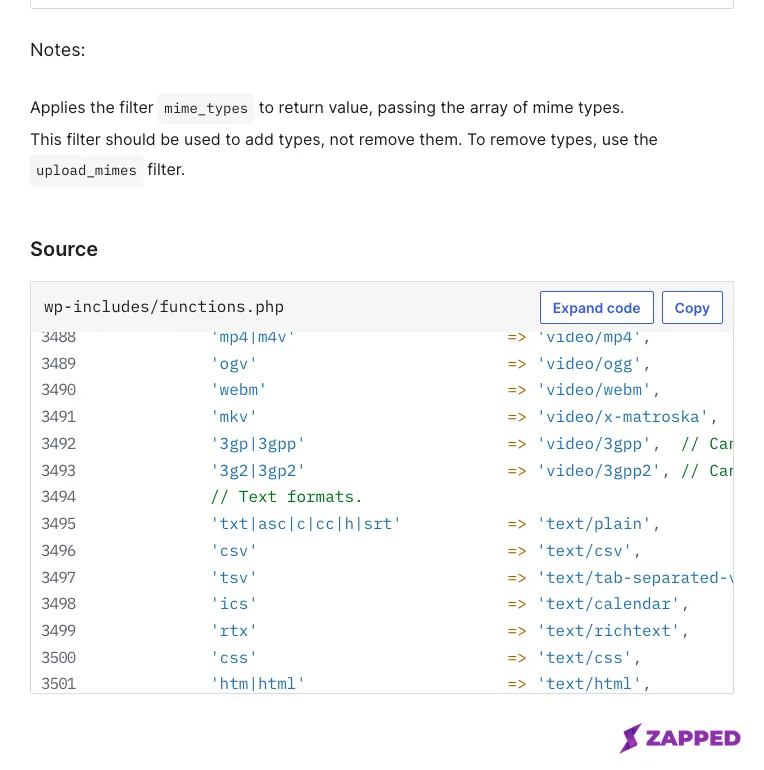
The default state is checkable in one page of the reference. The map returned by wp_get_mime_types() has no vcf entry, no vcard entry, no text/vcard, and no text/x-vcard. The text group runs nine entries: txt|asc|c|cc|h|srt, csv, tsv, ics, rtx, css, htm|html, vtt, and dfxp. One of them, ics, maps to text/calendar. Calendar files are on that list. Contact files are not.
Permitting the extension, and why that may not finish the job
The documented way to permit a type for upload is the upload_mimes filter, which WordPress describes as filtering the list of allowed mime types and file extensions, and which core applies inside get_allowed_mime_types(). Its reference page shows the array going both ways, adding entries and unsetting one.
The note about scope sits on a different page. wp_get_mime_types() says of its own mime_types filter: "This filter should be used to add, not remove, mime types. To remove mime types, use the 'upload_mimes' filter." That note sends removals to upload_mimes, and the filter's own examples add as readily as they remove.
add_filter( 'upload_mimes', 'mrdn_allow_vcard' );

function mrdn_allow_vcard( $mimes ) {
    $mimes['vcf'] = 'text/vcard';

    return $mimes;
}
That is the whole documented step, and its smallness is the point. The array is keyed by the file extension regex, you add one entry, you return the filtered value. Miss the return and the media library silently keeps the unmodified list.
Permitting the extension does not automatically finish the job. WordPress then runs wp_check_filetype_and_ext(), which attempts to determine the real type from the file's contents using PHP's finfo_file() where that is available and falls back to the extension when it is not.
Whether a given contact file clears that step depends on the fileinfo database on your own server, so confirm your upload actually succeeds instead of assuming it. The wp_check_filetype_and_ext filter receives the sniffed type, and that is where you would intervene if it does not.
The allowed set already varies by who is uploading. WordPress removes htm|html and js from the list for any user without the unfiltered_html capability, so "it uploads for me" is not a statement about your site.
One constant bypasses type checking altogether, and WordPress documents it in terms worth quoting rather than paraphrasing. The unfiltered_upload capability "is not available to any role by default (including Super Admins)", and it exists only once ALLOW_UNFILTERED_UPLOADS is defined in the configuration file.
On Multisite, only Super Admins can be given it at all. That is a caveat to know about, not a step to take.
Generating the file instead of uploading it
Generate the file from the same fields the page already holds. The upload problem disappears, and so does the second one, which is keeping an uploaded file in step with a card you keep editing.
WordPress documents every part of that route separately. add_rewrite_rule() adds a rule that transforms a URL structure into a set of query vars, it has to run on init, and a custom query variable is only readable through get_query_var() once it is registered on the query_vars filter.
add_action( 'init', 'mrdn_register_card_route' );

function mrdn_register_card_route() {
    add_rewrite_rule(
        '^card/([^/]+)\.vcf$',
        'index.php?mrdn_card=$matches[1]',
        'top'
    );
}

add_filter( 'query_vars', function ( $vars ) {
    $vars[] = 'mrdn_card';
    return $vars;
} );
Two things break this in practice. Register the rule outside init and it never enters the rules array. Skip the query_vars filter and the rule matches while your handler reads an empty variable, which looks identical to a routing failure and is not one.
Rewrite rules also have to be regenerated before a new rule answers anything. WordPress's own instruction is to open the permalinks screen and save it without changing anything, and the reference calls flush_rewrite_rules() an expensive operation.
Contributors on that reference page suggest calling it from the activation hook rather than on init. Others there recommend deleting the rewrite rules option instead. Either way it is contributed guidance rather than a documented requirement.
add_rewrite_endpoint() is the other documented shape, adding an endpoint "like /trackback/" through an endpoint mask and exposing whatever follows the endpoint name as a query variable. Its reference names the hook to test that variable on, which is template_redirect.
add_action( 'template_redirect', 'mrdn_serve_card' );

function mrdn_serve_card() {
    $slug = get_query_var( 'mrdn_card' );

    if ( ! $slug ) {
        return;
    }

    $body = mrdn_build_vcard( $slug );

    if ( headers_sent() ) {
        return;
    }

    header( 'Content-Type: text/vcard; charset=utf-8' );
    header(
        'Content-Disposition: attachment; filename="' . sanitize_file_name( $slug ) . '.vcf"'
    );

    echo $body;
    exit;
}
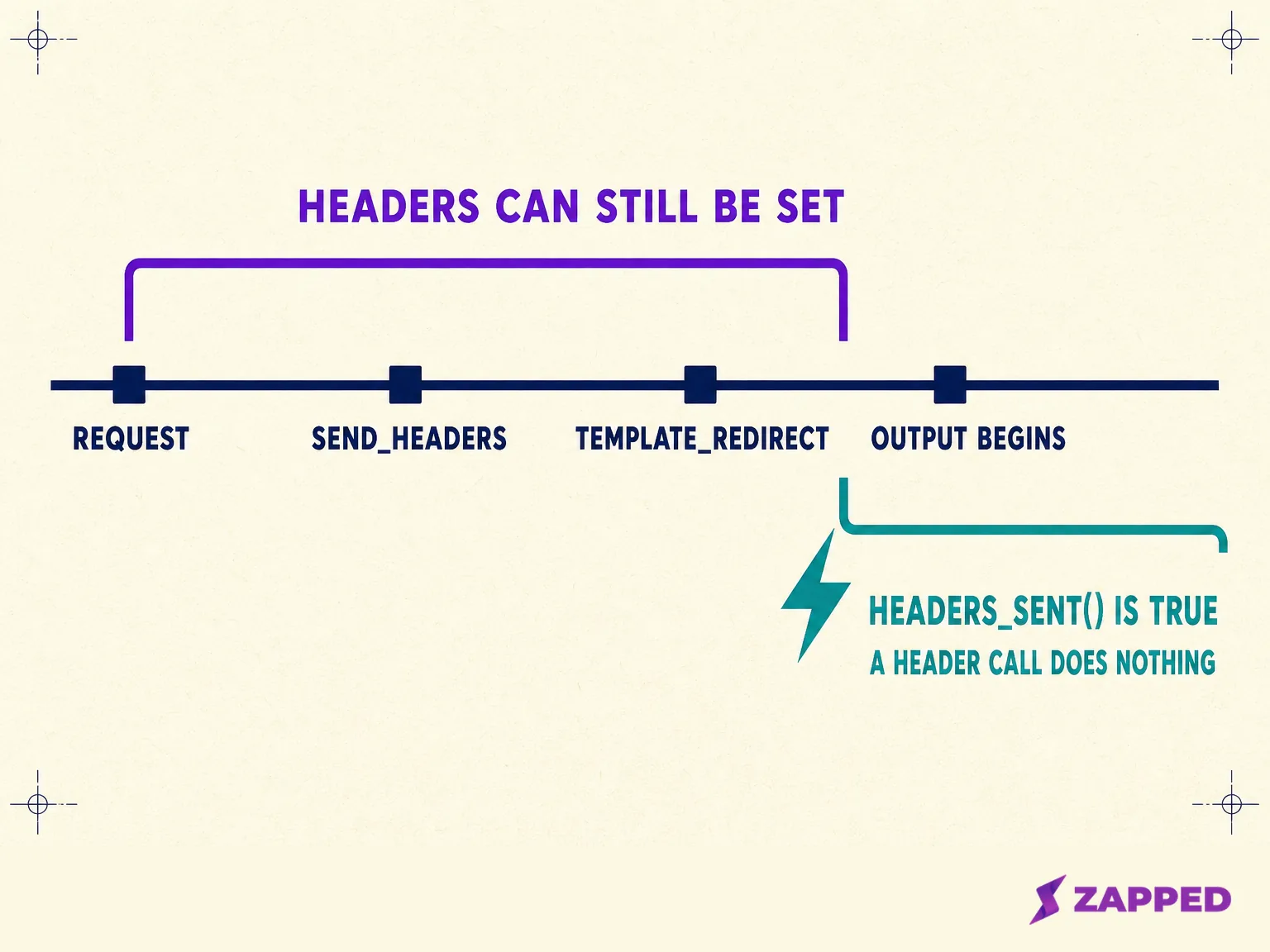
template_redirect fires before WordPress determines which template to load, which is early enough that nothing has been printed yet. That timing is the entire reason the two headers in the handler arrive at all.
Note what the handler does not contain. mrdn_build_vcard() is called and never written here, because what goes inside a contact file is a format question rather than a WordPress question.
Escape values as late as possible, which is WordPress's own guidance, and pick the function that matches where the value lands. The filename in that header is not HTML, so it goes through sanitize_file_name(), which WordPress describes as removing characters that are illegal in filenames on some operating systems.
Do not gate the download behind a nonce. WordPress documents a nonce lifetime as variable between 12 and 24 hours, and a printed QR code lasts considerably longer than that.
The REST API is the documented alternative if you would rather not touch rewrite rules.
add_action( 'rest_api_init', function () {
    register_rest_route(
        'meridian/v1',
        '/card/(?P<slug>[a-z0-9-]+)',
        array(
            'methods'             => 'GET',
            'callback'            => 'mrdn_rest_serve_card',
            'permission_callback' => '__return_true',
        )
    );
} );
The namespace is not decoration. The REST handbook is blunt that failing to namespace is analogous to skipping a vendor prefix in a theme or plugin. Since WordPress 5.5 a route without a permission_callback raises a notice, and __return_true is the documented value for a route that really is public, which a business card endpoint is.
None of this is one recipe in the WordPress documentation. Each piece is documented on its own page, and the assembly is ours. Worth knowing before you go hunting for an official page that says otherwise.
If a contact file is not the shape you want at all, the alternative is putting the details into the code itself, which a vCard QR code does and which has its own tradeoffs. For the reader who wants the QR built rather than the file served, generating a vCard QR code covers that path end to end.
The header that never arrives
When the headers never arrive, the download opens as a wall of text. Something printed output before your headers did, and WordPress core treats that state as unrecoverable rather than as something to work around: nocache_headers() opens by checking headers_sent() and returns without sending anything at all.
A stray blank line after a closing PHP tag is enough. So is one plugin echoing a notice early in the request. Nothing on the page looks broken when this happens, which is what makes it expensive to find.
send_headers is the documented place to add headers, described as firing once the requested HTTP headers for caching and content type have been sent. A contributed note on that page adds that since WordPress 6.1 it runs later in core load, after pre_get_posts, so conditional tags work inside it. That is a contributor's account, not part of the hook's own description.
If you took the media library route instead, the type your server sends is not a WordPress setting at all. It comes from the web server's own extension mapping, which on Apache is the mime.types file named by TypesConfig and is overridable per extension with AddType.
That is why there is no universal answer to what your host serves for a contact file, and why the only reliable move is to read your own response.
curl -sI https://yoursite.example/card/mara-okonjo.vcfRun it against your own URL and read the two headers that come back. If the type is wrong, you now know whether to fix a route, a server configuration, or a plugin printing early.
Five routes, and what each one costs you later
A page assembled from core blocks. A registered block pattern. A custom template in a child theme. A plugin. A dedicated theme. Each of the five is documented by WordPress, and each is judged here on the same four things.
What you have to know to build it. What breaks when something updates. Where its code lives. Whether it can serve the file on its own.
There is no winner in the table, because the four columns do not resolve to one. Read the row that matches the site you already have.
| Route | What you have to know | What breaks on an update | Where its code lives | Serves the file alone? |
|---|---|---|---|---|
| A page of core blocks | The block editor | Least. Core blocks are core | Content sits with the post as serialized block HTML. Styling comes from the theme | No. The File block adds a link and settles nothing about the response |
| A registered block pattern | A file with a header in the theme's /patterns folder, or register_block_pattern() on init |
The pattern registration, when the theme changes | The pattern belongs to the theme. Content already inserted sits with the post | No |
| A custom template in a child theme | The block theme Page hierarchy and a child theme with a matching Template header |
Little. Child themes exist so parent updates do not destroy modifications | A /templates folder inside the theme, child before parent |
No |
| A plugin | Plugin conventions, prefixing, and the route above | Your own code, or somebody else's maintenance decisions | Its own plugin directory, outside the theme | Yes. This is the only route that owns delivery |
| A dedicated theme | All of the above plus theme.json and a full template set |
Most surfaces at once | The theme, entirely | Only by carrying functionality that theme review puts elsewhere |
Two details in that table are worth spelling out. In a block theme the Page hierarchy resolves {custom-template}.html, then page-{post_name}.html, then page-{post_id}.html, then page.html, then index.html, and templates in a child theme's /templates folder are consulted before the parent's. index.html is the only template a block theme is required to ship. Classic themes use a PHP templating system instead.
theme.json sits at the root of the theme directory and is where a block theme's settings, styles, custom templates, and template parts are configured. Its current schema is version 3, introduced in WordPress 6.6.
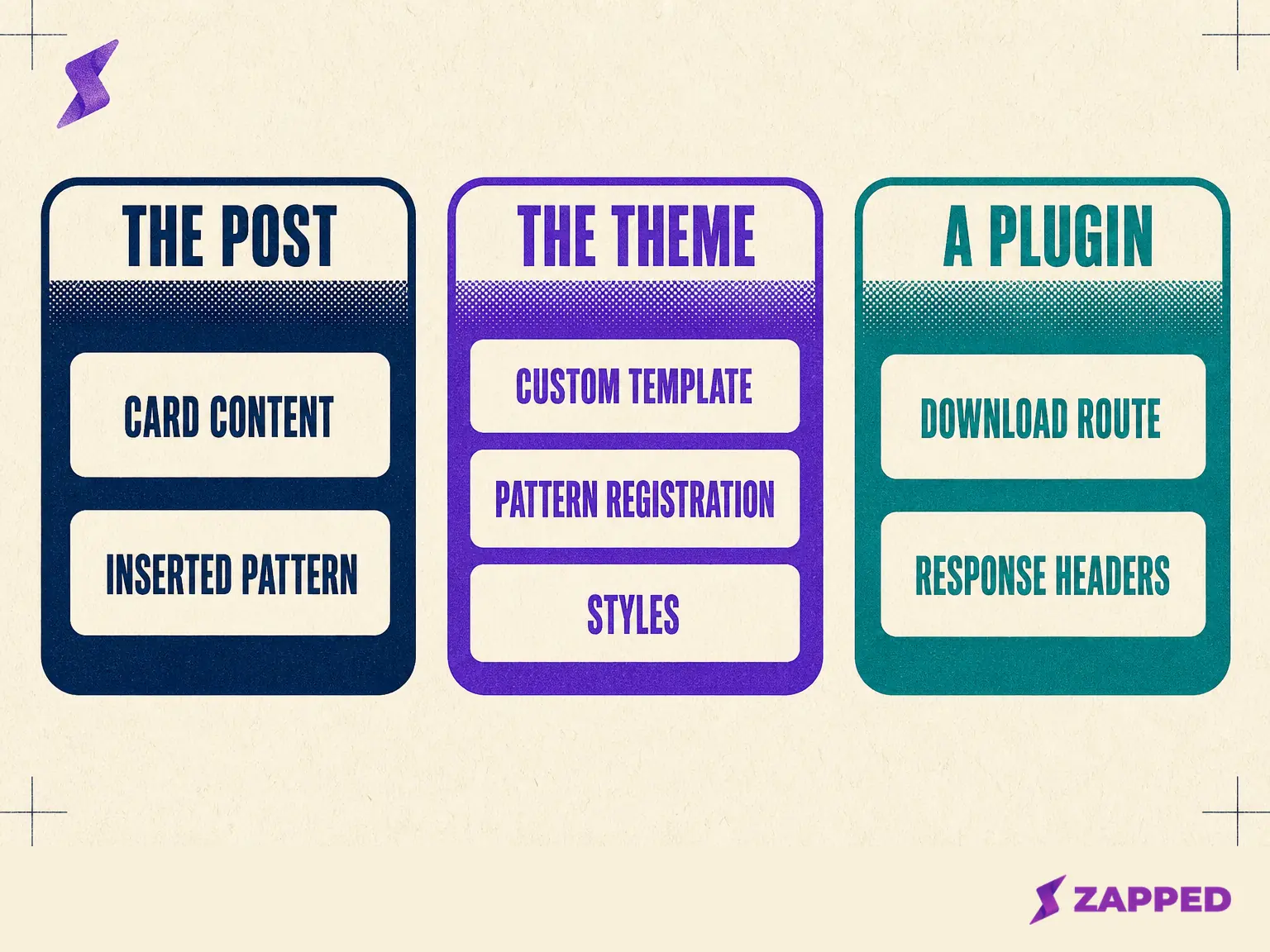
One architectural recommendation, then: presentation in the theme, the download route in a plugin. The boundary is WordPress's own.
The theme review requirements list functionality unrelated to design and presentation as plugin territory, naming analytics, SEO options, contact forms, resource caching, and share buttons among the examples. A route that serves a file is functionality by that definition, and a plugin is not a theme.
If you write that plugin yourself, prefix everything globally accessible with a unique identifier. WordPress's plugin guidance is direct about why: prefixes prevent conflicts with other plugins, and a function named serve_card will meet another one eventually.
What the plugin directory actually offers
Start with the install counts, which answer this better than any adjective. Each figure comes from the plugin's own directory page.
The plugin with the most installs in this space, Enable virtual card upload, sits above 7,000 active installations and does exactly one thing: it makes the file type uploadable.
The second, Enable vCard Upload, has passed 2,000 active installations and has gone eight years without an update. It is tested only up to WordPress 5.0.25, carries the directory's own warning that it has not been tested with the latest three major releases, and adds text/x-vcard to the allowed list. IANA lists that type as deprecated in favour of text/vcard.
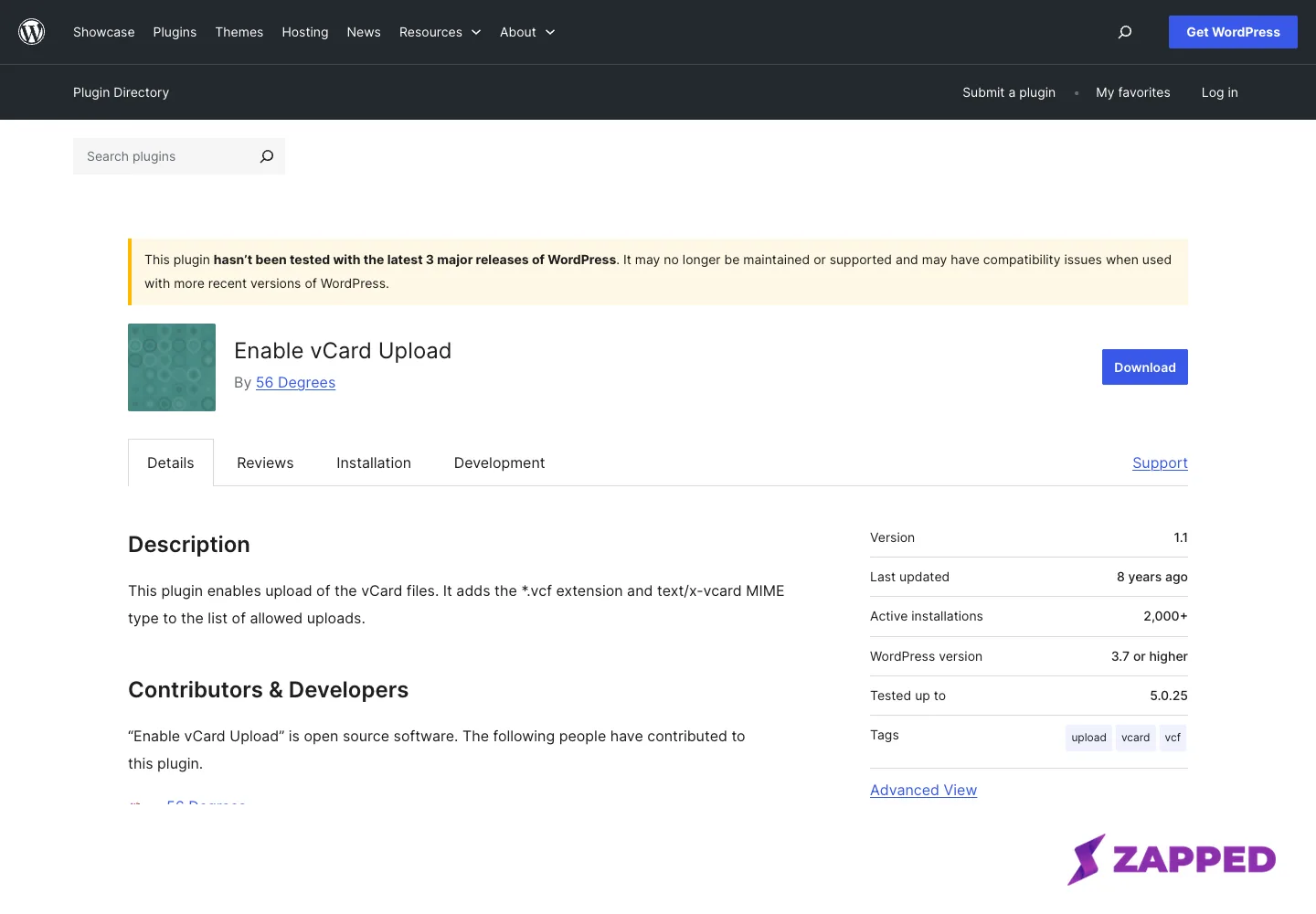
Source: WordPress.org plugin directory, Enable vCard Upload, captured 2026-08-06.
The plugins that actually build a card are much smaller. Smart Contact Card is the most current one that surfaced, above 100 active installations, tested up to WordPress 7.0.2, offering a downloadable contact file, a shortcode, and an Elementor widget. It has no reviews submitted, and its QR codes are generated by an outside service, QuickChart.io.
Business Card Template sits above 60 installations. Its listing advertises a contact file download, and separately a display shortcode, with nothing said about how the two relate. ECard, above 300 installations, describes contact details, social links, and galleries, and its listing does not mention a file download at all, which is a fact about the listing rather than about the code.
Those are the most installed plugins that surfaced, not a census of the directory. The pattern across them is still clear enough to act on: the shim that unlocks an upload has more installations than every plugin that builds a card put together, and the shim is the piece you least need if you generate the file instead.
Adding structured data next to the SEO plugin you already run
You are not adding structured data to a blank page. That is the whole WordPress difference here, and it is why advice written for a hand built page misfires.
wp_head is the documented hook for printing into the head of a front end page, and it runs only when the theme calls wp_head(). Every block theme does.
add_action( 'wp_head', 'mrdn_print_card_schema' );

function mrdn_print_card_schema() {
    if ( ! is_page( 'card' ) ) {
        return;
    }
    $data = array(
        '@context' => 'https://schema.org',
        '@id'      => home_url( '/card/#person' ),
    );
    echo '<script type="application/ld+json">' . wp_json_encode( $data ) . '</script>';
}
What that block demonstrates is the hook and the identifier, not the vocabulary. The properties describing a person belong to the format question rather than to WordPress. What matters here is the @id, because it is how a separate item connects to what is already on the page instead of competing with it.
Yoast does not emit isolated snippets. Its documentation describes one JSON-LD script containing one or more @graph objects, with a distinct top level piece for each entity, linked by @id, and its base output on every page includes Organization or Person, WebSite, and WebPage.
Add a hand written block beside that and you have two descriptions of the same person on one page. Yoast names that failure itself, which is stronger than anyone else asserting it.
Its functional specification describes plugins, themes, or systems from outside pulling the graph apart, producing duplicate or conflated properties and shared ID spaces. The recommendation that follows, adopt Yoast's framework and use its APIs, is the vendor's. The failure description is the useful part.
Both major plugins publish the way in. Yoast exposes wpseo_schema_graph_pieces for adding or removing pieces and wpseo_schema_needs_<class-name> for toggling one, with wpseo_json_ld_output switching the whole thing off. Rank Math exposes rank_math/json_ld for modifying all of its JSON-LD output and rank_math/snippet/rich_snippet_{$schema_type} for controlling whether a given type is emitted.
Google's policies set the constraint that decides how much of this is worth doing. Marked up content has to be visible to readers of the page, and structured data has to be a true representation of the page content.
Google also recommends @id for linking separate related items, which is the same mechanism your SEO plugin is already using. A profile page, in Google's terms, has to focus on a single person or organization affiliated with the site. A card page is exactly that.
One more reason a hand added block goes missing: a script tag pasted into a Custom HTML block runs into unfiltered_html again. The filter route has no such condition.
Accessibility checks worth running, and what the badges do not mean
Three WordPress facts here, and each one narrows what a standard or a badge actually covers.
WordPress's accessibility coding standard is WCAG 2.2 at level AA, and it states its own scope: WordPress core, WordPress.org websites, and official plugins. The theme you installed from a marketplace and the plugin you added last week are not inside that boundary.
WordPress's public accessibility statement is scoped just as carefully. It aims to make the WordPress Admin and bundled themes fully compliant with WCAG 2.2 AA where possible, acknowledges features in development that may not yet comply, and states plainly that WordPress is not currently conforming with ATAG 2.0.
ATAG is the standard for authoring tools, meaning the tool that helps you produce accessible content. That sentence is WordPress being honest about its own editor, and it is the sourced answer to whether the block editor will catch your mistakes for you.
Then the badge. A theme tagged Accessibility Ready has met the theme review team's minimum standards, and the handbook says outright that this does not require WCAG AA level compliance. That is a review threshold, not a compliance certificate.
The accessibility ready requirement set is still a useful preflight list by title. It names a skip to content link, meaningful landmark roles and names, keyboard navigation support, controls with accessible names, roles and states, labeled form fields, and meaningful heading structure.
It goes on: underlined links in text, no ambiguous link text, sufficient colour contrast of text and controls, alternative text, support for reflow, resize and text spacing changes, no unexpected changes of context, no links opening new windows without warning, accessible hover and focus content, an accessibility statement, and support for the .screen-reader-text class.
Four checks are worth running on the card itself before you share it:
- Tab through the entire card and confirm the focus indicator is visible on every control, including the social icons.
- Check the social icons row at a real tap size on a phone, not at desktop cursor precision.
- Check the card's text against the theme's own palette rather than against the colours you designed with.
- Narrow the browser to phone width and confirm nothing needs sideways scrolling.
How fast a card page can be on WordPress
Findable and slow is the wrong shape for a page someone opens once, on cellular, standing in a conference hall. That is the specific risk, and the measurements are public.
The HTTP Archive's Web Almanac put WordPress sites at a 45 percent pass rate for all three Core Web Vitals on mobile in its 2025 CMS chapter, with a median mobile Lighthouse performance score of 41 against an SEO score of 92. Those two numbers next to each other are the whole problem in miniature.
The trend is genuinely improving, which the single year figure hides. The 2024 chapter recorded 40 percent, up from 28 percent the year before.
WordPress attributes the cost where you can act on it. Its optimization documentation points at plugins, caching layers, and static asset delivery, and says directly that the number of plugins and their performance will have a huge impact on a site's performance.
Which brings the route comparison back around. A card page is one of the very few WordPress pages that can legitimately load almost nothing, so every plugin the card route drags in is a real cost paid on a slow connection.
Once the page URL becomes a digital business card QR code printed on something, that cost is fixed for the life of the print run.
What it costs to keep running
The build above is finite. The maintenance is not, and it has five parts.
Three things update on their own schedules: WordPress core, the theme, and every plugin in the card's path. The route in the middle of this article is code you now own, on top of those three.
If the contact file is uploaded rather than generated, the card and the file are two copies of the same details, and nothing warns you when they drift.
The download is the fragile part, and it fails quietly. One byte of early output and the headers never arrive. The page still looks perfect.
A theme change moves the boundary. Templates and patterns live in the theme, the page's content does not, and knowing which artifact sits where before you switch is the entire point of the route table above.
And the plugin you picked may simply stop. One of the two most installed vCard plugins has not been updated in eight years and still registers a deprecated media type, and it did not announce that in advance.
Zapped takes the other side of that trade, where nothing needs updating after launch. The card stays live after it is shared, so a printed QR code and every link already handed out keep working once you edit the card's details. Per card analytics come with the product rather than with another plugin in the page's path.
On the Free plan that means one card with five content blocks, sixty days of analytics history, and a badge on the card that a Professional plan removes.
If you are weighing that against building it yourself, how electronic business cards work covers what the hosted side of the category actually does. And once the page exists, getting it opened is a separate job, which sharing a digital business card covers channel by channel.
Build it in WordPress for the reason that holds up: the card sits on a domain and a site you already own and control, next to everything else you publish. Put the download route where it survives the next redesign, which means outside the theme.
Sources
WordPress developer documentation, standards registries, plugin directory pages, and independent measurement, all checked in August 2026.
- upload_mimes hook reference
- wp_get_mime_types() reference
- get_allowed_mime_types() reference
- wp_check_filetype_and_ext() reference
- WordPress roles and capabilities
- add_rewrite_rule() reference
- add_rewrite_endpoint() reference
- flush_rewrite_rules() reference
- template_redirect hook reference
- send_headers hook reference
- nocache_headers() reference
- Adding custom REST API endpoints
- WordPress nonces
- Escaping output
- sanitize_file_name() reference
- Block editor key concepts
- Core blocks reference
- Global settings and styles, theme.json
- Block themes
- Template hierarchy
- Block patterns
- Child themes
- Theme review requirements
- Plugin best practices
- wp_head hook reference
- Yoast schema functional specification
- Yoast schema API
- Rank Math filters and hooks
- Google structured data general guidelines
- Google profile page structured data
- WordPress accessibility coding standards
- WordPress accessibility statement
- Theme review accessibility handbook
- Accessibility ready requirements
- WordPress performance optimization
- Apache mod_mime documentation
- IANA media type registration for text/vcard
- Web Almanac 2025, CMS chapter
- Web Almanac 2024, CMS chapter
- Enable virtual card upload plugin listing
- Enable vCard Upload plugin listing
- Smart Contact Card plugin listing
- Business Card Template plugin listing
- ECard Digital Visiting Card plugin listing